DVD Styler
-
Hello, I have already managed to burn several DVDs with DVD Styler without any problems.
Now, I want to burn a movie of 698 MB onto a disc that has a capacity of 4.7 GB... But it's impossible to burn it! This error message appears:
"The selected video file cannot fit on a DVD. Please reduce the video quality (bitrate) or remove some titles."
I can't fix this issue!!! Does anyone have a solution???? Thank you in advance!
Now, I want to burn a movie of 698 MB onto a disc that has a capacity of 4.7 GB... But it's impossible to burn it! This error message appears:
"The selected video file cannot fit on a DVD. Please reduce the video quality (bitrate) or remove some titles."
I can't fix this issue!!! Does anyone have a solution???? Thank you in advance!
1 answer
-
Hello,
Can you take a screenshot of the message window because I have never received such a message?
DVDStyler is primarily an authoring software (DVD-Video creation), it does not burn. This operation is done using third-party software like Imgburn for ISO Image or CDburner if you have a DVD folder containing both VIDEO_TS and AUDIO_TS directories.
So try to break down the operations:
1- generate the DVD folder or the ISO Image on your computer
2- use separate burning software to burn
In principle, the software calculates the final size so that the film transformation can fit on the capacity of a DVD which is 4.7 GB (actually 4.32 GiB).
But more than the weight (size) of the file, what you need to consider is the duration of the video. Generally, it is considered that a 4.7 GB DVD can contain a maximum of 2h/2h30 of video; for DVDStyler it’s 136 min.
What is the duration of your video file?
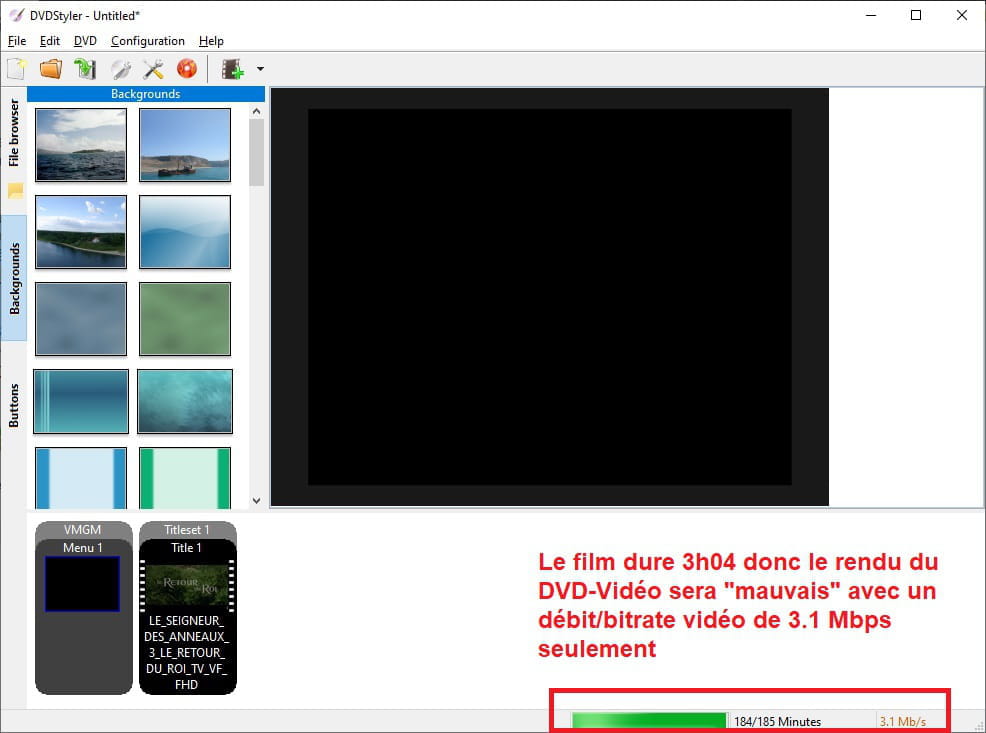
Make sure that automatically, the progress bar is green and not completely filled:
If it exceeds, there is a risk that it won’t be suitable (“poor quality”) like for example on The Lord of the Rings 3, The Return of the King (3h04), which aired on TNT recently:
Even for this file, DVDStyler should automatically reduce the file size to make it fit on a DVD. After, it remains to know after the conversion whether this will really be the case:
Well now, to try to answer you, try to output your file as an ISO Image (to know its weight), or indicate the size of your VIDEO_TS folder if that’s how you proceed. This number will tell you if the size exceeds the storage capacity of a single DVD-5 which is 4.7 GB or approximately 4.32 GiB actual size.
You can, of course, adjust the video bitrate in Properties (DVD --> Options) but if you lower it too much, it will impact the visual rendering. Generally, a bitrate considered acceptable should be around 6000 Kbps.
You can also choose not to make a menu although I think it does not greatly influence the final weight.
Best regards
--
Long live Bobo! ~ Little fish will grow big ~