How to Open a Large CSV File Without Losing Data
Hello everyone,
I would like to work with an open database in CSV format that contains nearly 8 million rows (vehicles in circulation in Quebec).
I would appreciate your recommendations on what software to use (preferably low-cost) to analyze it without losing any data. Indeed, when I try to open it in Excel (latest version Office 360 on Mac), I feel that it's truncated because there are too many rows.
Thank you
--
Blessed are those who can laugh at themselves: they will never cease to have fun!
--
Blessed are those who can laugh at themselves: they will never cease to have fun!
I would like to work with an open database in CSV format that contains nearly 8 million rows (vehicles in circulation in Quebec).
I would appreciate your recommendations on what software to use (preferably low-cost) to analyze it without losing any data. Indeed, when I try to open it in Excel (latest version Office 360 on Mac), I feel that it's truncated because there are too many rows.
Thank you
--
Blessed are those who can laugh at themselves: they will never cease to have fun!
--
Blessed are those who can laugh at themselves: they will never cease to have fun!
7 answers
-
ContributorHello,
you can save this data in Excel, as long as you don't put it all in the same tab.
you didn't indicate what kind of analysis you want to do: is it really necessary to save everything in Excel? -
In fact, it is an open CSV database with the list of 8 million registered vehicles in Quebec. I want to be able to analyze and interpret, for example, the number of vehicles by category and by region, etc., which are all fields (columns).
https://www.donneesquebec.ca/recherche/fr/dataset/vehicules-en-circulation/resource/4bb416f3-8aea-4f8e-8e07-562f73629003?view_id=306c43c3-dd5a-42d2-b47b-70edcd6cc7a9
So it doesn't really suit me to import the database into 8 tabs, because I feel that it will be complicated later for analysis.
I discovered in the help section the Get & Transform function in Excel. It seems to allow the file to connect to a database without importing it. However, when I try, it only imports it, and then I have the same size problem....
--
Blessed are those who know how to laugh at themselves: they will never stop having fun! -
ModeratorHello,
Excel has a maximum of about 1 million rows.
8 million rows and 850 MB is out of scope.
The solution is to load the data into a (real) database, for example, MySQL (I would use Oracle) and query it using SQL (or install a more user-friendly querying tool, like PowerBi)
But this requires a minimum level of technical skill in IT.
-
-
Moderator@yg_beYes, probably. I am not an Access user, but I downloaded the CSV, and it opens in Access, which seems to link to the CSV without importing it. However, even on my relatively powerful PC, Access quickly ends up in a Windows "not responding" status when trying to scroll through the rows; there are 6,608,227 of them. A text editor like Notepad++ seems more efficient with this text file than Access does ;-)
-
Contributor@jee peeprobably better to import it for perfect performance, like Notepad++.
-
-
Hello
Excel can handle over a million rows
the recent versions have more advantages-
-
@jee peeExactly. Excel is not enough.
-
-
SQLite would be a good candidate for reading all its data without loss.
Trauq -
Hello everyone. Thank you for your suggestions, but as discussed, I am on a Mac unfortunately. Do you have any suitable recommendations?
Thank you-
-
-
Hello,
I think the work you are asking for is not suitable for a spreadsheet (Excel, Calc, or others).
You need a tool that is more aligned with your request.
In your case, a database would be appropriate (PostgreSQL, MySQL, SQLite3, ...)
The issue is that you need to learn the syntax to execute this work.
This will require some time at first, but it will pay off later.
What tool do you have on Mac to carry out the task?
And are you willing to spend time to save time (which also makes things easier for you)?
Trauq -
@trauqnejFor now, I don't have any particular tool and if I need to learn SQL, then I will :) As you said, it will save me time. However, I can't afford to pay a lot for a DBMS.
-
Moderator@PyvoudeletMany DBMS are free, you can go for MariaDB, a very good alternative to MySQL that has the same syntax and functionality.
-
-
ModeratorI am reopening this discussion following a similar request: https://forums.commentcamarche.net/forum/affich-36718337-ouvrir-un-csv-trop-volumineux-faire-des-requetes where I discovered importing into Excel with Power Query.
I wanted to test this on the file from that discussion.
Here's what I applied in Excel 2016: Data/New Query/From File/CSV File, provide the location of the CSV file
Once the file is displayed, click Edit
In the menu bar "Group By"/Brand + Type + Region/Count/Count
Wait, ... Then close and load, and we get the result in Excel, a file of 8500 lines:
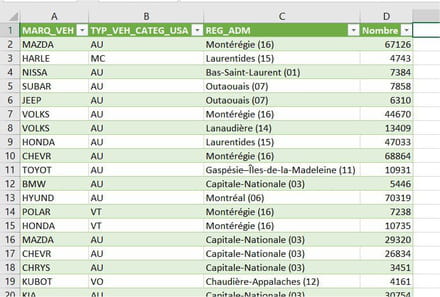
I have a rather powerful PC and it must have been saturated for 2/3 minutes. But we have the result of a query on a file of several million lines.
--
a stranger is a friend you haven't met yet.