
Bluetooth device paired but unable to connect w8.1
Moufa_san
Posted messages
2
Status
Member
-
BH74 -
BH74 -
Hello everyone!
I have an HP Pavilion 17.
After an update, my Bluetooth speaker no longer wants to connect.
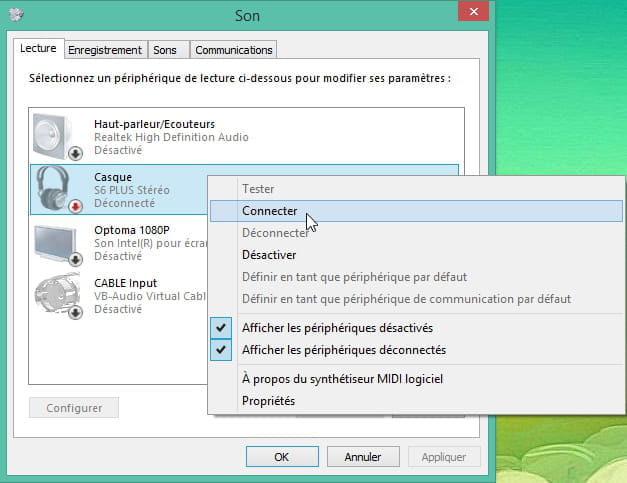
When I go to my playback devices, I see my device activated. I right-click and select "connect," but nothing happens... as if I hadn’t clicked at all.

In Settings / Manage Bluetooth devices, it is indeed paired.
In the Troubleshooter utility, I get the following error message even though my speaker is connected and can easily work with my other devices (like my phone, for example).

I have updated my drivers, and it still doesn’t work.
I uninstalled and reinstalled my drivers, still nothing.
I deleted my device and tried again, still no luck.
I turned my computer off and on again, and nothing worked.
I tried to restore my system to before the update, and I got the following error message: "System restore failed in the delayed write phase for the file \??\Volume{700d7c8f-f091-4ae2-915c-bcf2411c19}\Windows\LastGood\system32. (0xc000003a)"
(I’m not sure if this is related, but still...)
Here is the list of my drivers:

So, there it is.
I tried to be as comprehensive as possible, but if any information is missing, I will gladly provide it.
Thank you in advance for the time you will dedicate to my request. I'm truly out of ideas...
I have an HP Pavilion 17.
After an update, my Bluetooth speaker no longer wants to connect.
When I go to my playback devices, I see my device activated. I right-click and select "connect," but nothing happens... as if I hadn’t clicked at all.
In Settings / Manage Bluetooth devices, it is indeed paired.
In the Troubleshooter utility, I get the following error message even though my speaker is connected and can easily work with my other devices (like my phone, for example).

I have updated my drivers, and it still doesn’t work.
I uninstalled and reinstalled my drivers, still nothing.
I deleted my device and tried again, still no luck.
I turned my computer off and on again, and nothing worked.
I tried to restore my system to before the update, and I got the following error message: "System restore failed in the delayed write phase for the file \??\Volume{700d7c8f-f091-4ae2-915c-bcf2411c19}\Windows\LastGood\system32. (0xc000003a)"
(I’m not sure if this is related, but still...)
Here is the list of my drivers:

So, there it is.
I tried to be as comprehensive as possible, but if any information is missing, I will gladly provide it.
Thank you in advance for the time you will dedicate to my request. I'm truly out of ideas...
2 answers
-
Hello,
I managed to fix the problem of a paired but not connected Bluetooth device at Windows 10 startup.
Go to the taskbar and right-click on the Windows 10 logo. Then click on Run and type services.msc in the form, then click OK.
Find "Network Connections," then right-click on this service and click on "Properties," then set the startup type to automatic. Restart the computer.