IDM blocks after 100% download
Solved
Malopinos
Posted messages
5
Status
Member
-
Malopinos Posted messages 5 Status Member -
Malopinos Posted messages 5 Status Member -
Good evening,
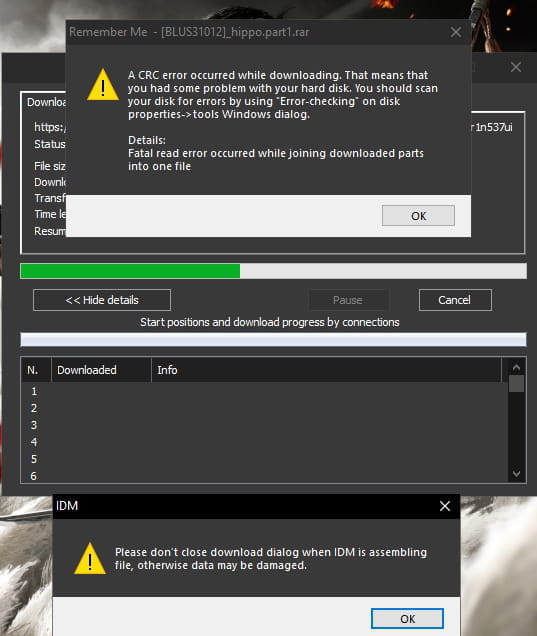
I just downloaded a 5GB compressed file with IDM, but it gets stuck after 100% of the download; it's the file assembly stage, I believe. Here is a photo.
Thank you

I just downloaded a 5GB compressed file with IDM, but it gets stuck after 100% of the download; it's the file assembly stage, I believe. Here is a photo.
Thank you
6 answers
-
It's depressing to have to re-download a 5 GB file with a slow connection haha, and indeed they are two files and of course I select both and extract them to... to have one single file, but thank you for taking the time to explain this little detail even though I already know it.
Thank you :D -
-
-
pistouri Posted messages 19010 Registration date Status Contributor Last intervention Ambassador 8 732
Hello,
1- The archive part 1 might be corrupted (''dammage'' on your screenshot below), this happens sometimes.
You downloaded your archive (Hippo...?) from a crack site, which is common when you have part 1, part 2, part 3..., it's not complete.
Often they are copied from other outdated sites.
Please copy/paste the site in question in your next message.
2- Not enough disk space on your PC
3- Try downloading the file by temporarily disabling the antivirus or another security application.
4- Temporary directory IDM
Simply change the temporary directory located at:
Open IDM → Download → Options
Tab → Save as
At the bottom of the window section → Temporary directory
Then → Browse
Choose a different location.
Create a temporary folder in your Downloads folder
5- Run IDM as administrator.
6- Change the Max connections number to 1
Open IDM → Download → Options
Tab → Connection
Section → Max connection number
7- Proxy
IDM → Download → Options
Tab→ Proxy/Socks
Tick or select the line → Use system settings
Then OK
Restart your download.
8- Empty the DwnlData directory
To do this, you need to Show hidden files and folders
Then go to:
Drive C: \ User \ "your user account" \ AppData \ Roaming \ IDM \ DwnlData
Open the DwnlData folder
Delete everything.
Sometimes you will see your name in a folder, open it and delete the contents.
Restart the download.
A+
--
pistouri -
Hello,
Thank you very much, sorry for not posting in the appropriate forum, I didn't get a response so I re-downloaded the file and this time it worked without any problem. I will try these suggestions if I encounter this issue again.
Thank you and have a great day! :D -
pistouri Posted messages 19010 Registration date Status Contributor Last intervention Ambassador 8 732
It could have been the file size in your case 5GB, it's a large file as an archive.
To assemble if you have for example a part 2 you need to select both archives highlighted and then right-click extract to... This way part 1 will look for part 2 from the other archive to decompress it into a single file or folder if you prefer.
WinRAR or 7-Zip to unzip.
Thank you for the feedback.
Have a great rest of the day.
--
pistouri