
Copy/paste in Mozilla Thunderbird doesn’t work!! 'images from the net
marichka
-
marichka -
marichka -
Hello,
with my Mozilla Thunderbird email client the copy-paste does not work (I want to paste images from the web ... gifs ..etc) ctrl + v does not work either .. if you could help me, I've been stuck on this for months!!! THANKS in advance
Configuration: Windows / Chrome 81.0.4044.92
with my Mozilla Thunderbird email client the copy-paste does not work (I want to paste images from the web ... gifs ..etc) ctrl + v does not work either .. if you could help me, I've been stuck on this for months!!! THANKS in advance
Configuration: Windows / Chrome 81.0.4044.92
7 answers
-
Hello
does copy/paste work only in Thunderbird or also in other programs? -
hello
only with images ?
text can be copied/pasted correctly ?
does the writing window accept HTML ? -
Hello Marichka,
Copying and pasting images from the Internet via Google Chrome into a Thunderbird message works perfectly!
Proof:
On a web page, right-click / Copy image:

In a Thunderbird message, right-click / paste

Result :

-
pistouri Posted messages 19010 Registration date Status Contributor Last intervention Ambassador 8 732
Hello,
1- Display Thunderbird Menu Bar
Right-click at the top of the page and check → Menu Bar and the other bars
Check and update to the latest version of Thunderbird.
Click the menu with the three horizontal lines then the question mark icon.
Or Tools then Options then tab Update.
Click on Check for updates.
Or install from the practical guide CCM.
Or on the official site.
2- Enable Drag & Drop in Firefox.
Close Thunderbird.
Launch the configuration editor.
To do this, clear everything in the address bar (URL) and do a copy/paste or type:
about:config
Then press Enter.
In the Search field paste:
browser.launcherProcess.enabled
Double-click the line to set the value to → false
Close and restart Firefox.
Restart Thunderbird and give it a try.
3- Write a message
Click on the second-to-last icon → Insert a link, an anchor, an image, a horizontal line or a table
Click on Image in the list provided (link, anchor, image, horizontal line, table).
Check the box ''Attach this image to the message''
Click on the box ''Choose a file''.
The explorer opens, go fetch your image and select it (click on your image).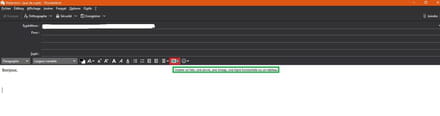
4- Editing and addressing
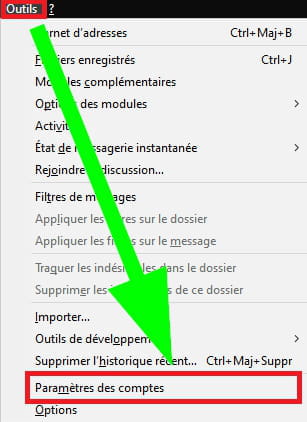
Tools then Account Settings
Tab "Composition and addressing" and check the box "Compose messages in HTML".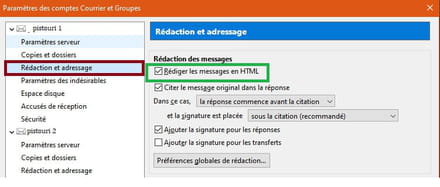
If you have the rectangle with a red cross, you need to compact the various Thunderbird folders beforehand, right-click on the inbox etc then ''Compact''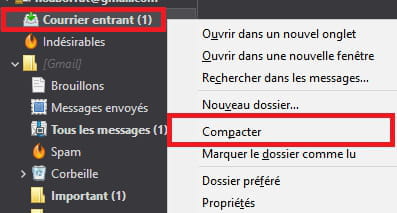
5- Temporarily disable your antivirus and other security suite if you have one.
See you later
--
pistouri -
Hello pistouri,
I don’t see why go through all this fuss and tinker in the configuration editor when everything you describe is already the default options of a freshly installed Thunderbird!
What I described in my previous post works without changing any configuration and answers the question asked.-
I think my Thunderbird install is bugged! I’m having issues with the outgoing mail server… I need to “go through all of this!!!”
thanks for your help, it’s appreciated- I think the best solution is to uninstall and then reinstall Thunderbird, but before that you need to back up Thunderbird. The simplest way to back up all of Thunderbird is to copy the following folder: C:\Users\Nom_de_l_utilisateur\AppData\Roaming\Thunderbird To restore the data, simply copy this folder back to the same location.
-
-
In short, only copying/pasting images from Chrome to Thunderbird doesn't work? Chrome to Paint or others works? Copying/pasting images from Firefox, Edge or others to Thunderbird works?
-
Hello,
copy/paste works in Gmail (mail) anyway I have other issues in Thunderbird with the outgoing server!! thank you for your intervention I will get back to you ...





