
DisplayPort 144Hz Plein Écran "Out of Range"
Solved
Lionhem
Posted messages
15
Status
Member
-
Lionhem Posted messages 15 Status Member -
Lionhem Posted messages 15 Status Member -
Hello,
I recently refreshed my setup with a RTX 2060 and discovered DisplayPort, which I have never had before.
Setup:
RTX 2060
Updated Windows 10
1st screen: BenQ XL 2430T (main screen 144Hz via DisplayPort)
2nd screen: Asus at 60Hz (secondary via HDMI)
Explanation:
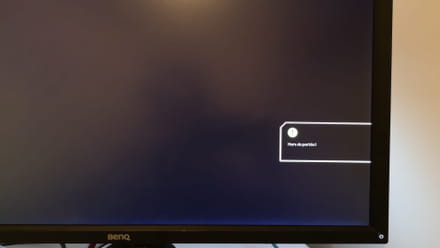
When I play in full screen 144Hz on different games, sometimes I get a "Out of range" message on my screen, and I have to Alt Tab and restore the game until it eventually displays. About 50% of the time I get the error message, sometimes 4 times in a row, and I have to repeat the operation, which takes several seconds.
Details:
- When I'm not in full screen, I don't have this problem.
- I don't have an issue at 60Hz via HDMI.
- When I unplug my second screen, I still have the problem.
- All my drivers are up to date.
- No matter which port I connect my screen to, the result is the same.
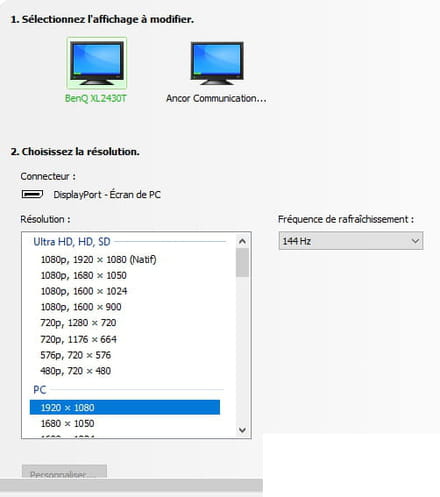
I don't understand why there is 1080p, 1920x1080 (Native) in Ultra HD, HD SD, but when I select it, I cannot go beyond 60Hz.
Here is the DisplayPort cable I bought in case the problem comes from there.
https://www.amazon.fr/gp/product/B07TTQPWFV/ref=ppx_yo_dt_b_asin_title_o00_s00?ie=UTF8&psc=1
The only answers I found on this subject are related to incorrect refresh rate configurations on Windows set to 60Hz while they expect the game to run at 144Hz. It seems to me that I haven't made this mistake. I could potentially play in borderless fullscreen, but that reduces in-game performance, and I shouldn't have this problem, so I want to resolve it.
GeForce Experience Panel:
Here is my problem; I tried to provide as many details as possible while remaining clear. If you need more information to provide a solution, feel free to ask.
Thank you in advance for your help.
Configuration: Windows / Chrome 80.0.3987.163
I recently refreshed my setup with a RTX 2060 and discovered DisplayPort, which I have never had before.
Setup:
RTX 2060
Updated Windows 10
1st screen: BenQ XL 2430T (main screen 144Hz via DisplayPort)
2nd screen: Asus at 60Hz (secondary via HDMI)
Explanation:
When I play in full screen 144Hz on different games, sometimes I get a "Out of range" message on my screen, and I have to Alt Tab and restore the game until it eventually displays. About 50% of the time I get the error message, sometimes 4 times in a row, and I have to repeat the operation, which takes several seconds.

Details:
- When I'm not in full screen, I don't have this problem.
- I don't have an issue at 60Hz via HDMI.
- When I unplug my second screen, I still have the problem.
- All my drivers are up to date.
- No matter which port I connect my screen to, the result is the same.

I don't understand why there is 1080p, 1920x1080 (Native) in Ultra HD, HD SD, but when I select it, I cannot go beyond 60Hz.
Here is the DisplayPort cable I bought in case the problem comes from there.
https://www.amazon.fr/gp/product/B07TTQPWFV/ref=ppx_yo_dt_b_asin_title_o00_s00?ie=UTF8&psc=1
The only answers I found on this subject are related to incorrect refresh rate configurations on Windows set to 60Hz while they expect the game to run at 144Hz. It seems to me that I haven't made this mistake. I could potentially play in borderless fullscreen, but that reduces in-game performance, and I shouldn't have this problem, so I want to resolve it.
GeForce Experience Panel:
Here is my problem; I tried to provide as many details as possible while remaining clear. If you need more information to provide a solution, feel free to ask.
Thank you in advance for your help.
Configuration: Windows / Chrome 80.0.3987.163
1 answer
-
Problem solved by setting the Nvidia panel to "1080p, 1920x1080 (Native)" instead of PC: 1920 x 1080.
I thought this would prevent me from setting my games to 144Hz, but that’s not the case.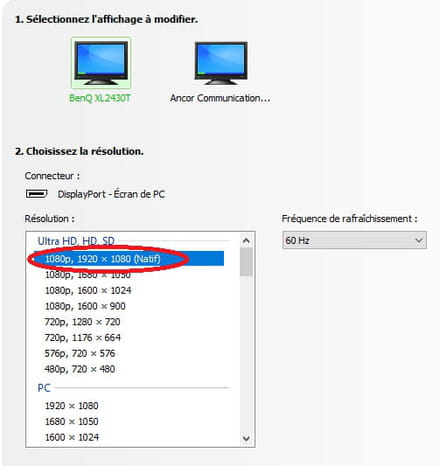
I don’t exactly understand the reason for this issue, but if my solution can help anyone, great.
Best regards.
