Disable Intel Rapid Storage

Solved
Gabi -  
fabul Posted messages 42100 Registration date   Status Modérateur Last intervention   -
Hello,

How to disable Intel Rapid Storage?

Thank you for your attention

2 réponses

fabul Posted messages 42100 Registration date   Status Modérateur Last intervention   6 035
 
Hello,

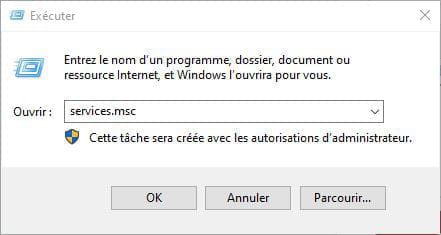
Right-click on the Start button > Run

Type services.msc

Right-click on Intel services

Set them to "Manual"

Restart Windows
1
Gabi
 
I couldn't find service.msc.
There are many other services, but I couldn't find this one.
0
fabul Posted messages 42100 Registration date   Status Modérateur Last intervention   6 035 > Gabi
 
Did you right-click on the Start button and then Run?

Then typed services.msc?


Then you will find services whose names start with Intel.
0
Celtina > fabul Posted messages 42100 Registration date   Status Modérateur Last intervention  
 
I succeeded in that, but I'm unable to find Intel Rapid Storage.
0
fabul Posted messages 42100 Registration date   Status Modérateur Last intervention   6 035 > Celtina
 
Download Autoruns and check the Logon section

You will find something like IAStorIcon or similar

To uncheck

And restart Windows
0
Gabi
 
Yes, thank you, I found it.
A big thank you for the information.
Gabi
0