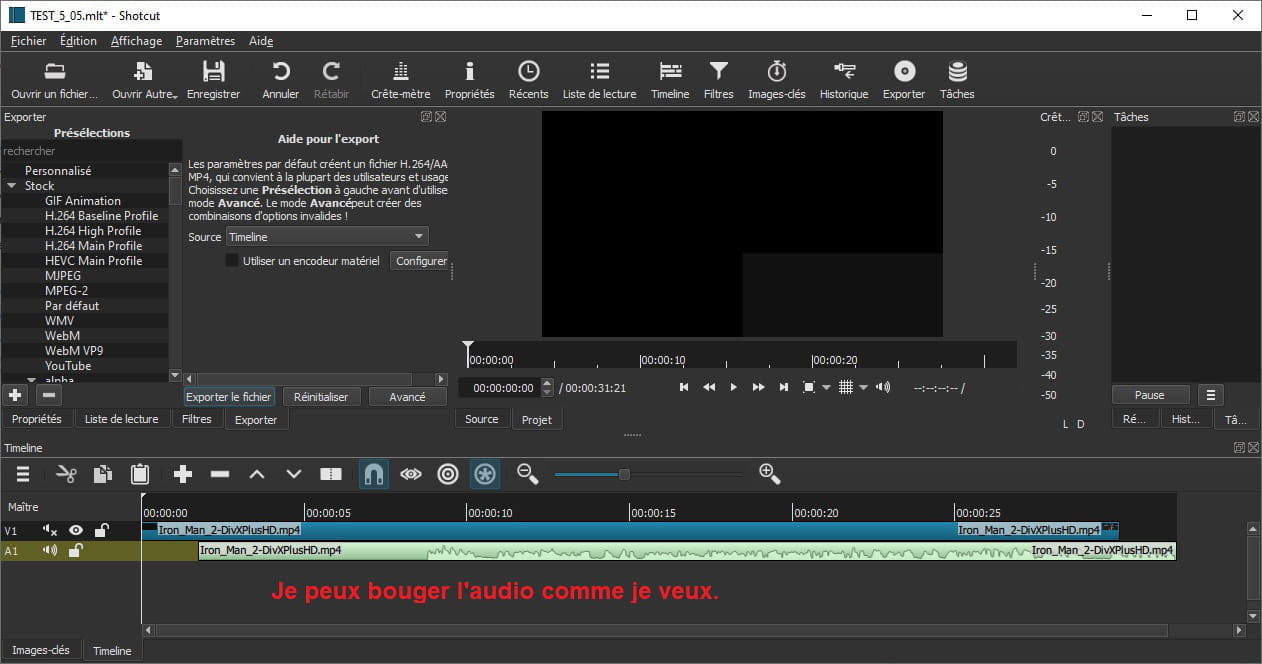
Shotcut - moving audio track
Hello,
I’m reaching out to this site with a question that seems so trivial and easy to answer that I can’t find any tutorial to address it ^^'!
I’ve recently started using Shotcut – which I’m discovering with pleasure – but I’d like to move the audio/video tracks freely, yet to my surprise, I’m not able to do so. Am I missing something?
Bonus question while I’m at it: When I add one or more effects, the video slows down and stutters. Is there a way to avoid that? It’s quite bothersome in its own way...
I’m reaching out to this site with a question that seems so trivial and easy to answer that I can’t find any tutorial to address it ^^'!
I’ve recently started using Shotcut – which I’m discovering with pleasure – but I’d like to move the audio/video tracks freely, yet to my surprise, I’m not able to do so. Am I missing something?
Bonus question while I’m at it: When I add one or more effects, the video slows down and stutters. Is there a way to avoid that? It’s quite bothersome in its own way...
2 answers
-
Hello,
You can separate the audio from the video in a video file by right-clicking and selecting Detach Audio.
Before:
After (it's on a different track, but the principle remains the same):
As for Shotcut crashing, I don't know why it's bugging for you. Another user made the same remark as you in the review on the software page: https://www.commentcamarche.net/telecharger/tv-video/20067-shotcut/
Best regards
-
Indeed, that's what I had done, but the main idea would be to put the audio track as the first track to apply effects that would be visible. However, at the moment, with the video track taking priority, the visual effects from an audio track cannot be seen :/
I'm having bad luck with software in general ^^'! Thank you anyway!
-