Installation de Windows 10 avec GPT/UEFI
Solved
Grit94
Posted messages
12
Status
Member
-
Malekal_morte- Posted messages 178136 Registration date Status Moderator, Security Contributor Last intervention -
Malekal_morte- Posted messages 178136 Registration date Status Moderator, Security Contributor Last intervention -
Hello everyone,
Facing the "famous" problem "Windows cannot be installed on this disk. The selected disk is of the GPT partition style" during the Windows installation, I'm here seeking help.
My story is as follows:
On my advice, a friend of mine purchased an "ASUS FX570ZD-DM121" PC sold without an OS. We created a bootable USB stick to install Windows 10 and reached the disk selection step, which returns the above-mentioned message.
After researching with our friend Google, it seems this occurs when the BIOS is in legacy boot mode and not UEFI.
This is where the crux of the problem lies. Indeed, when I go into the BIOS of this PC (ASUS version 2.20.0049), in the boot section, I don't see any line corresponding to the boot mode.
I have the following choices (the names might be inaccurate, I don't have the PC on hand, but if needed I could request a photo):
- PXE optrom -> choice: enable/disable
- #disk 0 -> choice: available disk
- disk priority -> choice: setting the priority of all detected disks
- Delete EFI partition -> choice: delete an EFI partition (I don't know what this corresponds to, so I haven't touched it. Too dangerous to play with things you don't master in the BIOS)
In short, nothing mentions legacy or UEFI boot mode. I've seen discussions about an option called "CSM," but no trace of that either. Lastly, "secure boot" is disabled. When I enable it, I have no choices available in the "Boot" tab.
I tried to clean and convert the stubborn SSD disk back to GPT format via the Windows console, but no changes were observed. I also attempted to format the disk to MBR, but another error appears.
In conclusion, Windows indicates that it cannot be installed on my disk in GPT format. It seems to be a UEFI/legacy boot mode issue, but I can't find any trace of these settings in the BIOS.
Has anyone encountered this problem or have any ideas on this subject?
Thank you in advance!
Facing the "famous" problem "Windows cannot be installed on this disk. The selected disk is of the GPT partition style" during the Windows installation, I'm here seeking help.
My story is as follows:
On my advice, a friend of mine purchased an "ASUS FX570ZD-DM121" PC sold without an OS. We created a bootable USB stick to install Windows 10 and reached the disk selection step, which returns the above-mentioned message.
After researching with our friend Google, it seems this occurs when the BIOS is in legacy boot mode and not UEFI.
This is where the crux of the problem lies. Indeed, when I go into the BIOS of this PC (ASUS version 2.20.0049), in the boot section, I don't see any line corresponding to the boot mode.
I have the following choices (the names might be inaccurate, I don't have the PC on hand, but if needed I could request a photo):
- PXE optrom -> choice: enable/disable
- #disk 0 -> choice: available disk
- disk priority -> choice: setting the priority of all detected disks
- Delete EFI partition -> choice: delete an EFI partition (I don't know what this corresponds to, so I haven't touched it. Too dangerous to play with things you don't master in the BIOS)
In short, nothing mentions legacy or UEFI boot mode. I've seen discussions about an option called "CSM," but no trace of that either. Lastly, "secure boot" is disabled. When I enable it, I have no choices available in the "Boot" tab.
I tried to clean and convert the stubborn SSD disk back to GPT format via the Windows console, but no changes were observed. I also attempted to format the disk to MBR, but another error appears.
In conclusion, Windows indicates that it cannot be installed on my disk in GPT format. It seems to be a UEFI/legacy boot mode issue, but I can't find any trace of these settings in the BIOS.
Has anyone encountered this problem or have any ideas on this subject?
Thank you in advance!
5 answers
-
Hi,
We would need photos of the BIOS, with the different tabs and menus, it would be more informative than text. If possible, in English... The translation can sometimes be disastrous. :-)
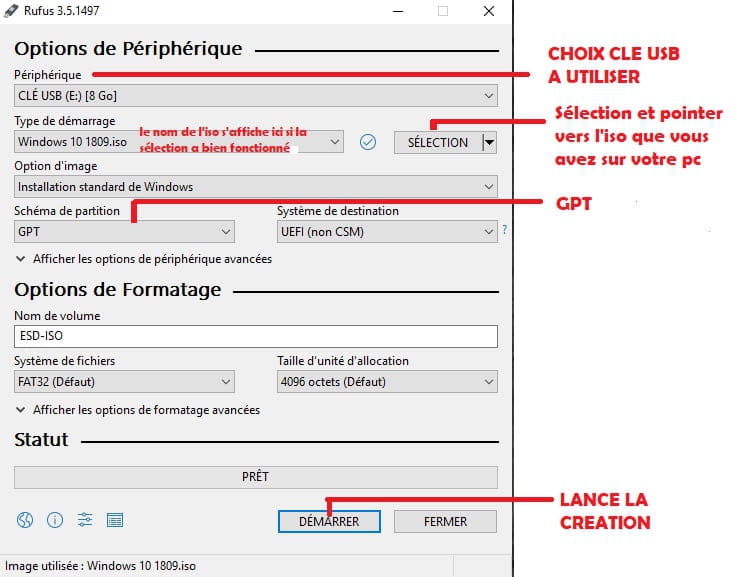
That said, this is a recent machine, so it must definitely support UEFI, as evidenced by the option that mentions the EFI partition, and therefore, Windows 10 will need to be installed in UEFI (make sure to prepare a compatible bootable USB for UEFI installation, create one with Rufus if necessary).
--
~ To know how to listen is to possess, besides one's own, the minds of others... said Leonardo da Vinci.
~ “The art of writing is above all to make oneself understood” — Eugène Delacroix