
Asus laptop powers on and off by itself
Charlotte___
Posted messages
6
Status
Member
-
Anonymous user -
Anonymous user -
Hello,
I have an Asus x93s laptop that turns on and off by itself. I've scoured the forums and tried a lot of things, but I haven't found a solution.
Processor: Intel Core 2 Duo B960 2.2Ghz
System: Windows 7 Home Premium 64-bit
Graphics card: NVIDIA GeForce GT630M, DDR3 1GB VRAM
RAM: 1 stick of 4GB
Power supply: output 120W
Let me know if you need any other information
Here we go with a long description, but I prefer to provide all the details to get the most appropriate help possible.
I left it unplugged and turned off for about 3 months, and when I tried to turn it back on, it kept turning off and restarting after a few seconds, even with the screen closed. I let the battery drain, then recharged it fully before opening the screen. It turned on normally, and I was able to use it for several months.
A few weeks ago, I started playing games (Tomb Raider and Batman Arkham Asylum), and my computer shut down while I was playing. It happened several times, but I was able to restart it and use it for several days.
Then it started turning on for 2 seconds (just long enough to see the logo) and then turning off and restarting 5 seconds later.
I cleaned the fan and removed dust from pretty much everywhere and tried to turn it on with no success. I pressed the power button for 30 seconds, tried to turn it on with and without the battery, and only with the battery, all without success. Then I tried to start it with the least number of components possible, meaning the RAM, hard drive, screen, fan, the cpu, and gpu, and it turned on. I put everything back together, and it worked.
I ran tests with different software to check the temperature of various components, and the cpu and gpu were around 45°C I think, with a few internet tabs open, while the other components were at 30°C, so nothing alarming. My battery was at 57% wear.
I played Batman for 20 minutes and my computer shut down. I don't know the temperatures of the components while I was playing. It started doing the repetitive on and off again, so I disassembled everything and tried to turn it on with the least number of components possible.
And now I have very random results. I removed the motherboard battery for an hour to do a reset. I managed to turn it on with the cpu, gpu, fan, screen, and RAM. Then I tried to add components gradually to see if it would turn on. It worked when I added the hard drive. Then the keyboard. I then put in the WiFi card, and that caused it to bug. I went back to the previous steps, and it doesn't work anymore.
It's worth noting that every time it bugged and I plugged and unplugged the different components, I didn't always get the same results. Sometimes it would turn on perfectly, and sometimes it would turn on and off incessantly with the same components plugged in. So it's difficult for me to determine the precise problem.
So I'm at this stage now, and I don't know what else to try. It's an 8-year-old computer that I haven't changed anything on, but it has always worked very well. It might be the power supply that isn't strong enough anymore, but I don't have another one to test, and I wanted your opinion before buying a new one. It might also be the thermal paste that I've never replaced, but since the temperatures of my cpu and gpu are not too high at rest, I have my doubts.
That's everything I can tell you about the struggles of my computer. Thank you for reading, and I look forward to your advice. Thank you in advance.
I have an Asus x93s laptop that turns on and off by itself. I've scoured the forums and tried a lot of things, but I haven't found a solution.
Processor: Intel Core 2 Duo B960 2.2Ghz
System: Windows 7 Home Premium 64-bit
Graphics card: NVIDIA GeForce GT630M, DDR3 1GB VRAM
RAM: 1 stick of 4GB
Power supply: output 120W
Let me know if you need any other information
Here we go with a long description, but I prefer to provide all the details to get the most appropriate help possible.
I left it unplugged and turned off for about 3 months, and when I tried to turn it back on, it kept turning off and restarting after a few seconds, even with the screen closed. I let the battery drain, then recharged it fully before opening the screen. It turned on normally, and I was able to use it for several months.
A few weeks ago, I started playing games (Tomb Raider and Batman Arkham Asylum), and my computer shut down while I was playing. It happened several times, but I was able to restart it and use it for several days.
Then it started turning on for 2 seconds (just long enough to see the logo) and then turning off and restarting 5 seconds later.
I cleaned the fan and removed dust from pretty much everywhere and tried to turn it on with no success. I pressed the power button for 30 seconds, tried to turn it on with and without the battery, and only with the battery, all without success. Then I tried to start it with the least number of components possible, meaning the RAM, hard drive, screen, fan, the cpu, and gpu, and it turned on. I put everything back together, and it worked.
I ran tests with different software to check the temperature of various components, and the cpu and gpu were around 45°C I think, with a few internet tabs open, while the other components were at 30°C, so nothing alarming. My battery was at 57% wear.
I played Batman for 20 minutes and my computer shut down. I don't know the temperatures of the components while I was playing. It started doing the repetitive on and off again, so I disassembled everything and tried to turn it on with the least number of components possible.
And now I have very random results. I removed the motherboard battery for an hour to do a reset. I managed to turn it on with the cpu, gpu, fan, screen, and RAM. Then I tried to add components gradually to see if it would turn on. It worked when I added the hard drive. Then the keyboard. I then put in the WiFi card, and that caused it to bug. I went back to the previous steps, and it doesn't work anymore.
It's worth noting that every time it bugged and I plugged and unplugged the different components, I didn't always get the same results. Sometimes it would turn on perfectly, and sometimes it would turn on and off incessantly with the same components plugged in. So it's difficult for me to determine the precise problem.
So I'm at this stage now, and I don't know what else to try. It's an 8-year-old computer that I haven't changed anything on, but it has always worked very well. It might be the power supply that isn't strong enough anymore, but I don't have another one to test, and I wanted your opinion before buying a new one. It might also be the thermal paste that I've never replaced, but since the temperatures of my cpu and gpu are not too high at rest, I have my doubts.
That's everything I can tell you about the struggles of my computer. Thank you for reading, and I look forward to your advice. Thank you in advance.
6 answers
-
Hello,
Have you checked in Device Manager for any yellow exclamation marks?
Driver update...
New battery? (computer 8 years old)-
Hello,
I made all the updates and I don't think I saw any exclamation points in the devices. I also updated the driver for my NVIDIA graphics card.
Could my problem be related to the battery? I've never had issues with time loss or anything like that. But I was planning to buy a new one anyway while my computer is disassembled and it's the cheapest component to replace.
-
-
I will still check the exclamation points in the peripherals
especially the graphics card. A few seconds will suffice... -
Tired battery, dead battery, or exhausted adapter (8 years old)?
If the battery can be removed, try it without...-
I removed the battery for all my tests. Every time I try to turn on my computer, it's without the battery. I had tried to turn on my computer just with the battery and I had the same problems.
I think I will change the battery tomorrow.
And the adapter, it annoys me to buy one if that's not the problem.
Just to be sure, we agree that the adapter is the same thing as the power supply, it's what goes from the wall socket to the computer?- Yes, it would be a shame to incur costs without a guaranteed result.
Worn-out hard drive, in poor condition.
If you manage to start it for a few minutes, try this:
https://www.commentcamarche.net/telecharger/utilitaires/6735-crystaldiskinfo/
You will get information about the condition of the hard drive...
Try reinstalling the old Nvidia driver. - Thank you very much for your help! I will try what you suggested after I change the battery, I think. I'll keep you updated on this discussion.
I found a computer that works with the same adapter as mine. So I tested turning on my computer with the other adapter, and it only turned on briefly. Then I turned on the other computer with my adapter, and it worked perfectly.
So apparently my adapter is working, and we can rule it out as a suspect.
-
-
-
My computer started up perfectly yesterday and today without having changed anything.
I was able to run tests on different software. Apparently, my hard drive is in good condition according to CrystalDisk: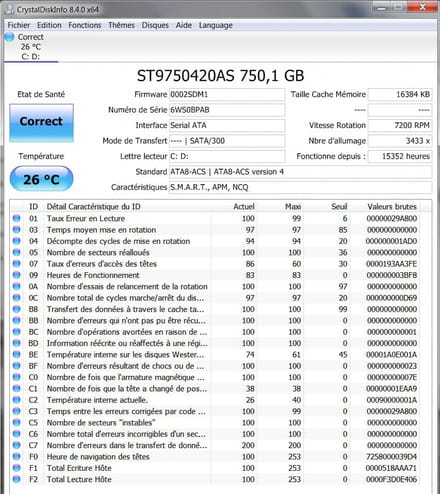
I also ran tests on OCCT and didn’t encounter any errors or crashes, so apparently no issues with the GPU or CPU.
Hoping my computer continues to work. -
