How to repair Windows 7 without CD from grub rescue?
Solved
Heliostre
Posted messages
6
Status
Member
-
Malekal_morte- Posted messages 178136 Registration date Status Moderator, Security Contributor Last intervention -
Malekal_morte- Posted messages 178136 Registration date Status Moderator, Security Contributor Last intervention -
Hello everyone!
Thank you for reading me and I hope this bottle thrown into the sea can save my PC...
The crux of the matter: I had a dual boot of Debian-Windows 7 that was installed for me without me mastering Linux at all.
I therefore deleted the partitions under Debian on my PC. When rebooting, it displayed the message "error: no such partition, entering rescue mode, grub rescue."
I was told afterwards that I should have restored the Windows bootloader x)
My question is: is it possible to repair Windows without restoring my PC to factory settings, knowing that I don't have the Windows installation CD?
I saw that it was possible to create a bootable USB drive, but since I don’t know the architecture of my Windows, I’m afraid I’ll mess everything up. Similarly, for the edition, it seems to me it was the Home edition but I don't know more and I’m really anxious about screwing up my PC with this, I don’t know if it matters.
And if repairing Windows is impossible, is there a way to recover my files anyway?
Thank you again so much for reading my call for help!
Thank you for reading me and I hope this bottle thrown into the sea can save my PC...
The crux of the matter: I had a dual boot of Debian-Windows 7 that was installed for me without me mastering Linux at all.
I therefore deleted the partitions under Debian on my PC. When rebooting, it displayed the message "error: no such partition, entering rescue mode, grub rescue."
I was told afterwards that I should have restored the Windows bootloader x)
My question is: is it possible to repair Windows without restoring my PC to factory settings, knowing that I don't have the Windows installation CD?
I saw that it was possible to create a bootable USB drive, but since I don’t know the architecture of my Windows, I’m afraid I’ll mess everything up. Similarly, for the edition, it seems to me it was the Home edition but I don't know more and I’m really anxious about screwing up my PC with this, I don’t know if it matters.
And if repairing Windows is impossible, is there a way to recover my files anyway?
Thank you again so much for reading my call for help!
2 answers
-
Hi,
Go into the BIOS, check if you have Windows Boot Manager in the boot order.
If so, put it first.
Then try to boot from it.
If you don't have Windows Boot Manager but have your hard drive, do this:
~~
If it doesn't work:
From another PC, download the ISO of Windows 7: https://www.commentcamarche.net/telecharger/systemes-d-exploitation/14933-microsoft-windows-and-office-iso-download-tool/
Create a Bootable USB drive with Rufus.- how to download Rufus.
- Launch Rufus and specify the path of the ISO file
- In partition scheme, choose MBR.
For more details, refer to this tutorial for details: how to create a Windows installation USB drive
When it's done, on the crashed PC:- Boot from it by changing the boot sequence and specify the USB drive or DVD: How to boot the computer from USB drive
- You will reach the Windows installer.
- Go to repair your computer (menu at the bottom left of the main page)
- Advanced troubleshooting options
- Command Prompt
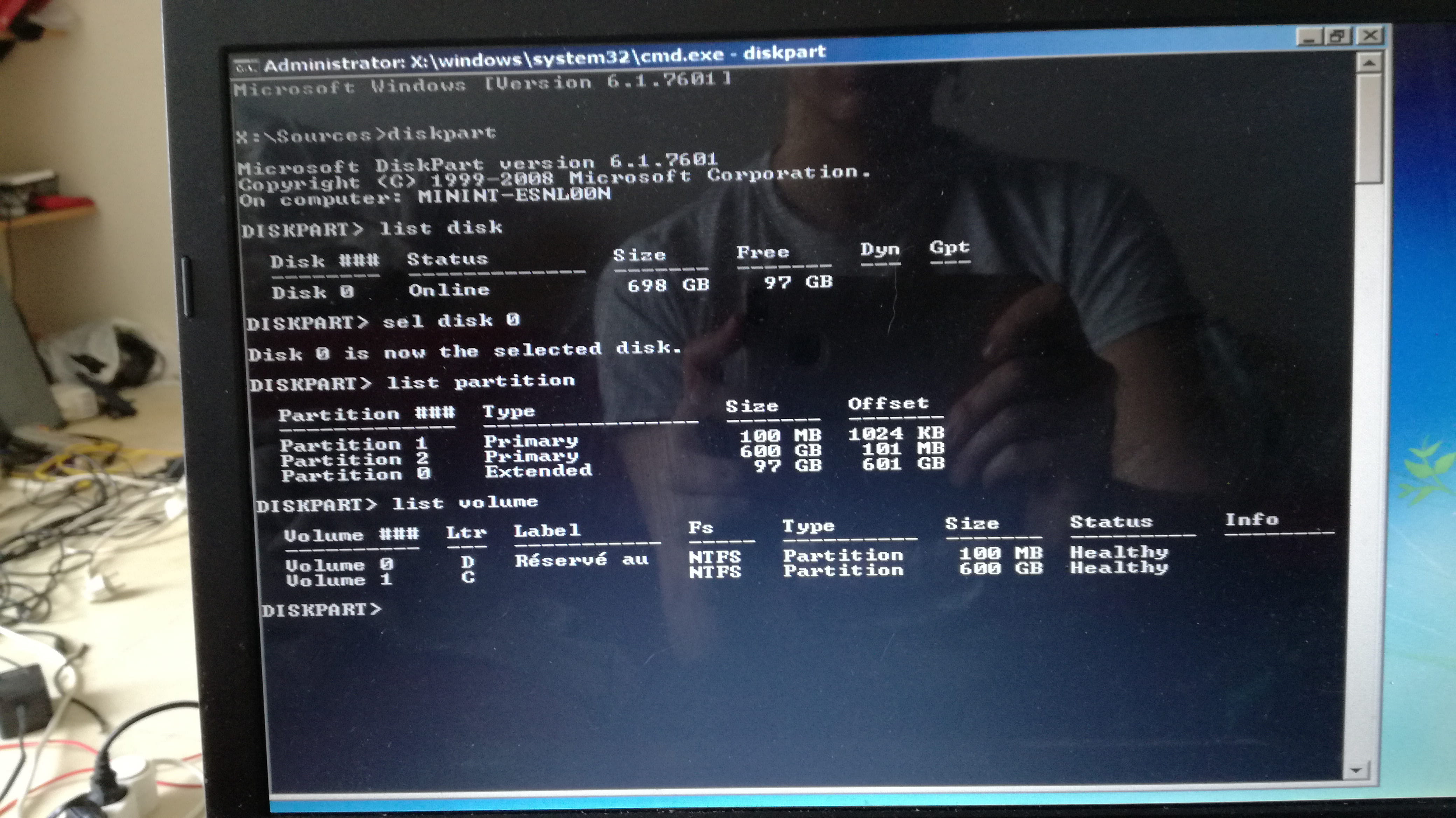
- type diskpart and hit enter
Provide the result of the following commands:
list disk
sel disk 0
list partition
list volume
exit
Take a picture of the result and provide the result in a screenshot.
and provide the result of the command:bcdedit /v
Take a picture of the result and provide the result in a screenshot.
-
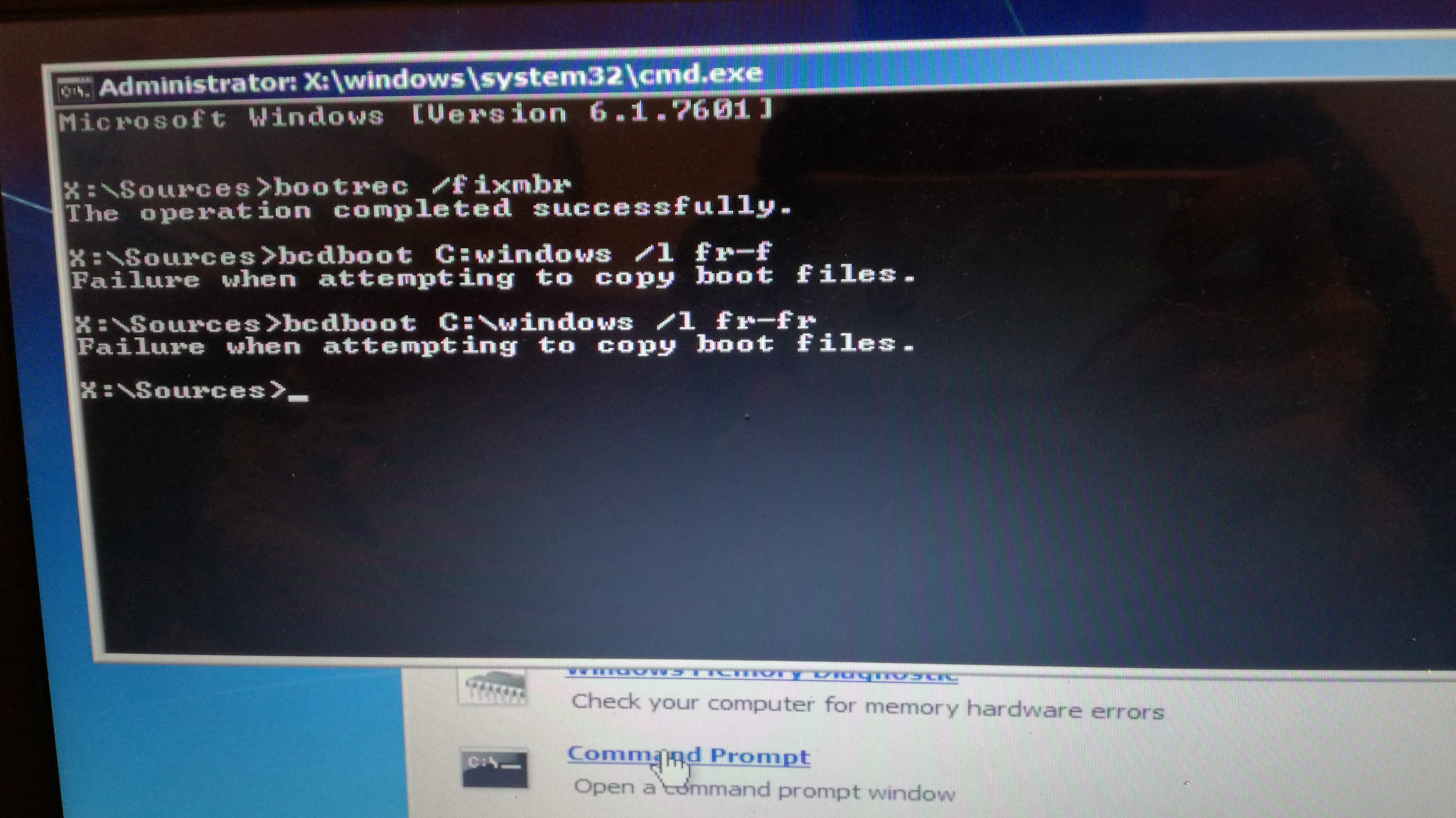
Try this:
bootrec /fixmbr
bcdboot C:\windows /l en-us
(it's an l like Laurent)
If you don't encounter any errors, restart the computer and see if it allows you to boot.
-
For the moment, I feel like he doesn't agree x)

He also suggests doing it from a restore point, but since you didn't mention it, I assume it's not feasible?- So in the end I used this method:
https://windowsreport.com/how-to-fix-the-failure-when-attempting-to-copy-boot-files-error/
And it worked!
Thanks again for all your advice ❤️
-