
Desperately looking for WIFI DRIVERS for NEO 14A 2WH32
Solved
spideyufo
Posted messages
18
Status
Member
-
batstee -
batstee -
Hello,
I am looking for the WIFI and SOUND DRIVERS for my NOTEBOOK THOMSON NEO 14A 2WH32
I have reinstalled Windows 10 Pro, everything works but I forgot to back up the DRIVER folder in the original OS system and I no longer have the DRIVERS.
I am looking for the WIFI and SOUND DRIVERS for my NOTEBOOK THOMSON NEO 14A 2WH32
I have reinstalled Windows 10 Pro, everything works but I forgot to back up the DRIVER folder in the original OS system and I no longer have the DRIVERS.
23 answers
- 1
- 2
Next
-
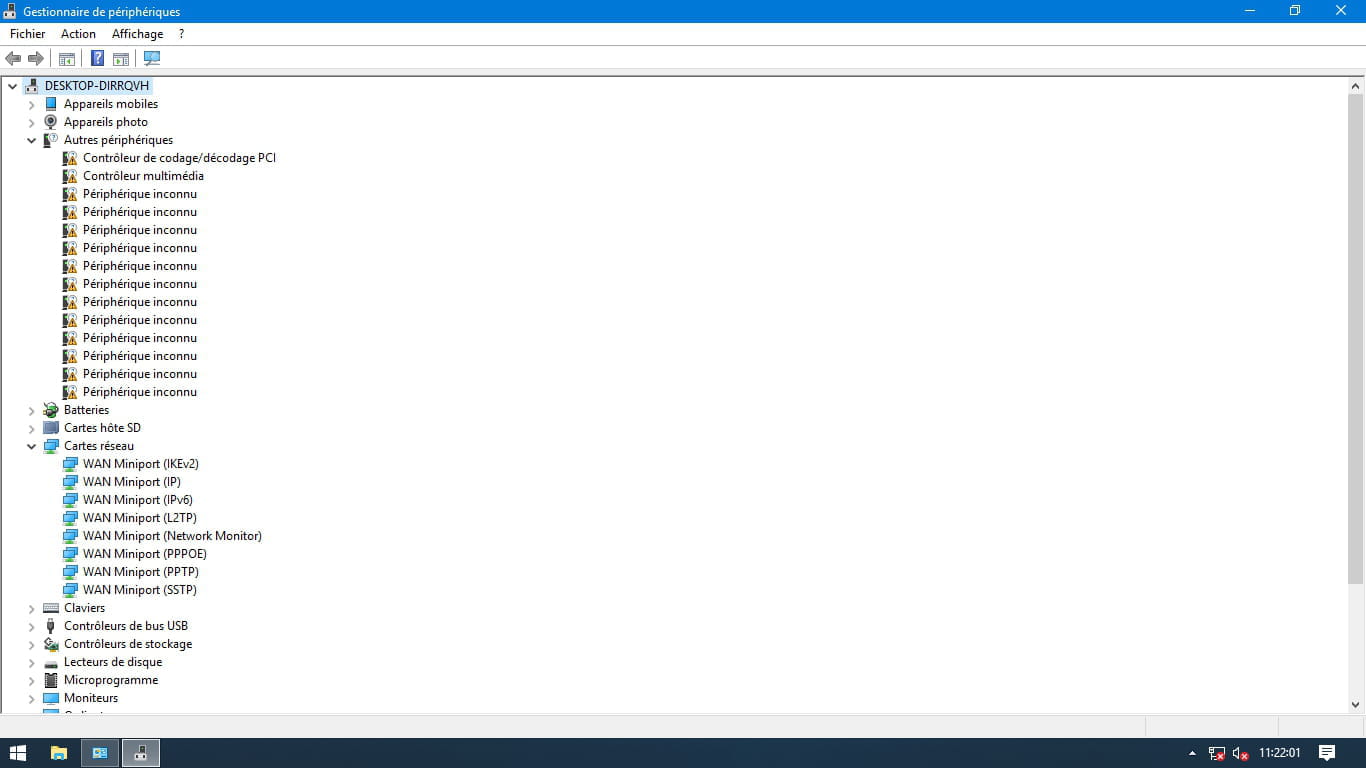
What are the error codes for each ACPI?
All these error codes are located in the device manager
In fact, to be able to activate the drivers for the WIFI card, you first need to install the INTEL and ACPI drivers.
Personally, I spent 2 days finding the drivers one by one; and I asked for help from THOMSON France, Spain, Portugal but none of them could really guide me precisely.
I am preparing a link to the Driver files. -
Here is the link to the Drivers I found online with an exhaustive search for each missing ACPI on the site: https://drp.su/en/catalog
- First, you need to install the INTEL ACPI drivers and then the WIFI and Bluetooth driver
https://accounts.google.com/ServiceLogin?service=wise&passive=1209600&continue=https://drive.google.com/open?id%3D11dSbDPSrGsY69S1MTVd_B-giZpejfdB1&followup=https://drive.google.com/open?id%3D11dSbDPSrGsY69S1MTVd_B-giZpejfdB1
As a piece of advice, as soon as the Wifi works, I recommend returning to the above site for an AUTO detection and installation of the latest drivers. -
Indeed, I went to the REALTEK website and tried the following drivers knowing that the WIFI is 802 11 b/g/n https://www.realtek.com/en/component/zoo/advanced-search/638?Itemid=276
but still without success
I believe, as you said, that we first need to install the proper UART and ACPI 8086 drivers, another crazy move :) -
I reinstalled the previous version of WINDOWS HOME 64bits and the same problem persists with the same missing drivers.
I think that WINDOWS PRO will work with the right DRIVERS that I'm expecting from THOMSON customer service. -
I received exactly the same response from the customer services in Spain, Portugal, and the US.
The people managing THOMSON's customer service are UNRELIABLE and know nothing; they really don't want to help those who purchase their products. Now, I've understood the quality of their services.
I managed to finalize the search for all the drivers with the previous sites and finally found a software that really found and installed AUTOMATICALLY the very last BLUETOOTH driver that I was missing.
>DriverPack-17-Online
Thank you very much for your help, Jeannets; at least there’s someone to rely on when you're in trouble :) -
Hello Mathias,
To start, what version of Windows is installed on the PC?
Then, you can already install a free software https://driverpack.io/fr, it should be able to find most of the missing drivers.
Good luck! -
jeannets Posted messages 28462 Registration date Status Contributor Last intervention Ambassador 6 618
Hello,
That must be it:
https://www.touslesdrivers.com/php/constructeurs/telechargement.php?v_code=47378&v_langue=fr
If that doesn't work, you should provide the Wifi card's identifier...
https://www.commentcamarche.net/faq/35597-trouver-le-numero-d-identification-d-un-peripherique
Optionally, display the hidden devices in the "Device Manager". -
Hello Jeannets,
thank you for your quick response,
the driver installs correctly but there is still no WIFI network.
I realized this morning that I had installed Windows 10 64-bit on this NOTEBOOK which should be 32-bit hence the reference NEO 14A 2WH32.
Here are the current issues encountered with this system:
-
Yes, it's true that it's a lot... But it doesn't provide any device identification numbers...
If it's 64 bit and works, it's because the processor is indeed 64 bits. As for the rest, I don't know.
Given the number of installations needed, I would recommend going to the "Driver Cloud" site https://www.driverscloud.com/
There is an indirect procedure for PCs not connected to the internet... by transferring with a USB key...
I advise you to start with the Ethernet cable connection drivers... and connect directly to the back of your BOX using an RJ45 cable (this way, you won't need a key) then you can connect to this site directly and update everything else...
-
-
-
Unfortunately, there is no Ethernet port on this NOTEBOOK
HERE is the result but I don’t see the network config?
https://drive.google.com/file/d/1Lr4x10k0miaIo9T_4lNJHDi1hV0ozLTk/view?usp=drive_open-
You can read this https://www.commentcamarche.net/faq/388-drivers-comment-trouver-des-pilotes
The purpose of Drivers cloud is not to produce 50 pages of reading about your setup...
But to make several back and forths between the two PCs to perform the offline detection of your problematic PC and then report the resulting file in the designated box.... Then, based on this file, it should suggest drivers.... You need to download them one by one, install them, and restart... It's a fairly long operation, but the magic wand does not exist here... That's why I recommend first installing what allows you to connect; the rest of the work will become easier afterwards.
-- One possible thing, I believe, would be to share your Smartphone's connection and connect it via USB cable to your PC and then connect to driverCloud; if you have the possibility and the plan..??
It is possible that your Wi-Fi card does not exist as such, you need to install other drivers first for it to appear...
Do you know the manufacturer’s website for this PC..?? I can't find it.... A manual, a receipt..??
A 'Fn+^) key activates or deactivates the Wi-Fi, you also need to ensure it is in ACTIVE position... that would be silly.
-
-
Okay, thank you for your help. I'm doing a search for drivers one by one with the links you gave me,
I think I'm going to install a WiFi dongle to have internet and detect the drivers automatically;
I'll keep you posted
Have a good weekend.-
I searched, I think your "Wifi card" is a REALTEK RTL 8723xS, I bet on the 8723DS and went to look on the Realtek driver website, here it is https://www.realtek.cz/realtek-wireless-drivers.html
The driver that works with Windows 10 in 64 bits should be this one:
https://www.realtek.cz/download-RTL8723DS-wireless-driver-for-Windows10-64bit.html
Your PC was originally 32 bits and the Thomson drivers are for Win10 32 bits; this is already a good reason for it not to work with Win10 in 64
The manual here https://static.mythomson.com/var/fichiers/1571749472-manuel-multilingue-thomson-neo14.pdf clearly states that you must back up the drivers that are in the folder...... It is well defined. And if they say that, it's because they know that their drivers are custom-made specifically for them... with little chance of finding them elsewhere
They have a customer service reachable by email here sav@groupsfit.eu ....... It is possible that they can provide you with these drivers as a last resort. It's not guaranteed, but you can try if what I gave you doesn't work.
+++
-
-
Alright, I'm trying all this, faster than the music is your help.
Here is the list of driver incidents I am getting, it seems that the REALTEK WIFI I am trying to install is not installed:
\VEN_8086&DEV_2298&SUBSYS_72708086&REV_36\3&11583659&0&D0 requires that the installation be continued.
\VEN_8086&DEV_22B8&SUBSYS_72708086&REV_36\3&11583659&0&18 requires that the installation be continued.
The device ACPI\8086228A\1 requires that the installation be continued.
The device ACPI\8086228A\2 requires that the installation be continued.
The device ACPI\INT3400\2&daba3ff&0 requires that the installation be continued.
The device ACPI\8086228E\1 requires that the installation be continued.
The device ACPI\8086228E\2 requires that the installation be continued.
The device ACPI\8086228E\3 requires that the installation be continued.
The device ACPI\808622A8\1 requires that the installation be continued.
The device ACPI\10EC5651\4&24bb754d&0 requires that the installation be continued.
The device ACPI\INT3403\0 requires that the installation be continued.
The device ACPI\INT3403\4 requires that the installation be continued.
The device ACPI\INT33BD\1 requires that the installation be continued.
The device ACPI\INT3406\2&daba3ff&0 requires that the installation be continued.-
OK, there are a lot of incompletely installed points... and regarding the processor... so it’s cardiac...
I'm starting to wonder if your source for the Windows 10 Pro file is compatible with Atom X5 processors, indeed, I've read a lot about the ATOM versions, including the end of updates, numerous incompatibilities, etc... so if you picked a Windows 10 file randomly from the web, I understand the existence of a certain level of risk...
I sent an email to Thomson support, I’ll see if they respond..?? and what they say.
I fear that your setup has been poorly assembled from the start...
-
-
Yes indeed, it is possible that Windows Pro is not compatible; I am also waiting for a response from THOMSON customer service.
Apparently, it is the WINDOWS HOME version that is installed on the NEO ATOM, and I prefer Windows PRO. -
jeannets Posted messages 28462 Registration date Status Contributor Last intervention Ambassador 6 618
Here is a PC built on the same principle, with the same processor, etc. and inexpensive (€47) https://www.cdiscount.com/informatique/achat-pc-ordinateur/mini-pc-windows-10-excelvan-z85-intel-atom-x5-z835/f-1070853-ovo4521706945731.html
I suppose its version of Windows 10 is like the others...???
It also seems that there is no benefit to switching to 64-bit... https://answers.microsoft.com/en-us/windows/forum/windows_10-windows_install/windows-10-tablet-x86-upgrade-to-x64/5bfe7158-872d-4bc9-8c2a-3292528a0592-
You can also download this https://downloadcenter.intel.com/download/19792/Intel-Processor-Diagnostic-Tool?product=93361
It's a diagnostic tool for your processor model...
You could also try installing Windows 8.1 on this PC and then upgrade to Windows 10, hoping the right choices are made automatically...
if necessary with a USB Wi-Fi adapter...
-
-
I think we need to find the right RTL Realtek wireless driver, but there are so many that I prefer to wait for a response from customer service; I've tried a good ten with a different reaction each time, but still nothing.
-
There aren't many Realtek drivers...that are for WiFi and Bluetooth... Add Windows 10... Only for chips that start with RTL and motherboards for Atom processors...
I’ve sent you the links from Realtek...POST 8, for the RTL8732S chip which I think is the one in your PC... but the problem doesn’t only come from that... To solve it by only installing this driver, everything else would need to work correctly... and that’s not the case, far from it...
I wish you to get a good response from Thomson's customer service... otherwise, I don't really see how you could manage to fix this.
I saw another one from ASUS that uses the same... here’s the link to the WiFi driver https://dlcdnets.asus.com/pub/ASUS/nb/DriversForWin10/WLAN/WLAN_Broadcom_Win10_64_VER59310323.zip to check out.
-
-
Thank you very much for your help Jeannets,
I finally managed to add the drivers one by one and the WIFI and sound were activated after installing the missing ACPI
Have a good weekend -
yes, but there is only one driver left to install >> BLUETOOTH with the following code >> ACPI\OBDA8723\4&29E26D5C&0
-
Hello spideyufo,
I am reaching out to you because I find myself in the same situation as you with my Neo14a-2wh32. I had to reinstall Windows due to a problem and had to format the hard drive for that... I can't find the missing ACPI drivers... Can you help me? -
It's Windows 64-bit Home.
The reference Neo14a-2wh32 is not available on driverpack, and not being very knowledgeable, I didn't dare take another reference from Neo14 (searched from another pc). -
So I guess you have Windows 10 64-bit, in that case just click on INSTALL ALL REQUIRED DRIVERS and all the drivers will install automatically
DriverPack is suitable for all devices
Have you tried installing the Pack?-
I cannot install the drivers automatically because I don't have internet access with my Neo14. I have to download them from another computer, which is why I can't find the exact drivers. I tried an offline scan in two parts with drivercloud, but it doesn't detect the missing ACPI...
When I search on driverpack from my second PC indicating "Thomson NEO14A-2WH32"
I get the packs for the following different references:
"Thomson NEO14-2.32B"
"Thomson NEO14-2.32BS"
"Thomson NEO14-SE"
"Thomson computing NEO14-2.32B"
"Thomson computing NEO14-2.32BS"
"Thomson computing NEO14-32WC"
But there is no pack "Thomson NEO14A-2WH32", could any of these packs be compatible?
Thank you for your help.
-

- 1
- 2
Next