Power button stays on
Solved
frenetique
Posted messages
80
Status
Member
-
gugu01 Posted messages 15669 Registration date Status Contributor Last intervention -
gugu01 Posted messages 15669 Registration date Status Contributor Last intervention -
Hello everyone:
HELLO EVERYONE
I received an HP laptop as a gift in English with Windows 7 Pro {18 months},
Recently, a nephew updated it to Windows 10 and in French,
Interestingly, when I turn off the laptop, the power light remains on.
I need to hold the button for a long time to turn it off
This phenomenon occurs if the computer stays on for more than 10 to 15 minutes
Otherwise, everything is normal after 1 to 10 minutes. Normal shutdown,
Another thing to turn off the laptop after more than 15 minutes of activity: we restart the computer and immediately select the shutdown option and everything turns off
It's too bad the nephew is traveling
Thank you for any help
HELLO EVERYONE
I received an HP laptop as a gift in English with Windows 7 Pro {18 months},
Recently, a nephew updated it to Windows 10 and in French,
Interestingly, when I turn off the laptop, the power light remains on.
I need to hold the button for a long time to turn it off
This phenomenon occurs if the computer stays on for more than 10 to 15 minutes
Otherwise, everything is normal after 1 to 10 minutes. Normal shutdown,
Another thing to turn off the laptop after more than 15 minutes of activity: we restart the computer and immediately select the shutdown option and everything turns off
It's too bad the nephew is traveling
Thank you for any help
8 answers
-
Hello,
Your PC seems to be going into hibernation instead of shutting down (hypothesis)
Follow the steps below and see what it gives:
All settings
Then System


First,
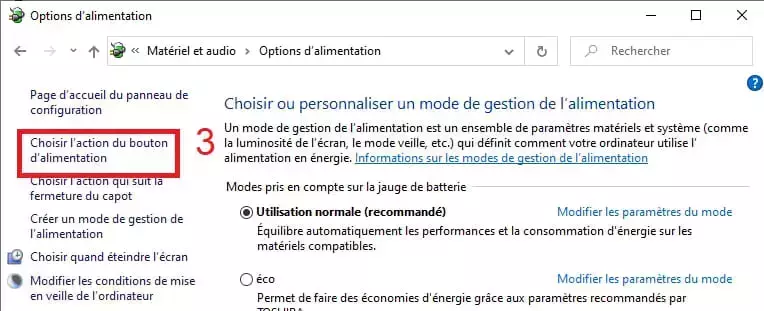
uncheck "hibernate" if checked.
Make sure to save the change.
Restart your PC to ensure the change takes effect.
Then... test the shutdown to see if it's better or not.
If it's okay, then good; if not:
"Fast startup" can also interfere on older PCs, so try disabling it.
--
Auto message
If you're here, it's because you don't know, so... ;-)
Mini Reminder for the volunteers helping you: Reply, Respect, Politeness,... -
Thank you
I just followed the advice and will restart and wait a few minutes to inform you. -
Hello gugu.
I thought my problem was solved, but it’s not the case.
In fact, the next day my problem persisted and I had to wait until yesterday to move on
to the second solution. And unfortunately, the situation is still the same. -
It's simple, make sure you click on stop and not mistakenly click on sleep?
Otherwise, disable hibernation, sleep, and fast startup.
We'll reactivate them one by one later to see.
All settings
Update and security
Run a search for updates and install them (repeat this several times to ensure all are taken)
And check for updating your drivers if needed, with this:
https://www.commentcamarche.net/faq/48455-mettre-a-jour-ses-pilotes-gratuitement-avec-driverscloud
Basically, we only keep the classic shutdown, no sleep or anything.
We'll see about getting updated.
Depending on the results, we'll reactivate sleep and fast startup to check.
-----------------
What exact HP model do you have?
(label under the PC or in the battery compartment if removable, like dv7 4163sf, model number and letter that follow)
--
Auto message
If you are here, it means you don't know, so... ;-)
Mini regard for the volunteers who help you: Reply, Respect, Politeness,... -
Yes, I’m checking carefully before clicking on stop. It’s true that I had doubts.
Drivers are up to date.
Model HP 17-FO74 NR
I have followed all your advice. -
Model---HP Pavilion 17-f074nr
unchecked: fast startup, hibernation, and lock.
For updates, I am told everything is okay
But review the updates. -
I'm not too sure...
This model seems to be from 2015 and should be OK under Windows 10.
(at least, I think)
I see that it originally comes with two utilities/programs affecting the power settings:
"HP AC Power Control Utility" and "ENERGY STAR Qualified Power Plan"
If you have them, check the possible settings that might affect the shutdown.
You can also check "HP Support Assistant" to see if it provides any updates or indicates an issue.
--
Auto message
If you are here, it's because you don't know, so... ;-)
Mini message to the volunteers helping you: Reply, Respect, Politeness,...-
Hello gugu01
I took some time to get back to you because I needed to restart the whole process from the beginning.
Now I can tell you that everything is working, and the drivers were the source of the trouble.
You were right.
I spent all day yesterday testing and also this morning.
Shutting down normally and for sleep mode, just touch the keyboard and it wakes up.
Fast startup is unchecked and sleep mode and lock are enabled.
My thanks are renewed to you, and I look forward to hearing from you again. -
"Fast startup is unchecked and sleep and lock."
Fast startup should be checked again (the PC starts faster, which is interesting)
As for sleep mode, personally I uncheck it (not very useful and sometimes causes wake-up issues)
You’re welcome ;-) -
-
-
-
Thank you gugu, I will take a look at all of this with a clear mind.
Then I will get back to you.