
Iomega Ego recognized as CD drive
Milou9254
Posted messages
7
Status
Member
-
fabul Posted messages 42285 Registration date Status Moderator Last intervention -
fabul Posted messages 42285 Registration date Status Moderator Last intervention -
Hello
I have read dozens of posts on a similar problem: my Iomega Ego hard drive (RPHD-UG3) is recognized on my computer (Windows 10, Lenovo Ideapad 720s) as a CD drive, and not as a hard drive. I used to use it on a Windows 7 PC.
I have tried everything, but nothing works. I installed the latest version of Iomega Encryption Utility. The HDD is recognized as "OEM Disk Drive". When I update the drivers via Windows, it tells me that it finds the drivers but cannot install them, "access denied".

I tried compatibility mode, but nothing worked either.
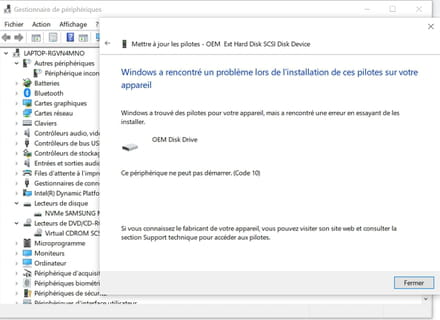
I also tried a manual installation of the OEM driver, but "this device cannot start", see:
I wouldn't insist if I didn't have dozens of GB of personal photos on this drive... Thank you so much for your help!
I have read dozens of posts on a similar problem: my Iomega Ego hard drive (RPHD-UG3) is recognized on my computer (Windows 10, Lenovo Ideapad 720s) as a CD drive, and not as a hard drive. I used to use it on a Windows 7 PC.
I have tried everything, but nothing works. I installed the latest version of Iomega Encryption Utility. The HDD is recognized as "OEM Disk Drive". When I update the drivers via Windows, it tells me that it finds the drivers but cannot install them, "access denied".

I tried compatibility mode, but nothing worked either.
I also tried a manual installation of the OEM driver, but "this device cannot start", see:

I wouldn't insist if I didn't have dozens of GB of personal photos on this drive... Thank you so much for your help!
2 answers
-
Hi,
What if you uninstalled the disk encryption program before installing the driver? -
Then right-click > Run as administrator
Or: https://www.commentcamarche.net/informatique/windows/261-desactiver-le-controle-de-compte-d-utilisateur-uac-de-windows/
