Unable to boot from USB
Solved
Bwatx
-
gugu01 Posted messages 15669 Registration date Status Contributor Last intervention -
gugu01 Posted messages 15669 Registration date Status Contributor Last intervention -
Hello,
I dusted off my Samsung ATIV 500T laptop, and it consistently boots into the BIOS.
There are three tabs in my BIOS: SysInfo
Security: TPM 2.0 Device (ENABLED), Secure Boot Configuration -> Secure Boot (DISABLED)
Exit
I have copied W8 (it was running on W8) onto my USB drive, which shows up in Boot Override (Exit tab). When I press Enter on it, nothing happens. When I try to boot from the USB by tapping F10, I can either boot from the USB drive or go into the BIOS, and even when I choose the USB drive, I end up in the BIOS.
I’ve tried every possible combination of enabled/disabled settings, with different USB drives, different ports, etc., but nothing works, always the same result.
Any solutions, please?
Thank you in advance,
Best regards,
I dusted off my Samsung ATIV 500T laptop, and it consistently boots into the BIOS.
There are three tabs in my BIOS: SysInfo
Security: TPM 2.0 Device (ENABLED), Secure Boot Configuration -> Secure Boot (DISABLED)
Exit
I have copied W8 (it was running on W8) onto my USB drive, which shows up in Boot Override (Exit tab). When I press Enter on it, nothing happens. When I try to boot from the USB by tapping F10, I can either boot from the USB drive or go into the BIOS, and even when I choose the USB drive, I end up in the BIOS.
I’ve tried every possible combination of enabled/disabled settings, with different USB drives, different ports, etc., but nothing works, always the same result.
Any solutions, please?
Thank you in advance,
Best regards,
4 answers
-
jeannets Posted messages 28460 Registration date Status Contributor Last intervention Ambassador 6 618
Hello,
This is not really the standard PC, it needs a 32-bit version of Windows and probably the hand-stitched OEM version for Samsung... and all other versions probably won't work (I assume).
It's likely that its battery is too empty or that for too long, it has lost the content of its 64GB eMMC drive and also its Windows, which is why it starts in BIOS. Or its Windows is corrupted.
Your USB drive must contain a version of Windows 8 in 32-bit that is not UEFI since your "Secure Boot is disabled"; on the contrary, if "Secure Boot" is enabled, a UEFI USB drive is needed.
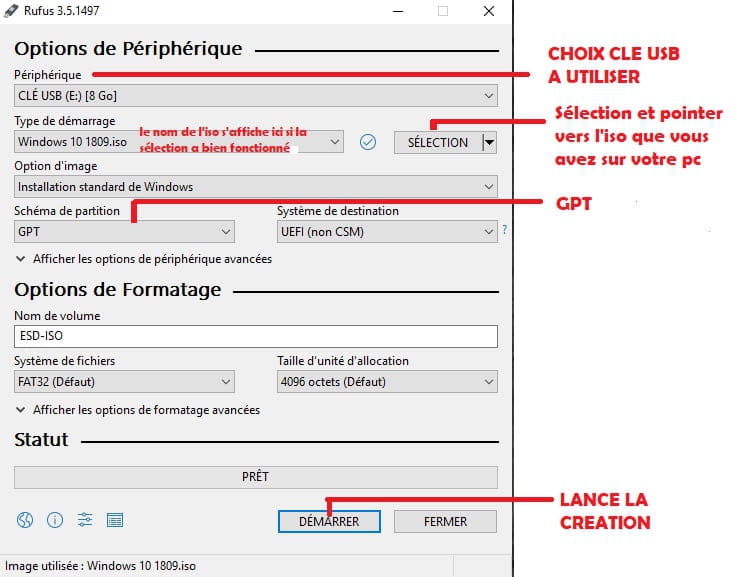
This USB drive must be created with Rufus by loading the Windows ISO file... https://rufus.ie/