How to write accented letters and others
Nathalie1976_2833
Posted messages
3
Registration date
Status
Member
Last intervention
-
VaneGardie -
VaneGardie -
Hello,
I recently bought a universal folio wireless keyboard, and when I try to type a word with two accents or an acute accent, I can't manage it, as well as the ç; using shift 4 doesn’t display it either.
What should I do to make it work?
Thank you in advance.
I recently bought a universal folio wireless keyboard, and when I try to type a word with two accents or an acute accent, I can't manage it, as well as the ç; using shift 4 doesn’t display it either.
What should I do to make it work?
Thank you in advance.
Related links:
- I can no longer use circumflex accents and diaereses.
- how to type accented characters on acer aspire switch 10?
- How to make accents?
- my keyboard is not typing anymore and the letters are sending me elsewhere
- HOW TO WRITE À, É, È, Ç, Ê IN CAPITAL LETTERS...?
- how to type the greater than and less than symbols on a qwerty keyboard
6 answers
-
the ç by pressing shift 4
???
Hi
The ç is located on the 9 key, the é on the 2 key, the è on the 7 key, etc.. etc...

Are you talking about a PC? a MAC? which operating system? an azerty or qwerty keyboard?
Is it okay with a wired keyboard?
-- -
Hello,
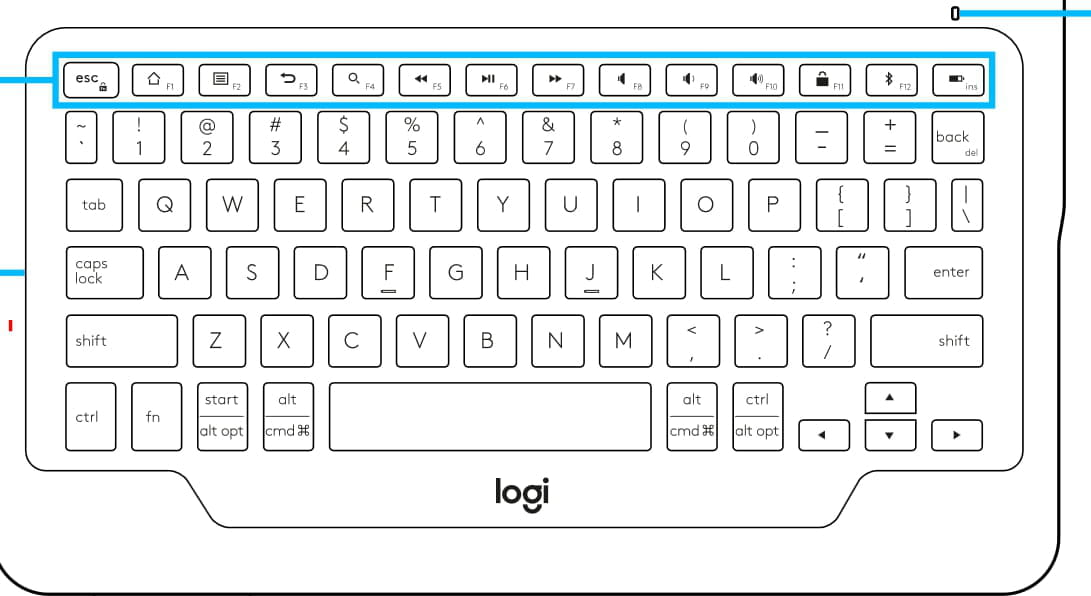
If this keyboard is indeed the Logitech Universal Studio https://www.logitech.com/assets/65046/universal-folio.pdf
It looks like this
In my opinion, the accents are obtained directly with the keys ~/' (next to the 1) for the acute accent and the key "/` (to the left of Enter)
Note: there is no ç.
As for the characters located above the number keys, if they do not work with "Shift", then you must use the keys surrounding the space bar.
Either "Alt/Cmd" or "Ctrl/Alt opt"
Not finding a user manual for operation, it’s hard to say more.
--Very difficult to catch a black cat in a dark room.
Especially when it’s not there... -
Hello,
Are you talking about accents on uppercase or lowercase letters?
Best regards
--
One can find happiness by accepting things that cannot be changed.
Absence of responses from 5-6 PM, thank you for your understanding :) -
I speak to make an e with an acute accent or a grave accent, as well as the a's and also the c's, the parentheses, and all the symbols that are above the numbers.
-
Hello,
Maybe you should go into the language settings and choose: Swiss French.
Best regards
--
You can find happiness by accepting things you cannot change.
No responses will be given after 5-6 PM, thank you for your understanding :) -
Hello, I just bought the same keyboard and I'm having the same issue. It's impossible, for example, to type the exclamation mark or the hyphen... Have you found a solution to the problem? Thank you for your response.