Shortcut icon
bienvenue60
-
bienvenue60 -
bienvenue60 -
Hello,
I'm still just as useless, but I would like to put a shortcut on my desktop, for example: my insurance, my bank, mutual, social security, etc. but I don't know how to do it. Thank you for explaining it to me, for example, Amélie and her logo.
I'm still just as useless, but I would like to put a shortcut on my desktop, for example: my insurance, my bank, mutual, social security, etc. but I don't know how to do it. Thank you for explaining it to me, for example, Amélie and her logo.
2 answers
-
Hello,
https://www.linternaute.fr/hightech/guide-high-tech/1413756-comment-creer-un-raccourci-vers-un-site-internet-sur-son-bureau/
Personally, I add the website in question to my Bookmarks, then I right-click on the link (in the Bookmarks) and choose " Copy " next I minimize the browser window to the taskbar, then all that's left to do is right-click on the desktop and select " Paste shortcut... ".
After that, you can close the browser.
--
The enemy is stupid: he thinks that we are the enemy while it is him!
Pierre Desproges -
Hello,
you're not useless, you just haven't looked into the subject ^_^ x)
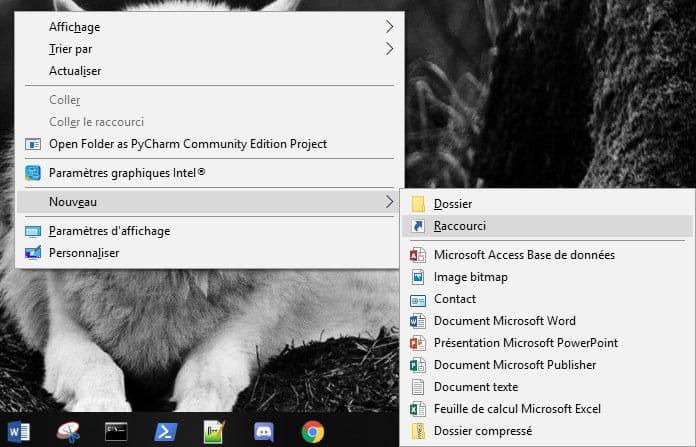
To create a shortcut, right-click on the desktop.
A window like this will open.
You will move the mouse over "new" then shortcut
and you click on it.
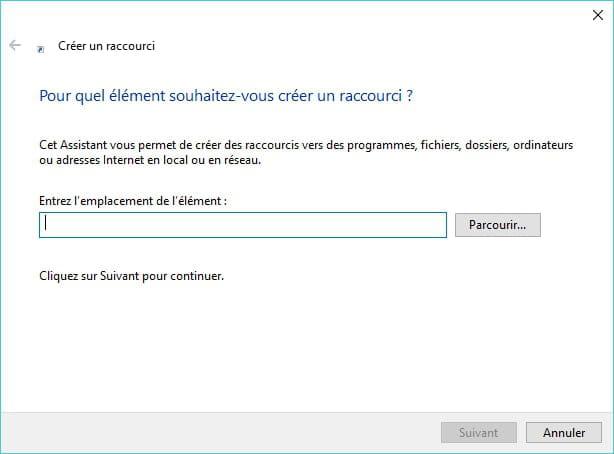
You will come across an interface like this.
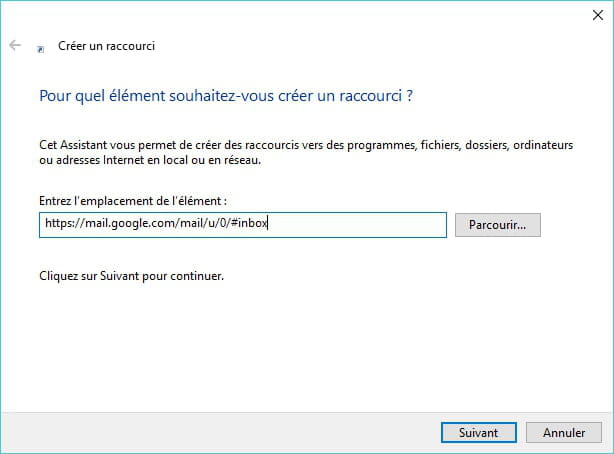
If you want to make a shortcut that opens a link: in my example it's Gmail.
Copy the link that is at the top of the browser.
and paste it in the shortcut window
like this:
and then you press "enter"
You will enter the name of the shortcut; you can put whatever you want.
then again "enter"
Congratulations, you have your shortcut!!
--
Programming is not learned, it is understood.