Problematic device, missing driver
Solved
mistinguette59
Posted messages
27
Status
Membre
-
kaneagle Posted messages 86263 Registration date Status Modérateur Last intervention -
Hello,
I'm reaching out to kaneagle who helped me so brilliantly not long ago by finding device drivers that I was struggling to find online myself.
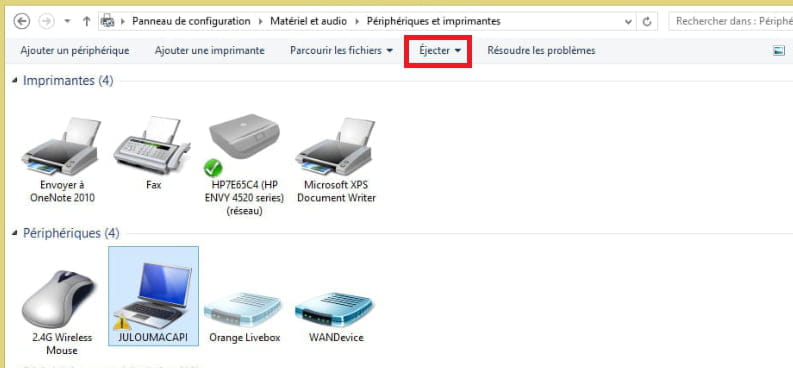
Since this morning, I've been trying to reinstall my printer (HP Envy). It usually works from the start, even though I sometimes have difficulty detecting it (I uninstall through the programs and cleanly reinstall), but it never lasts long before I have to start over, due to it being recognized as offline... I noticed I had a yellow exclamation point in front of my computer (control panel/hardware and sound/devices and printers/devices (my PC)). I searched online and went to msinfo32/components/problem devices; I indeed have a missing driver (?). Here is what it indicates as the ID of the missing device:
Not available ACPI\TOS1901\2&DABA3FF&2 The drivers for this device are not installed.
I don't even know how to install this driver since nothing appears abnormal in the device manager. Could this plug and play feature be causing my printer issues?
Thank you for taking the time to read this. Best regards.

I'm reaching out to kaneagle who helped me so brilliantly not long ago by finding device drivers that I was struggling to find online myself.
Since this morning, I've been trying to reinstall my printer (HP Envy). It usually works from the start, even though I sometimes have difficulty detecting it (I uninstall through the programs and cleanly reinstall), but it never lasts long before I have to start over, due to it being recognized as offline... I noticed I had a yellow exclamation point in front of my computer (control panel/hardware and sound/devices and printers/devices (my PC)). I searched online and went to msinfo32/components/problem devices; I indeed have a missing driver (?). Here is what it indicates as the ID of the missing device:
Not available ACPI\TOS1901\2&DABA3FF&2 The drivers for this device are not installed.
I don't even know how to install this driver since nothing appears abnormal in the device manager. Could this plug and play feature be causing my printer issues?
Thank you for taking the time to read this. Best regards.
15 réponses
here I am again (not without difficulty)
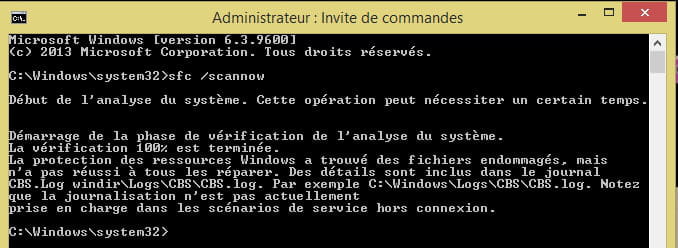
I finally managed to update my Windows tonight after repairs (it took me more than a day to get it done, they are stubborn!)
as for the triangle, it still looks good unfortunately, but having tested several things with your help, I think I'm going to leave it as it is, after all, if it's fine like that :)
and even more crazy, I downloaded your SM bus driver and surprise, I was told that Windows updated my device, after several attempts, reboots, etc. I still have the indication that the driver is not installed... incomprehensible!
so to summarize, as long as I don't have any issues, I'll leave it as is!
after all, why look for trouble if it doesn't pose a real problem?
anyway, a big thank you for your availability and precious help kaneagle,
I really appreciate your sharing of knowledge,
thank you very much and have a great weekend!
mistinguette
I finally managed to update my Windows tonight after repairs (it took me more than a day to get it done, they are stubborn!)
as for the triangle, it still looks good unfortunately, but having tested several things with your help, I think I'm going to leave it as it is, after all, if it's fine like that :)
and even more crazy, I downloaded your SM bus driver and surprise, I was told that Windows updated my device, after several attempts, reboots, etc. I still have the indication that the driver is not installed... incomprehensible!
so to summarize, as long as I don't have any issues, I'll leave it as is!
after all, why look for trouble if it doesn't pose a real problem?
anyway, a big thank you for your availability and precious help kaneagle,
I really appreciate your sharing of knowledge,
thank you very much and have a great weekend!
mistinguette
Download and install --> 7Zip 64 bits
Download this driver --> ACPI
Right-click on --> 20494261.....cab
Select --> 7Zip
Choose --> extract to "20494261......\"
Go to the device manager
Right-click on the device
Update driver
Search for a driver on my computer or Browse my computer ......
Browse
Select the folder --> 20494261.....
OK, next
Restart.
--
The human being is at its best when things are at their worst.
Download this driver --> ACPI
Right-click on --> 20494261.....cab
Select --> 7Zip
Choose --> extract to "20494261......\"
Go to the device manager
Right-click on the device
Update driver
Search for a driver on my computer or Browse my computer ......
Browse
Select the folder --> 20494261.....
OK, next
Restart.
--
The human being is at its best when things are at their worst.
Thank you very much for your help Kaneagle,
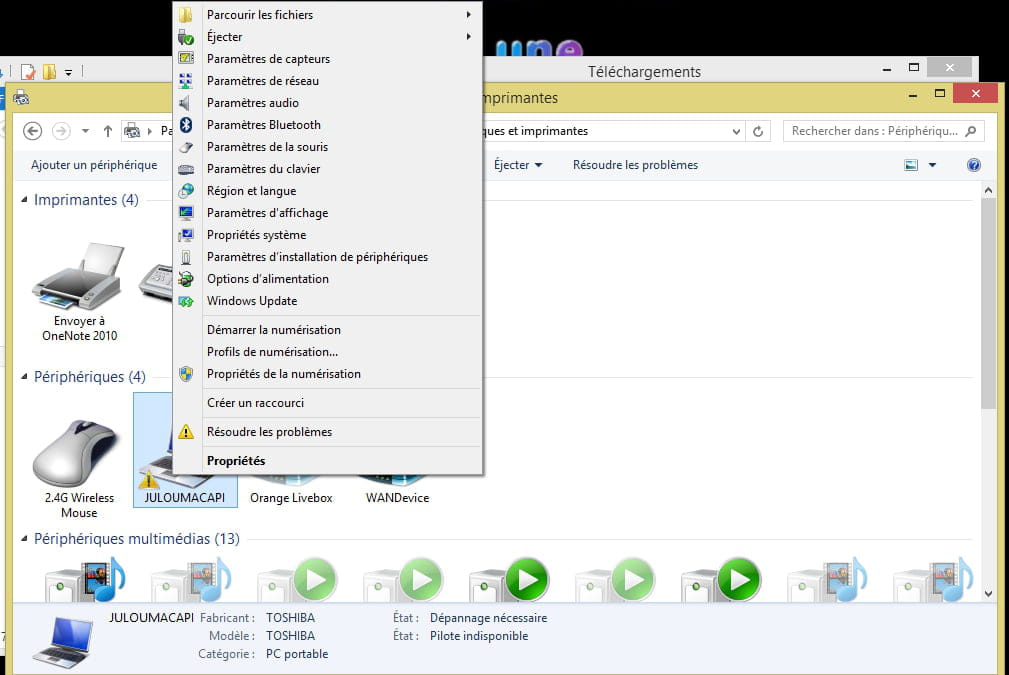
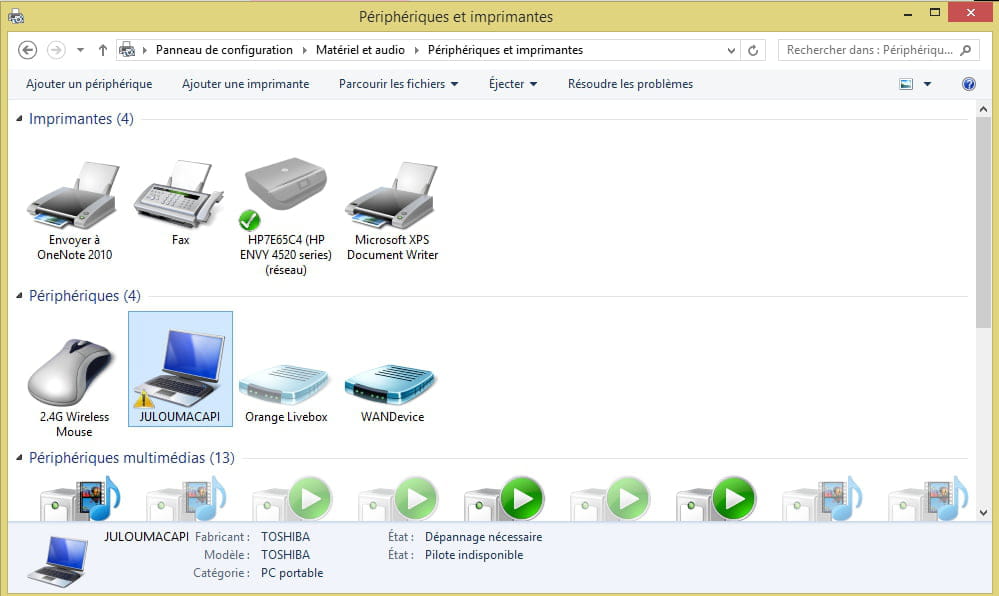
only this time I have a problem, I'm attaching a screenshot for you to visualize
this exclamation point is located in hardware and audio and not in the manager (which would have been convenient for me)
what do you think I should do because when I right-click I have a whole list but not "update" because there are several devices in this specific peripheral, I hope you can understand me...
only this time I have a problem, I'm attaching a screenshot for you to visualize
this exclamation point is located in hardware and audio and not in the manager (which would have been convenient for me)
what do you think I should do because when I right-click I have a whole list but not "update" because there are several devices in this specific peripheral, I hope you can understand me...
Where does this identifier come from?
--> ACPI\TOS1901\2&DABA3FF&2
In the device manager
Look in system devices and see if there is an alert for a device.
--
Human beings are at their best when things are at their worst.
--> ACPI\TOS1901\2&DABA3FF&2
In the device manager
Look in system devices and see if there is an alert for a device.
--
Human beings are at their best when things are at their worst.
this identification number appears when I choose "troubleshoot",
windows tells me there is a missing driver (impossible to install this way of course) so when I look at the details it gives me this identifier...
I checked several times (even now) and in the device/system manager there are no alerts: as I said in my first post, I would be quite troubled about how to proceed since there is no triangle in the manager :(
windows tells me there is a missing driver (impossible to install this way of course) so when I look at the details it gives me this identifier...
I checked several times (even now) and in the device/system manager there are no alerts: as I said in my first post, I would be quite troubled about how to proceed since there is no triangle in the manager :(
Here is what I have in the problem resolution report: Devices and Printers Editor Details
Problems found
Unknown device has no driver Unknown device has no driver
No driver is installed for Unknown device. Not fixed Not repaired
Apply the solution for the driver problem Finished
Install a driver for this device Not executed
Problem with PnP devices Problem with PnP devices
There are issues with some PnP devices. Windows will take further steps to resolve these issues. Detected Detected
Windows Update is set to never install drivers Windows Update is set to never install drivers
Driver updates are not automatically installed when detected by Windows Update. Fixed Fixed
Change Windows Update settings Finished
Problems found Detection details
5 Unknown device has no driver Not fixed Not repaired
No driver is installed for Unknown device.
Informative Device information
ID: ACPI\TOS1901\2&DABA3FF&2
Error code: 28
Apply the solution for the driver problem Finished
Follow the solution instructions to resolve the driver problem.
Install a driver for this device Not executed
The driver for Unknown device is not installed. Install the latest driver for the device.
Problem with PnP devices Detected Detected
There are issues with some PnP devices. Windows will take further steps to resolve these issues.
6 Windows Update is set to never install drivers Fixed Fixed
Driver updates are not automatically installed when detected by Windows Update.
Change Windows Update settings Finished
Change Windows Update settings to download and install driver updates automatically.
Detection details Expand
Data collection information
Computer name: JULOUMACAPI
Windows version: 6.3
Architecture: x64
Time: Thursday, February 28, 2019, 4:59:44 PM
Editor details Expand
Devices and Printers
Troubleshoot problems related to devices and printers.
Package version: 2.0
Publisher: Microsoft Windows
Devices and Printers
Troubleshoot problems related to devices and printers.
Package version: 1.0
Publisher: Microsoft Corporation
Hardware and Devices
Find and fix problems with devices and hardware.
Package version: 1.1
Publisher: Microsoft Windows
Windows Network Diagnostics
Detects network connectivity issues.
Package version: 1.0
Publisher: Microsoft Windows
Printer
Find and fix printing problems.
Package version: 1.0
Publisher: Microsoft Windows
USB
Troubleshoot issues with a USB device
Package version: 1.0
Publisher: Microsoft Windows
Problems found
Unknown device has no driver Unknown device has no driver
No driver is installed for Unknown device. Not fixed Not repaired
Apply the solution for the driver problem Finished
Install a driver for this device Not executed
Problem with PnP devices Problem with PnP devices
There are issues with some PnP devices. Windows will take further steps to resolve these issues. Detected Detected
Windows Update is set to never install drivers Windows Update is set to never install drivers
Driver updates are not automatically installed when detected by Windows Update. Fixed Fixed
Change Windows Update settings Finished
Problems found Detection details
5 Unknown device has no driver Not fixed Not repaired
No driver is installed for Unknown device.
Informative Device information
ID: ACPI\TOS1901\2&DABA3FF&2
Error code: 28
Apply the solution for the driver problem Finished
Follow the solution instructions to resolve the driver problem.
Install a driver for this device Not executed
The driver for Unknown device is not installed. Install the latest driver for the device.
Problem with PnP devices Detected Detected
There are issues with some PnP devices. Windows will take further steps to resolve these issues.
6 Windows Update is set to never install drivers Fixed Fixed
Driver updates are not automatically installed when detected by Windows Update.
Change Windows Update settings Finished
Change Windows Update settings to download and install driver updates automatically.
Detection details Expand
Data collection information
Computer name: JULOUMACAPI
Windows version: 6.3
Architecture: x64
Time: Thursday, February 28, 2019, 4:59:44 PM
Editor details Expand
Devices and Printers
Troubleshoot problems related to devices and printers.
Package version: 2.0
Publisher: Microsoft Windows
Devices and Printers
Troubleshoot problems related to devices and printers.
Package version: 1.0
Publisher: Microsoft Corporation
Hardware and Devices
Find and fix problems with devices and hardware.
Package version: 1.1
Publisher: Microsoft Windows
Windows Network Diagnostics
Detects network connectivity issues.
Package version: 1.0
Publisher: Microsoft Windows
Printer
Find and fix printing problems.
Package version: 1.0
Publisher: Microsoft Windows
USB
Troubleshoot issues with a USB device
Package version: 1.0
Publisher: Microsoft Windows
5 Unknown peripheral has no driver
In the device manager
Do you have a section --> other devices?
--
Humans are at their best when things are at their worst.
In the device manager
Do you have a section --> other devices?
--
Humans are at their best when things are at their worst.
Repair Windows.
Check out this tutorial --> Repair Windows 8 without data loss
--
Human beings are at their best when things are at their worst.
Check out this tutorial --> Repair Windows 8 without data loss
--
Human beings are at their best when things are at their worst.
I followed the tutorial, I'm at the Windows Update stage (it's searching tirelessly because there are no updates installed, I think I'm going to have to spend some time on this since an important update was already stuck when I completely reinstalled it last month, and now it seems to be the same thing with the repair, but no worries, I should manage).
However, I checked the devices and the problem "seems" to still be present,
I have an icon (a watch) instead of the triangle, but I've had this before and the triangle reappeared after a few minutes. It says "troubleshooting needed" below, and that's what's worrying me... We'll see, I'm doing the updates and I'll get back to you as soon as everything is in place.
Regards, mistinguette
However, I checked the devices and the problem "seems" to still be present,
I have an icon (a watch) instead of the triangle, but I've had this before and the triangle reappeared after a few minutes. It says "troubleshooting needed" below, and that's what's worrying me... We'll see, I'm doing the updates and I'll get back to you as soon as everything is in place.
Regards, mistinguette
During the update period, I thought I would check each item in the device manager to see if any drivers were missing,
and I came across this in system devices:
None of these items have a yellow triangle in front of them; could this make things progress?
(no trace of this ACPI\TOS1901\2&DABA3FF&2)
and I came across this in system devices:
- AMD SM bus (no driver installed) id PCI\VEN_1022&DEV_780B&SUBSYS_FF1E1179&REV_42
- High Precision Event Timer (no driver installed) id ACPI\VEN_PNP&DEV_0103
- Direct Memory Access Controller (no driver installed) id ACPI\VEN_PNP&DEV_0200
- Programmable Interrupt Controller (no driver installed) id ACPI\VEN_PNP&DEV_0000
- Arithmetic Coprocessor (no driver installed) id ACPI\VEN_PNP&DEV_0C04
- System Speaker (no driver installed) id ACPI\VEN_PNP&DEV_0800
- System Clock (no driver installed) id ACPI\VEN_PNP&DEV_0100
None of these items have a yellow triangle in front of them; could this make things progress?
(no trace of this ACPI\TOS1901\2&DABA3FF&2)
Download this driver --> SMBus
Right-click on --> SMBus.zip
Select --> 7Zip
Choose --> extract to "SMBus\"
Go to the device manager
Right-click on the AMD SM bus
Update driver
Search for a driver on my computer or Browse my computer ......
Browse
Select the unpacked driver folder --> SMbus
OK, next
Restart.
--
The human being is at their best when things are at their worst.
Right-click on --> SMBus.zip
Select --> 7Zip
Choose --> extract to "SMBus\"
Go to the device manager
Right-click on the AMD SM bus
Update driver
Search for a driver on my computer or Browse my computer ......
Browse
Select the unpacked driver folder --> SMbus
OK, next
Restart.
--
The human being is at their best when things are at their worst.


...you contribute very actively on this forum, it’s really very generous of you!
Best regards, mistinguette.