Size of an 8TB hard drive after formatting
brucine Posted messages 25341 Registration date Status Member Last intervention -
I recently bought 2 internal Seagate Barracuda hard drives (3.5", 8000 Go, 5400 RPM, SATA III, 256 MB, Hard drive).
I opened the first one, tested it and after initializing and formatting it shows me 7.27 TB free, isn't that a bit low? Considering that during initialization it showed 7.60 TB. And finally, when I right-click on this HDD from the computer, it tells me that there is already 6.17 GB of space used.
I know that there is always unusable space on a hard drive, for example I have a NAS with 4 HDDs of 4 TB each, but that's fine, 3.64 TB available is reasonable.
Here it's still more than 700 GB! I'm almost inclined to say it's a 7 TB drive, not 8.
I checked if there were any other partitions or unallocated space, but no, nothing at all.
Knowing that this is the first time I buy a 8 TB HDD, does this seem normal to you? And should I consider purchasing another HDD to fully utilize the space on this disk? Having limited means, it's the cheapest in the 8 TB range.
Thank you.
Configuration: Windows / Firefox 64.0
4 answers
-
Hello fadox69,
The reason for this difference is that the capacity of the drives is shown in decimal to provide an easy numerical reference (base 10), while Windows uses binary to calculate the capacity of the hard drive.
In short, the decimal amount corresponds to the same capacity in binary.
On the following link, you can find more information about it: https://www.seagate.com/fr/fr/support/kb/why-does-my-hard-drive-report-less-capacity-than-indicated-on-the-drives-label-172191en/
Best regards,
--
Seagate Technology │Official Forum Team
IronWolf Drives for All NAS Applications - SkyHawk Drives for Surveillance Applications - Barracuda Drives for PCs and Gaming-
-
Hello fadox69,
Could you share a screenshot of the Disk Management on your PC?
On Windows 10: right-click on the start menu, choose "Disk Management," and take a screenshot of the disks recognized by the operating system.
To share the screenshot with us, you can use a hosting service like this one: https://www.cjoint.com/
See you, -
Here it is :)
https://www.cjoint.com/c/IAlsLyCWXIK
The drive that interests us is the R drive named "Nv disque Y"; we can indeed see that it shows 7451.91 GB as explained in the link.
Here is when I right-click on Computer:
https://www.cjoint.com/c/IAlsNB5XyfK
I checked the recycle bin of the drive, no change, even when emptying the recycle bin it doesn't really move.
Thanks again. -
Hello fadox69,
We advise you to back up all your data files before reformatting.
Please follow the diskpart clean procedure to erase your drive: https://www.seagate.com/fr/fr/support/kb/how-to-diskpart-eraseclean-a-drive-through-the-command-prompt-005929en/
Once the drive is erased, it needs to be formatted following the instructions in the following link:
https://www.seagate.com/fr/fr/support/kb/how-to-format-your-hard-drive-220151en/
We hope this is helpful to you.
Best regards, -
-
-
Hello,
"it's normal":
https://www.commentcamarche.net/faq/8939-mon-disque-dur-ne-fait-pas-la-capacite-en-go-annoncee
Apart from SSDs, traditional hard drives have had this problem since time immemorial.
--
If my answer satisfies you, a simple click on "+1" would be great for me :-)
Best regards, Foxyfox51-
-
Yes, a HDD does lose space, that's true.
But can we also lose space when formatting an SSD? I have a 4TB SSD in my PS5 and I get 4TB.
Recently, I wanted to acquire an 8TB SSD and how come it shows 7.35TB? Is this due to quick formatting or do we need a complete format if there is one? It's true that losing 700GB is a lot for nothing, it's excessive on an SSD.
I think the SSD has defective ((partitions)) which would explain the 700GB of lost space, and it operates with what remains.
Thank you.
Hello there,
As explained in the other responses you haven't read, this has nothing to do with formatting (unless it’s a system disk, creating a reserved and recovery partition but of an insignificant size) nor with SDDs or HDDs.
A disk is sold in decimal, to get the binary capacity of a 8 TB disk, I divide 8*10^12 by as many times 1024 as needed to get down to bytes, the result is about 7.27 TB.
-
-
Good evening,
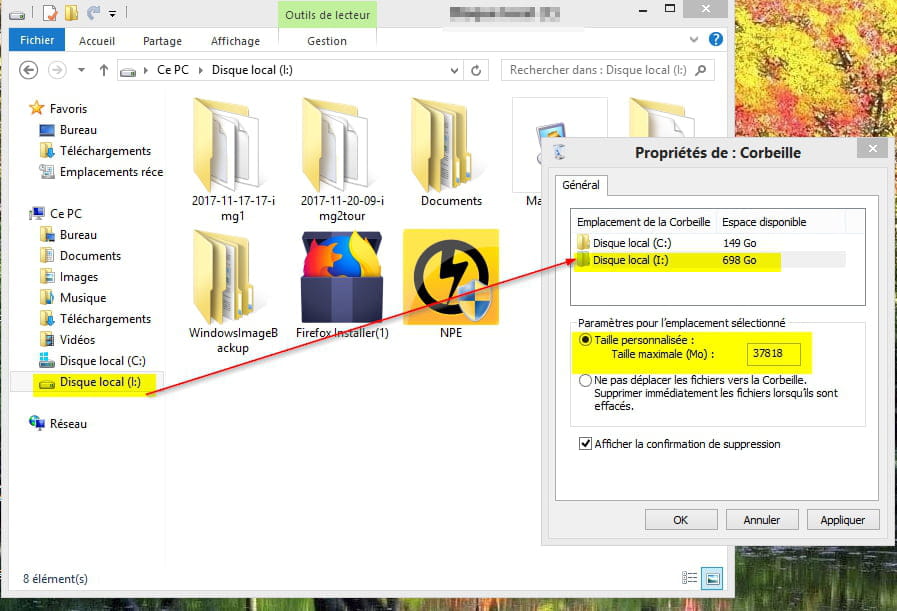
There is a hidden Recycle Bin on the hard drive (for example on my external hard drive);
Right-click on the Windows Recycle Bin then "Properties" ..
When the disk is removed ..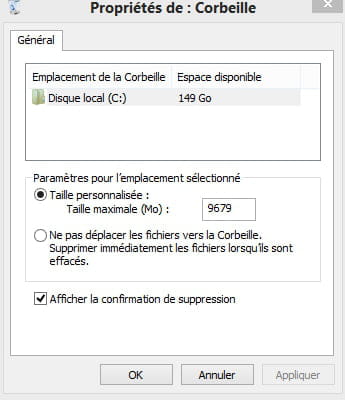
The enemy is stupid: he thinks we're the enemy when it's really him!
Pierre Desproges -
Here is the most powerful command in Windows to repair a partition on a hard drive or a USB stick:
https://www.pcastuces.com/pratique/materiel/reparer_cle_usb/page4.htm
The enemy is foolish: he thinks we are the enemy when it is actually him!
Pierre Desproges