
Value of a textbox in a cell with decimal number format
Solved
Anonymous user
-
Jkl -
Jkl -
Hello everyone,
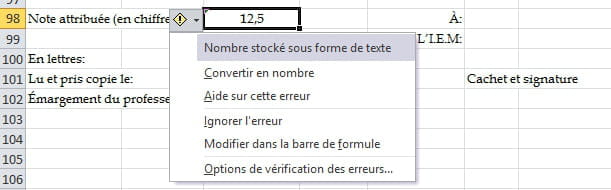
I am facing an Excel problem: In the cell "number stored as text" after entering data from a Textbox, and I have to manually convert it to a number
I tried several macros that I found online but without success.
Do you have any idea how to convert the text to a decimal number from a TextBox via VBA so that it is stored as a decimal number in the target cell?
Thank you in advance for your help

I am facing an Excel problem: In the cell "number stored as text" after entering data from a Textbox, and I have to manually convert it to a number
I tried several macros that I found online but without success.
Do you have any idea how to convert the text to a decimal number from a TextBox via VBA so that it is stored as a decimal number in the target cell?
Thank you in advance for your help
1 answer
-
Hello,
In your VBA procedure, on the line of code that adds the value from your input box to the specified cell, try adding : *1 at the end of your line of code, e.g.range("C98") = textbox1.value * 1
Theoretically, a mathematical operation converts text format to number format
Otherwise, you can use a variable by declaring it, e.g.Dim nb as currency nb = textbox1.value range("C98") = nb
Give it a try...
Jc
--
Let's save time: An example will always be more enlightening than long prose, so post an example from your file and the expected result:
