Duplicate a cell in Calc
Solved
michael6907
Posted messages
3
Status
Member
-
michael6907 -
michael6907 -
Hello,
how to duplicate a cell in LibreOffice Calc without it being incremented. Nor changing its value.
Thank you for your help
Configuration: Windows / Firefox 63.0
how to duplicate a cell in LibreOffice Calc without it being incremented. Nor changing its value.
Thank you for your help
Configuration: Windows / Firefox 63.0
6 answers
-
Hello
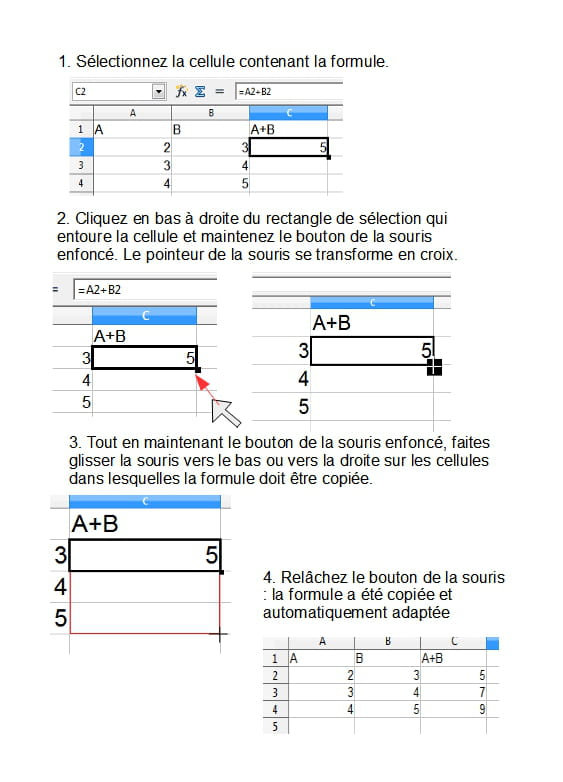
To copy a value, click on the handle while holding down the CTRL key
-
-
Hello,
provided that I have understood correctly,
when you activate a cell, in the formula bar you will see either the value contained or the formula it holds, just select the formula, then click Esc to exit creation mode and right-click on the destination cell/Paste
another method
double-click on the cell containing the formula/select the formula/Esc to exit creation mode/right-click on the destination cell/Paste
and that's how it works for all spreadsheets
See you later
Mike-31
I am responsible for what I say, not for what you understand... -
Hello michael.
Your question is ambiguous and open to interpretations:- Does your cell contain text, a numeric value, or a formula?
- Are you duplicating your cell by copying and pasting, dragging the handle, or writing a formula?
--
Retirement is great! Especially in the Antilles...
Raymond (INSA, AFPA) -
Hello Raymond.
My cell contains a numeric value.
And I am using the handle to duplicate. -
Re,
if you increment a formula, the cell address is automatically reconsidered. You either need to use what I explained to you earlier or set your cells to absolute reference, but there you will have to be more talkative and explain your formula because from a distance it is impossible to guess and my crystal ball is broken.
In the meantime, you can do some research on relative and absolute references to help you understand.
--
A+
Mike-31
I am responsible for what I say, not for what you understand...