
Hidden Graphics Card
Ciss
-
Greili13 Posted messages 14 Status Member -
Greili13 Posted messages 14 Status Member -
Hello,
After scouring forums and all kinds of more or less reliable sites for days and days, I can't find an answer to my specific problem.
My 940mx is in hidden devices, so I can't install the NVIDIA driver. I also have "3D video controller," which is hidden. Obviously, I can't update it through the option in the device manager.
Windows update is up to date, and all my drivers are as well.
Sometimes during startup, for some unknown reason, it appears, so each time I try to install it (I’ve tested with the drivers from ACER and NVIDIA), but of course, I get a BSOD FATAL_ERROR_VIDEO_DXGKRNL in the middle of the installation and then it disappears again.
I have a backup where it was present and active, but when I return to that point, it disappears.
This problem occurred right after a game of Fortnite at the end of July; I exited the game, and by chance went to the device manager, and I no longer saw it, and since then I've done multiple formats, restorations, backups, updates, and nothing works, and two weeks for customer service is quite a lot, especially since this is also my work computer. (The customer service already changed my motherboard because the display was glitching with pink, pixelated lines.)
I would like to reset everything, but I feel like at the very core of the machine,
there must be some sort of bad connection or input/output issue.
Acer A515-51G purchased in January 2018
I have Windows 10 Pro (originally it had the Home version, and on both versions I could use it for a few hours) v.17763
BIOS: 1.21
I5-7200U 2.5GHz
4Go DDR4
Geforce 940MX
If anyone has any sketch of an idea, I’m all ears. Thank you for taking the time to read this, and I hope to hear from you soon :)
Configuration: Windows / Firefox 62.0
After scouring forums and all kinds of more or less reliable sites for days and days, I can't find an answer to my specific problem.
My 940mx is in hidden devices, so I can't install the NVIDIA driver. I also have "3D video controller," which is hidden. Obviously, I can't update it through the option in the device manager.
Windows update is up to date, and all my drivers are as well.
Sometimes during startup, for some unknown reason, it appears, so each time I try to install it (I’ve tested with the drivers from ACER and NVIDIA), but of course, I get a BSOD FATAL_ERROR_VIDEO_DXGKRNL in the middle of the installation and then it disappears again.
I have a backup where it was present and active, but when I return to that point, it disappears.
This problem occurred right after a game of Fortnite at the end of July; I exited the game, and by chance went to the device manager, and I no longer saw it, and since then I've done multiple formats, restorations, backups, updates, and nothing works, and two weeks for customer service is quite a lot, especially since this is also my work computer. (The customer service already changed my motherboard because the display was glitching with pink, pixelated lines.)
I would like to reset everything, but I feel like at the very core of the machine,
there must be some sort of bad connection or input/output issue.
Acer A515-51G purchased in January 2018
I have Windows 10 Pro (originally it had the Home version, and on both versions I could use it for a few hours) v.17763
BIOS: 1.21
I5-7200U 2.5GHz
4Go DDR4
Geforce 940MX
If anyone has any sketch of an idea, I’m all ears. Thank you for taking the time to read this, and I hope to hear from you soon :)
Configuration: Windows / Firefox 62.0
22 answers
- 1
- 2
Next
-
re
in addition to this message >> https://forums.commentcamarche.net/forum/affich-35633846-carte-graphique-cachee#14
I'll explain how we can choose the options we want to install in the new driver version
you download and install Geforce Experience >> https://www.nvidia.com/fr-fr/geforce/geforce-experience/
you right-click on the Nvidia icon hidden in the taskbar >> new updates are available

a window opens with the available driver and the installed driver

you download the driver to your desktop, and you run it as administrator (right click)
you accept the license agreement

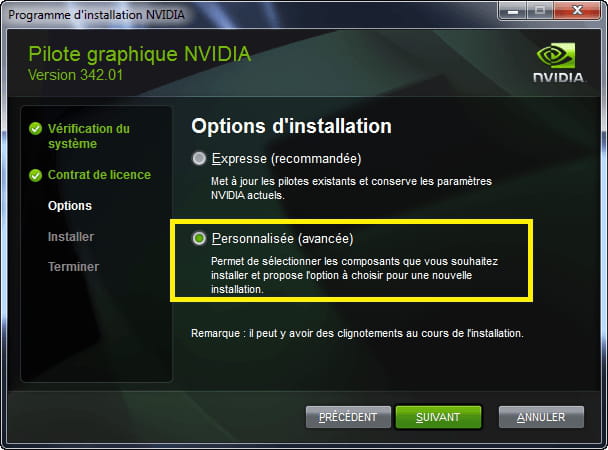
you arrive at this page, where you check the box "custom/advanced" and click "next"

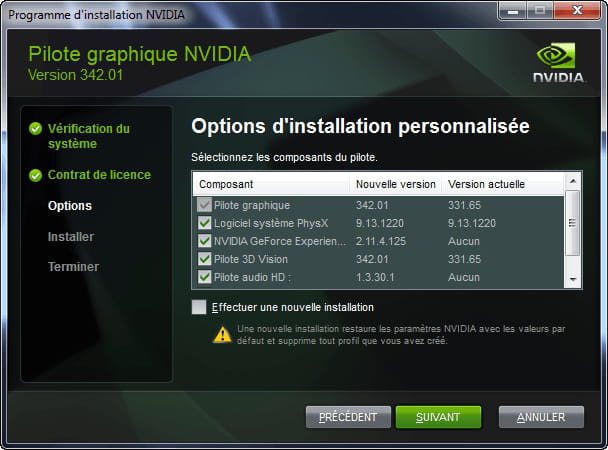
in the window that opens, check/uncheck the component(s) you want/do not want to install

in your case, I would select only "3D vision controller driver"

let me know how it goes
@+
--
the radiation level is higher at the employment office than at Chernobyl







- 1
- 2
Next