
Slow laptop, stuttering video
marinnine
Posted messages
4
Status
Member
-
Malekal_morte- Posted messages 178136 Registration date Status Moderator, Security Contributor Last intervention -
Malekal_morte- Posted messages 178136 Registration date Status Moderator, Security Contributor Last intervention -
Hello,
I have been the owner of an HP Pavilion dv6-3140sf laptop since 2011.
I installed Windows 10 when it was offered to me.
The computer has been very slow since then.
With Speccy, I notice that there are two graphics cards. Is that normal?
I think I downloaded some drivers or something like that several years ago, but it didn't work and may not have improved things.
I can no longer watch videos because the image is always choppy. On YouTube as well, even though I have a good internet connection.
I am attaching a Speccy capture.
I want to clarify that I only use my computer to manage photos and browse the internet. I do not play video games.
Do you see anything unusual? Should I remove one of the graphics cards or install something?
Thank you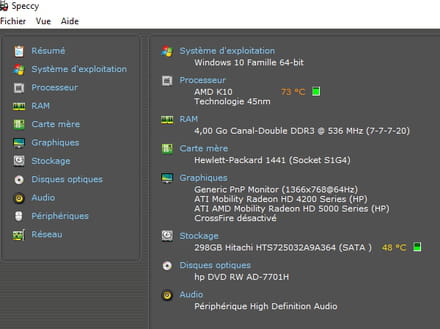
I have been the owner of an HP Pavilion dv6-3140sf laptop since 2011.
I installed Windows 10 when it was offered to me.
The computer has been very slow since then.
With Speccy, I notice that there are two graphics cards. Is that normal?
I think I downloaded some drivers or something like that several years ago, but it didn't work and may not have improved things.
I can no longer watch videos because the image is always choppy. On YouTube as well, even though I have a good internet connection.
I am attaching a Speccy capture.
I want to clarify that I only use my computer to manage photos and browse the internet. I do not play video games.
Do you see anything unusual? Should I remove one of the graphics cards or install something?
Thank you

4 answers
-
Windows 10 is quite resource-intensive by default. 4 GB is a bit tight for running applications in addition to Windows. In fact, it recommends 2 GB for the 64-bit version.
https://www.microsoft.com/en-us/windows/windows-10-specifications
As for graphics cards, the 4200 corresponds to the integrated graphics card in the processor while the 5000 is a separate graphics card. There’s no need to remove anything. On the contrary. -
Thank you for your response, Jithel. Would it be better for me to uninstall Windows 10 and go back to Windows 7?
When I turn on my computer, it tells me that there is no AMD driver installed for the 4200 series graphics card. Indeed, according to my research, I haven't found a driver for the 4200 series for Windows 10.
As for the 5000 series, it says in the device manager "Windows has stopped this device because it has problems (code 43)."
Thank you.-
A priori, it seems that Windows 7 is just as memory-RAM hungry:
https://support.microsoft.com/fr-fr/windows/configuration-requise-de-windows-7-df0900f2-3513-a851-13e7-0d50bc24e15f
So I suppose not in theory, but in practice, I would say yes.
According to this link:
https://www.amd.com/en/support/graphics/amd-radeon-hd/ati-mobility-radeon-hd-4000-series/ati-mobility-radeon-hd-4200
there is no driver for the 4200 series for Windows 10 (only Windows 8 or Windows 7)
As for the 5000, I can't even find it on AMD's website. Can you give me the name of your two graphics cards in Device Manager?
Then, I suggest going back to Windows 7 because driver versions exist for Windows 7 and not for Windows 10. No drivers mean possibly no graphics card (performance loss).
Finally, I suggest this software:
https://www.touslesdrivers.com/index.php?v_page=29
Run it on Windows 10 if you want, but I suggest doing it on Windows 7 because it offers to update many drivers. If you do it on Windows 10 but no drivers are installed for your graphics card, it's a waste of time.
-
-
Hi,
You should already clean the CPU fans; 73 degrees is way too much.
You're experiencing performance loss with those temperatures.
It shouldn't exceed 60 degrees.
Then, to see what's running,
To check the computer, I invite you to perform this FRST analysis and return the reports:
Follow the FRST tutorial. ( take the time to read carefully - everything is well explained ).
Download and run the FRST scan,
Wait for the scan to finish; a message will indicate that the analysis is complete.
Three FRST reports will be generated:- FRST.txt
- Shortcut.txt
- Additional.txt
Send these 3 reports to the site https://pjjoint.malekal.com/ to share them.
In return, provide the 3 pjjoint links leading to the reports here in a new response so that we can review them.
-
-
Cleaning the fans is important for lowering the temperature
1) Go to the Control Panel
then Programs and Features.
Uninstall:
Avast Free Antivirus
Avast Secure Browser
CCleaner
CyberLink
Java
PowerDirector
Since you are using Windows 10, if you uninstall Avast!, Windows Defender will take over, which is less intrusive and less resource-intensive.
If you want to keep Avast!, set it to minimal, see: https://www.malekal.com/antivirus-gratuits-desinstaller-composants-inutiles/
2) Disable/Remove from startup:
Adobe ARM
Adobe Reader Speed Launcher
Easybits Recovery
Magic Desktop for HP notification
Easybits)
See: how to remove a program from Windows startup
3)
Follow these two paragraphs from the page: How to speed up Windows startup
Check the hard drive and file system
Registry Compactor
-

