Improve my HP computer configuration

DRIVERSLOGICIELS
Posted messages
37
Status
Member
-
DRIVERSLOGICIELS Posted messages 37 Status Member -
DRIVERSLOGICIELS Posted messages 37 Status Member -
Hello,
I'm contacting you to ask for your help to improve the configuration of my computer
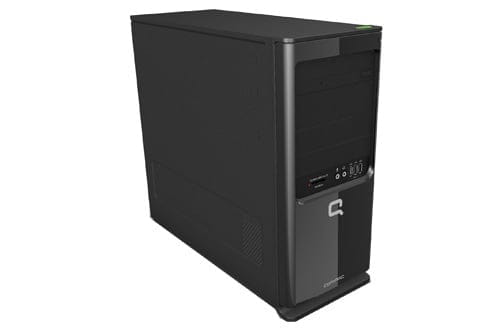
HP Compaq SG3-130FR
It will be used for surfing the internet and downloading but not for gaming.
I know how to change the processor with thermal paste, etc...
The problem is that I have difficulty knowing the compatible components for this computer,
I would like you to give me the best processor I can buy that is compatible, as well as the RAM; I can normally install two 4GB sticks which brings the maximum supported to 8GB, and also whether I should prefer another fan if I change the processor?
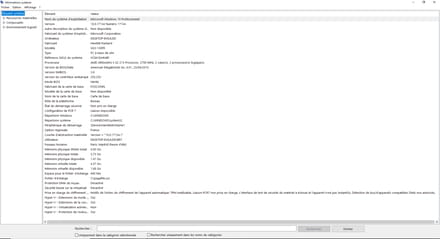
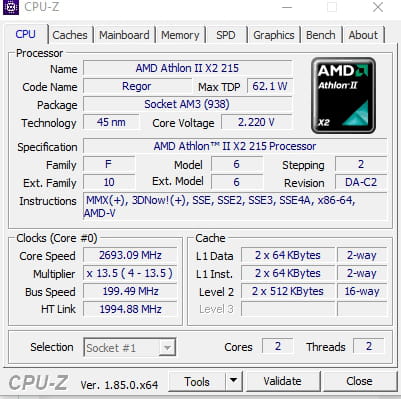
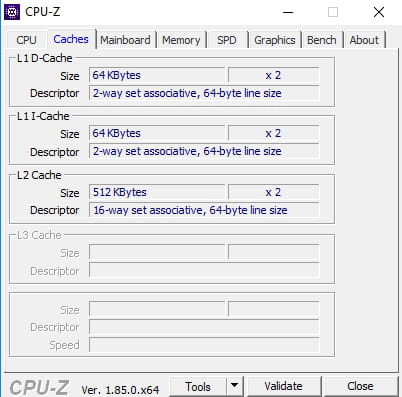
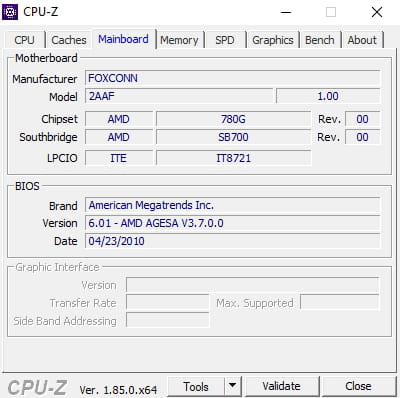
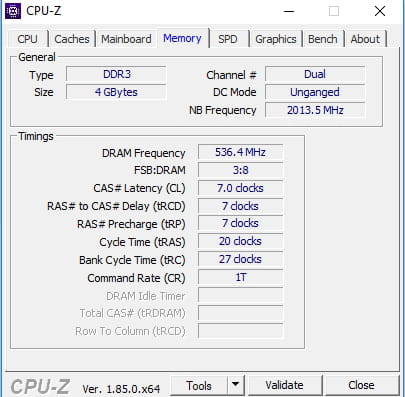
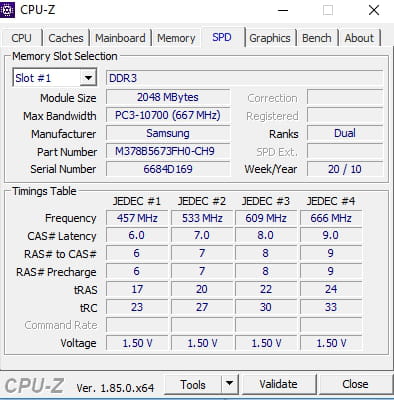
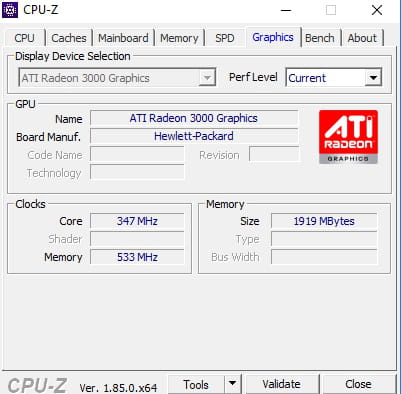
I’m attaching a photo of the current configuration.
CPU-Z
Thank you.
I'm contacting you to ask for your help to improve the configuration of my computer
HP Compaq SG3-130FR
It will be used for surfing the internet and downloading but not for gaming.
I know how to change the processor with thermal paste, etc...
The problem is that I have difficulty knowing the compatible components for this computer,
I would like you to give me the best processor I can buy that is compatible, as well as the RAM; I can normally install two 4GB sticks which brings the maximum supported to 8GB, and also whether I should prefer another fan if I change the processor?
I’m attaching a photo of the current configuration.
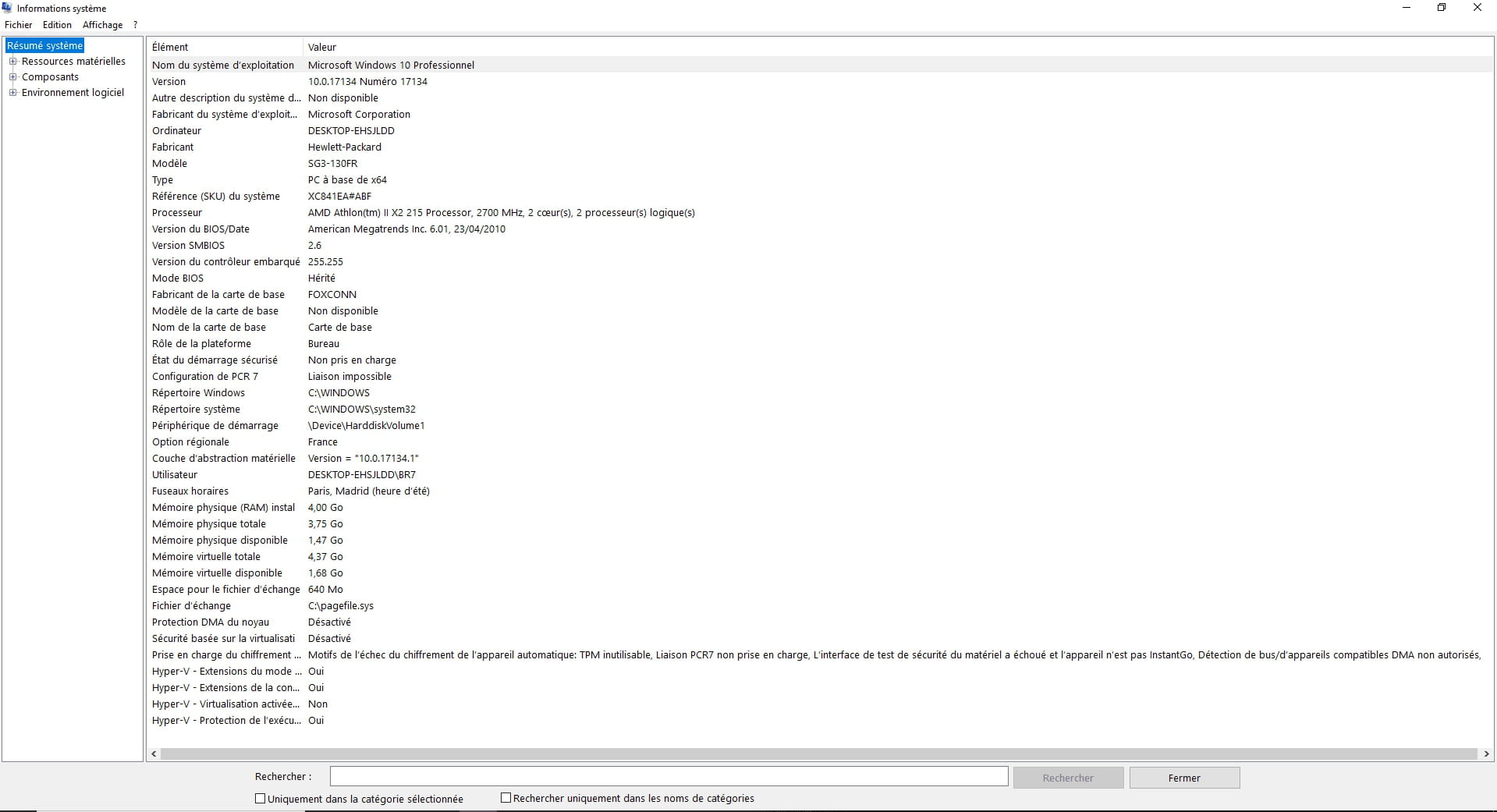
CPU-Z
Thank you.
9 answers
-
Hello,
download cpu-z and take screenshots of the tabs, it will be easier to see what is really there.-
-
-
100€ max for the RAM and a processor that is more user-friendly
but I am open to any suggestion. -
So I did some research regarding the CPU and found the best performance options available:
Phenom II x4 955
Phenom II x4 965 (harder to find)
Higher options:
Phenom II x4 970 (1 viewed at $120)
Phenom II x4 980 (not found)
I found the 955 and 965 on amazon.com, but I don't know what additional fees will be added for bringing them to France.
(here for the 955 / here for the 965)
There are also some 945s on Cdiscount: https://www.cdiscount.com/informatique/processeurs/amd-phenom-ii-x4-945-quad-core-processeur-3-0ghz/f-10764-auc4671390728902.html#mpos=19|mp
Otherwise, you can buy them on eBay
here for new 955s
here for used 965s
1 used 970
Regarding the RAM, you have 2x2GB, and 2 slots on your motherboard, so either you take one 4GB stick (about €30) and replace one 2GB stick to have 6GB, or you buy 2x4GB (about €60) and go for 8GB. -
Thank you very much for all this information. Which one is the most powerful of the processors in the list you gave me?
I found the Phenom II x4 965 abroad second-hand
https://www.ebay.fr/itm/AMD-Phenom-II-X4-965-3-4GHz-Quad-Core-HDZ965FBK4DGM-Processor/273374457284?hash=item3fa6632dc4%3Ag%3A8K0AAOSwvg1bWe2i
AND the Phenom II x4 980 in Germany for €103.80
https://www.ebay.fr/itm/AMD-Phenom-II-X4-980-BE-4x-3-70GHz-HDZ980FBK4DGM-CPU-Sockel-AM2-AM3-35340/112857530209?hash=item1a46d53f61%3Ag%3AaK0AAOSwzVhbZgda
-
-
vieu bison boiteu Posted messages 44334 Registration date Status Contributor Last intervention Ambassadeur 3 591
Hello
watch out for the CPU TDP
it's up to 95W
the 970 and 980 have a TDP of 125W => that's a no
see you later
--
no link on the web page in English, I'm already stealing enough by myself-
-
it's not a question of diet
it purely concerns the CPU TDP and what the motherboard can support
- TDP = this corresponds to "the thermal envelope" of the processor
the 965 also has a TDP of 125W => so it's also no -
I thank you for this additional information, but now I’m lost again about which one among the 95W is the most powerful?
There are quite a few on eBay and AliExpress at 95W:
https://fr.aliexpress.com/w/wholesale-phenom-II-x4-95w.html?spm=a2g0w.search0104.0.0.77953573WEitAk&site=fra&g=y&SortType=price_desc&SearchText=phenom+II+x4+95w&groupsort=1&initiative_id=SB_20180806092737&needQuery=n
I don’t know what that’s worth in terms of power. -
-
-
-
vieu bison boiteu Posted messages 44334 Registration date Status Contributor Last intervention Ambassadeur 3 591
B99 has a frequency higher than 960T
--
no link on the English web page, I'm already stealing enough by myself -
vieu bison boiteu Posted messages 44334 Registration date Status Contributor Last intervention Ambassadeur 3 591
So you have this case
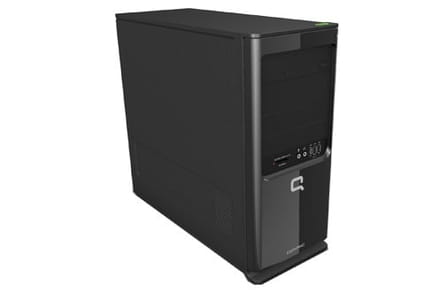
the cooler for the Athlon will not be suitable for a TDP of 95W
a cooler that is sufficient without overclocking = €7.79 = >>> Xigmatek Apache IV-N <<<
a more performant one = €16.99 = >>> Cooler Master Hyper TX3 EVO <<<
delivery possible at a Carrefour repair service
-
-
Do you have a location at the back???
Measurement to take = https://www.cjoint.com/c/CHFa6MsH3pw
Generally, it is for a 90 mm fan
But you need a chassis fan connector on the motherboard, of the same type as the processor fan connector
Otherwise, have a free 4-pin Molex on the power supply, and buy this adapter = https://www.amazon.fr/Adapter-3Pin-12V-4Pin-Molex/dp/B00773OUFE/ref=sr_1_565?s=computers&ie=UTF8&qid=1533749332&sr=1-565 -
-
-
Yes, 90mm is good logically. I'm not at home, but I can send photos tomorrow.
If I buy the CPU cooler Apache IV N
and the B99 processor, it should be correct, I think.
On the motherboard, I have two fan slots with 3 pins / 3-Pin
and I have a fan like this: https://rover.ebay.com/rover/0/0/0?mpre=https%3A%2F%2Fwww.ebay.fr%2Fulk%2Fitm%2F282881337735
For the Apache IV fan, I saw that it has 4 pins; is it adaptable?
Otherwise, I found this one with 3 pins, but I don't know its value: https://rover.ebay.com/rover/0/0/0?mpre=https%3A%2F%2Fwww.ebay.fr%2Fulk%2Fitm%2F183165044345
There is also CPU fan detection by BIOS at a specific slot. For example, if I disconnect it or plug it into another fan header for exhaust air (also 3-pin), it has happened before when I changed the thermal paste. The fan will run, but since it won't be detected, the PC gives me a message warning that for safety, the computer will shut down because there are no fans. After that, the message can be bypassed by tapping F2 at startup.
-
-
vieu bison boiteu Posted messages 44334 Registration date Status Contributor Last intervention Ambassadeur 3 591
For the CPU cooler, you will have a connector in the void, with the Apache
you won't have to search, there is a notch on the motherboard connector, and a notch on the cooler connector
for a 90 mm chassis fan, you can get one from the cooler on eBay, if you take it
currently, you only have one connector on the motherboard to plug in the cooler
--
no link on the web page in English, I’m already stealing enough on my own. -
I think that what we saw is good, but I'm still posting a photo of the motherboard. I have highlighted the connectors for the fan in black.
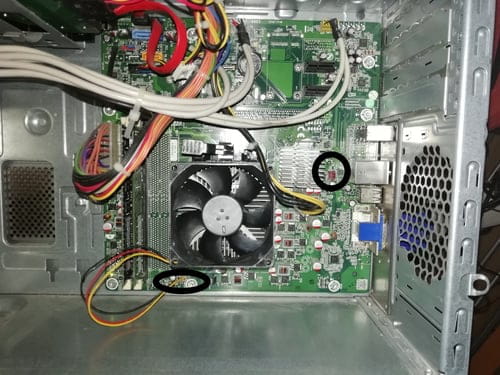
-
Rebonjour, je mets à jour ma configuration au niveau de la RAM.
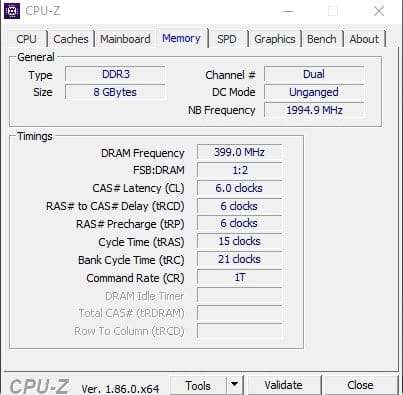
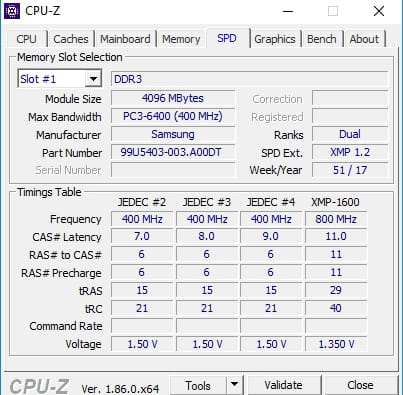
Est-il normal qu'avec 8 Go de RAM, la
fréquence NB
la fréquence DRAM
et la bande passante maximale soit plus basse qu'avec mes 4 Go de RAM ?-
-
Hello on eBay.
It was indicated in the description:
Memory 4GB DDR3 1600 MHZ PC3-12800 240PIN DIMM for AMD Motherboard Desktop
New and high quality
4GB PC3-12800 1600MHZ high density (128Mx4 Chipset)
Original chips, 16 chips on both sides
240 pins, desktop memory
Supports Dual Channel
1.5V CL11
Superior quality and at a better price
Unbuffered, Non-ECC, Non-registered
Fully tested
1-year warranty
I think I will get a refund as the return shipping costs are covered by PayPal
and by the way they are even less powerful than mine just before? -
-
I researched XMP mode, which is the manual modification of RAM, clock, and frequency, so I believe the base RAM is not at 1600MHz. You might be able to modify it through the BIOS to run at 1600MHz (essentially overclocking), but the motherboard needs to be compatible. XMP for Intel, AMP for AMD.
Is there a label on the modules? If so, what does it say?
How much did you pay for each unit? -
RAM XMP = it's the BIOS that varies the frequency according to its needs
whether it's on auto or at 1600 MHz, it's the BIOS that will choose
according to CPU-Z, in the SPD tab => the maximum displayed is 1333 MHz
so putting in 1600 MHz, I have questions, his motherboard probably doesn't support it
and in the Memory tab, his RAM is at 1066 MHz
-
-
vieu bison boiteu Posted messages 44334 Registration date Status Contributor Last intervention Ambassadeur 3 591
With 2x 2GB, in Memory, the frequency was 609 MHz (or 666 MHz) ???
the AMD Athlon II X2 215 2.7GHz has a BUS of 533 MHz
-
vieu bison boiteu Posted messages 44334 Registration date Status Contributor Last intervention Ambassadeur 3 591
you can't put 4x 4GB
as you only have one memory channel, I doubt you can put 2x 4GB
(8GB in dual channel, the second channel is nonexistent)
-
Yet I'm doing fine with the two 2x4GB sticks (1 4GB stick in each of the two slots available on the motherboard) and the computer detects 8GB of RAM
Just the frequency seems lower to me
Ideally, I think it's 4GB: https://rover.ebay.com/rover/0/0/0?mpre=https%3A%2F%2Fwww.ebay.fr%2Fulk%2Fitm%2F112570800909 -
If you want to try with two 4 GB sticks
also = https://www.amazon.fr/Corsair-CMV8GX3M2A1333C9-Select-M%C3%A9moire-ordinateur/dp/B0055LGG3Y/ref=sr_1_14?s=computers&ie=UTF8&qid=1534527477&sr=1-14&refinements=p_n_style_browse-bin%3A199703031%2Cp_n_feature_keywords_two_browse-bin%3A4370880031%7C4370879031
2x https://www.cdiscount.com/informatique/memoire-ram/micromemory-4gb-ddr3-10600-ecc-reg-4-go-ddr3/f-10716-mic5712505481950.html?idOffre=280630667#mpos=47|mp
2x https://www.cdiscount.com/informatique/memoire-ram/micromemory-ddr3-4gb-mmg1311-4gb/f-10716-mic5711045342844.html?idOffre=276351172#mpos=1|mp
https://www.cdiscount.com/informatique/memoire-ram/micromemory-ddr3-4gb-mmg1311-4gb/f-10716-mic5711045342844.html?idOffre=276351172#mpos=1|mp -
-