Ethernet wall socket/router issue
Solved
Hello everyone,
I have a very strange issue with my dual Ethernet wall socket:
- if I connect 2 devices to it, neither works.
- if I only connect one, it works (regardless of which one or the Ethernet port used)
I have ruled out IP conflicts by forcing a static and unique IP on each device:
- 192.168.0.14
- 192.168.0.15
Here is my network configuration in an image.

I configured my router #2 in "LAN", meaning that:
- router #1 IP: 192.168.0.1
- router #2 IP: 192.168.1.1 (DHCP disabled)
An Ethernet cable comes into port LAN 1 of router #2 and an Ethernet cable goes out of port LAN 2.
It’s this second cable that is used for my dual Ethernet wall socket.
Is my configuration incompatible with a wall socket?
Is there a setting to enable on the second router so it doesn't get confused when I connect both devices?
If anyone has knowledge about this, I would greatly appreciate your help! :-)
Thank you all,
Configuration:
Windows / Chrome 66.0.3359.181
I have a very strange issue with my dual Ethernet wall socket:
- if I connect 2 devices to it, neither works.
- if I only connect one, it works (regardless of which one or the Ethernet port used)
I have ruled out IP conflicts by forcing a static and unique IP on each device:
- 192.168.0.14
- 192.168.0.15
Here is my network configuration in an image.
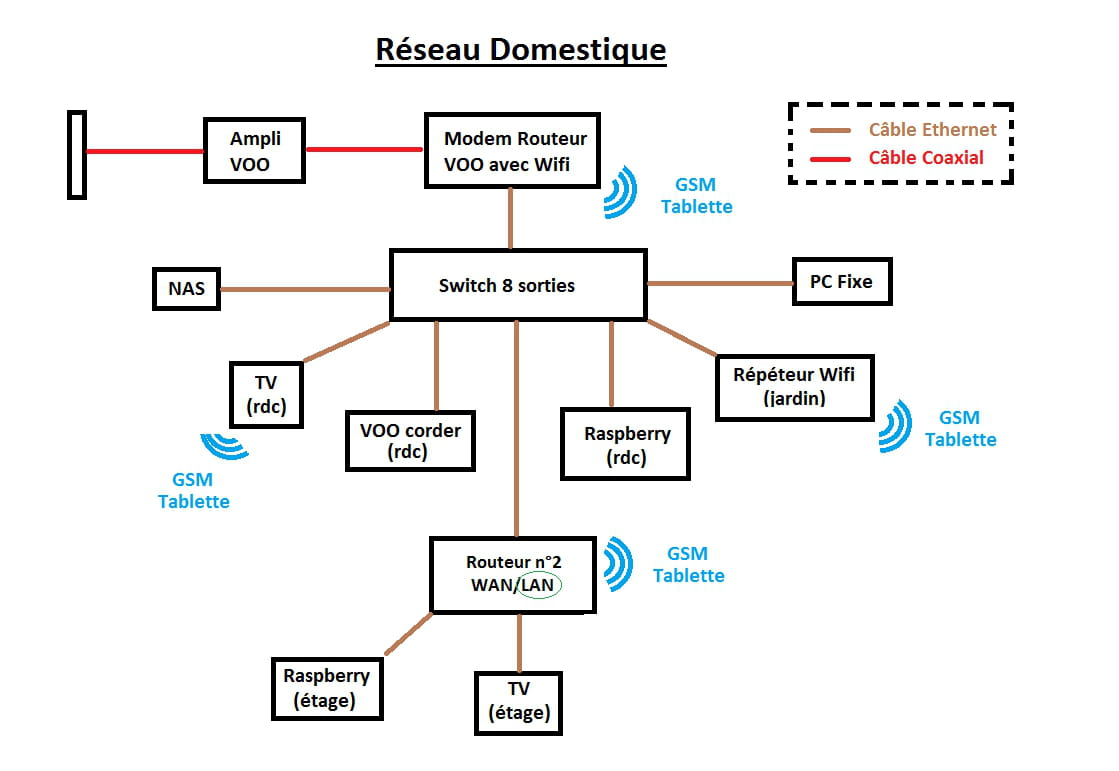
I configured my router #2 in "LAN", meaning that:
- router #1 IP: 192.168.0.1
- router #2 IP: 192.168.1.1 (DHCP disabled)
An Ethernet cable comes into port LAN 1 of router #2 and an Ethernet cable goes out of port LAN 2.
It’s this second cable that is used for my dual Ethernet wall socket.
Is my configuration incompatible with a wall socket?
Is there a setting to enable on the second router so it doesn't get confused when I connect both devices?
If anyone has knowledge about this, I would greatly appreciate your help! :-)
Thank you all,
Configuration:
Windows / Chrome 66.0.3359.181
3 answers
-
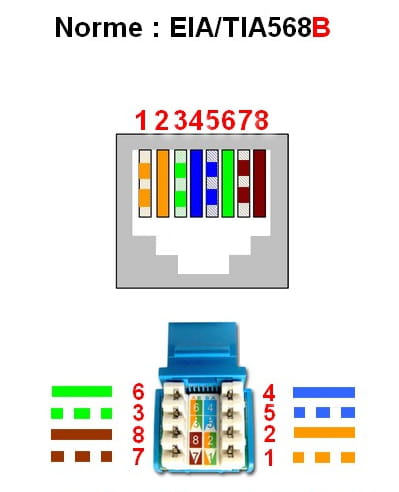
ModeratorIf I understand correctly, a single cable arrives behind the double RJ45 wall socket? That's where the problem lies. Either the 2 sockets are connected with all 8 wires of the Ethernet cable, which is pointless. Or 4 wires are on each socket, but for that, you need the same setup at the other end of the cable (and incidentally, the speed is limited to 100 Mbps). If this is the only wall socket, where does the other end go?
If your router 2 is at 192.168.1.1, it is on a different address range. It's probably that the network is connected to the WAN port, and since it doesn't do DHCP, you should rather establish the connection on one of the other ports. This allows you to access it across the entire network because to configure it, you likely need to be connected directly to it.
Is router 2 and the double RJ45 wall socket in the bedroom? You should have 3 or 4 sockets available on the router, making the second wall socket unnecessary?
-
Yes, that's right, a single cable arrives behind the double RJ45 wall socket. And yes, the two sockets seem to be connected with the 8 wires of the Ethernet cable (because if I plug in a device, it works no matter which socket I use). Finally, the other end of the cable is a male connector plugged into router 2 at LAN port number 2.
I didn't quite understand your second paragraph. What I can tell you is that I'm on LAN, router 2 is not reachable (which is not a problem), and the network is coherent. The internet works everywhere (WiFi or wired) as well as file sharing. I just feel like we can't plug in two Ethernet connections on a double RJ45 socket, which is not normal.
Router 2 is in the attic. Indeed, I still have 2 unused outputs. But from the attic to the room, there are 8 meters of cable. I'm using a wall socket in the "hope" of saving on cable, meaning pulling 1x 8m instead of 2x 8m. -
Moderator@ArraxasOn one side of a cable a plug, on the other two, this is not a correct connection.
Maybe a solution if it's a connection to the double wall socket with 4 wires on one and 4 wires on the other. But the connection must be properly wired. Who installed the double wall socket? -
-
@ArraxasInstead of laying another cable, you can add a small switch at the end; at least, if you no longer need it there later, it can be used elsewhere.
I recommend a gigabit (10/100/1000), but if the main switch isn't gigabit, you can settle for a 10/100.
-
-
Hi,
I think DHCP should be disabled on router 2, otherwise there would be more problems than that.
In fact, router 2 should also have a LAN IP address in the network of router 1, not used of course, for example 192.168.0.200, see:
The router in trouble.
As for the two sockets,
indeed, we would need to see their precise wiring, but if they are both wired in parallel on the same cable, they can't be very useful simultaneously, except to connect two phones on the same line, never two machines via Ethernet.
--
and ... There you go, there you have it!-
Hi brupala, thanks for your help!
So based on what you’re telling me (and what I read in the article you shared), setting my second router to 192.168.1.1 is pointless. All it does is make this router inaccessible from the network.
Second point that comes up. A single cable for 2 Ethernet ports has no chance of working :-/
It’s not like electricity or plumbing, so... ^^
In summary, there’s no possible alternative; I need to run a second cable, the wall socket is just there to “look nice.”
Did I get it all right? :-) -
@ArraxasThat's exactly it :-)
Indeed, it works for plumbing, electricity, and telephony, but not at all for the Ethernet network.
That's why they invented hubs, and then switches. -
There you go, I've set my router 2 to 192.168.0.100 and everything is working with the advantage that this router is accessible again from everywhere. :)
As for the switch, I'll hold off :p
Too bad, I'll run a second cable if needed.
For now, my TV will connect via Wi-Fi (that's sufficient for Netflix) and the Raspberry will use the Ethernet port (because it needs high bandwidth for the big movies stored on the NAS).
Thanks, everyone!
-
-
ModeratorHello,
You didn't specify the characteristics of the physical wiring. Where are your wall sockets located? And where do they lead to? They should normally connect to a central box, and what is there to constitute the overall network?
Your router 2, does it not reinject a new LAN on the same physical network as the first router? Because going into the router and coming out on the same physical network is not good.
As for your double wall socket, are there really 2 Ethernet cables behind it, not one that is duplicated?
Best regards,
-
Hello jee pee,
Thank you for your interest :)
For your first block of questions, it's a category 5, but I can't tell you more until this evening. The wall socket (ethernet), I only have one, and it's located in the bedroom. All other connections in the house are made directly without the intermediary of sockets, boxes, or jumpers (e.g.: router-ethernet-switch, switch-ethernet-pc, switch-ethernet-router2, etc.). Also, I don't have a central box, and for the overall network, there is nothing more than what is shown in the diagram.
Regarding the router, everything seems fine since everything works -- wifi/pc/tv/raspberry throughout the house, whether it's internet or file sharing. There is only one LAN; all devices have IPs based on router 1. Example: 192.168.0.x
Finally, for your last point, there is only one cable behind connected directly to router 2. If a second cable is needed, then I don't understand how the box does the split because currently, no matter which socket I use, the two operate separately but not together. Maybe there's a networking concept that I'm missing...
Do you think the problem comes from that?
-