Router connection to RJ45 wall socket
Solved
Cordwen
Posted messages
7
Registration date
Status
Member
Last intervention
-
brupala Posted messages 111188 Registration date Status Member Last intervention -
brupala Posted messages 111188 Registration date Status Member Last intervention -
Hello,
I recently got a new apartment and it has RJ45 sockets in all the rooms. To enjoy the wifi from my box (BBox), I'm looking to install a wifi router in one of the rooms (TP-Link Archer C20i).
However, no matter what I do, once the box is connected on one end and the router is connected on the other side in the room, they can't see each other. I'm thinking it must be me, that I've messed up the cable on the box side. So, to test, I plug my PC directly into the socket in the room... and it works!
So now I'm wondering if the router might be defective, and I connect it directly to the box and there are no issues, the router configures itself correctly and when I plug my PC into it, I have internet access.
So:
- the cables and connectors work (since the PC connects from the room)
- and the router works
It's quite puzzling.
My only theory is that the signal might be too weak for the router but not an issue for the PC's ethernet card? (There are about 15m of cable in the walls... 20 at most).
What do you think?
Thank you for your help.
I recently got a new apartment and it has RJ45 sockets in all the rooms. To enjoy the wifi from my box (BBox), I'm looking to install a wifi router in one of the rooms (TP-Link Archer C20i).
However, no matter what I do, once the box is connected on one end and the router is connected on the other side in the room, they can't see each other. I'm thinking it must be me, that I've messed up the cable on the box side. So, to test, I plug my PC directly into the socket in the room... and it works!
So now I'm wondering if the router might be defective, and I connect it directly to the box and there are no issues, the router configures itself correctly and when I plug my PC into it, I have internet access.
So:
- the cables and connectors work (since the PC connects from the room)
- and the router works
It's quite puzzling.
My only theory is that the signal might be too weak for the router but not an issue for the PC's ethernet card? (There are about 15m of cable in the walls... 20 at most).
What do you think?
Thank you for your help.
10 answers
-
Hi,
no,
too weak signal it can't be, a properly wired ethernet cable works up to 100m.
What do you see on the interface of your router regarding the WAN port when it's connected to the wall socket?
Are the indicators okay on both ends, have you tested with the cables that work directly and with the PC?
The problem is interesting...
--
And... Here you go! -
Thank you for your response,
If this isn't the signal, I really don't know what it could be...
So on the router side: there are no lights on the WAN and the interface shows "unplugged."
On the box side, the light on the Ethernet is really strange: the green light is on for about 6 seconds, then off for 12 seconds. The orange light is completely off.
From the box interface, the router is not detected as connected.
As for the cables, I'm being careful; I'm using the same one to test wall<->PC or wall <-> router and still the same for box <-> router.
Yes, the problem is interesting :-) -
Hi,
Indeed, we will have to dig deeper ;-)
Do you have a fiber connection? Because otherwise, with ADSL, you wouldn't be able to plug the box into the wall socket that would be used for the telephone line.
In the central box, how do you connect the origin of the socket in the room to the origin of the socket in the bedroom? Did you put an Ethernet cable between the two?
On the router, in both cases, are you using the same port for the input?
And is it the WAN port or a LAN port? Because in the first case, you need to configure a different subnet on the router compared to the box.
Best regards,
--
A stranger is just a friend you haven't met yet. -
Is the WAN light still off?
So it's definitely a physical or electrical problem.
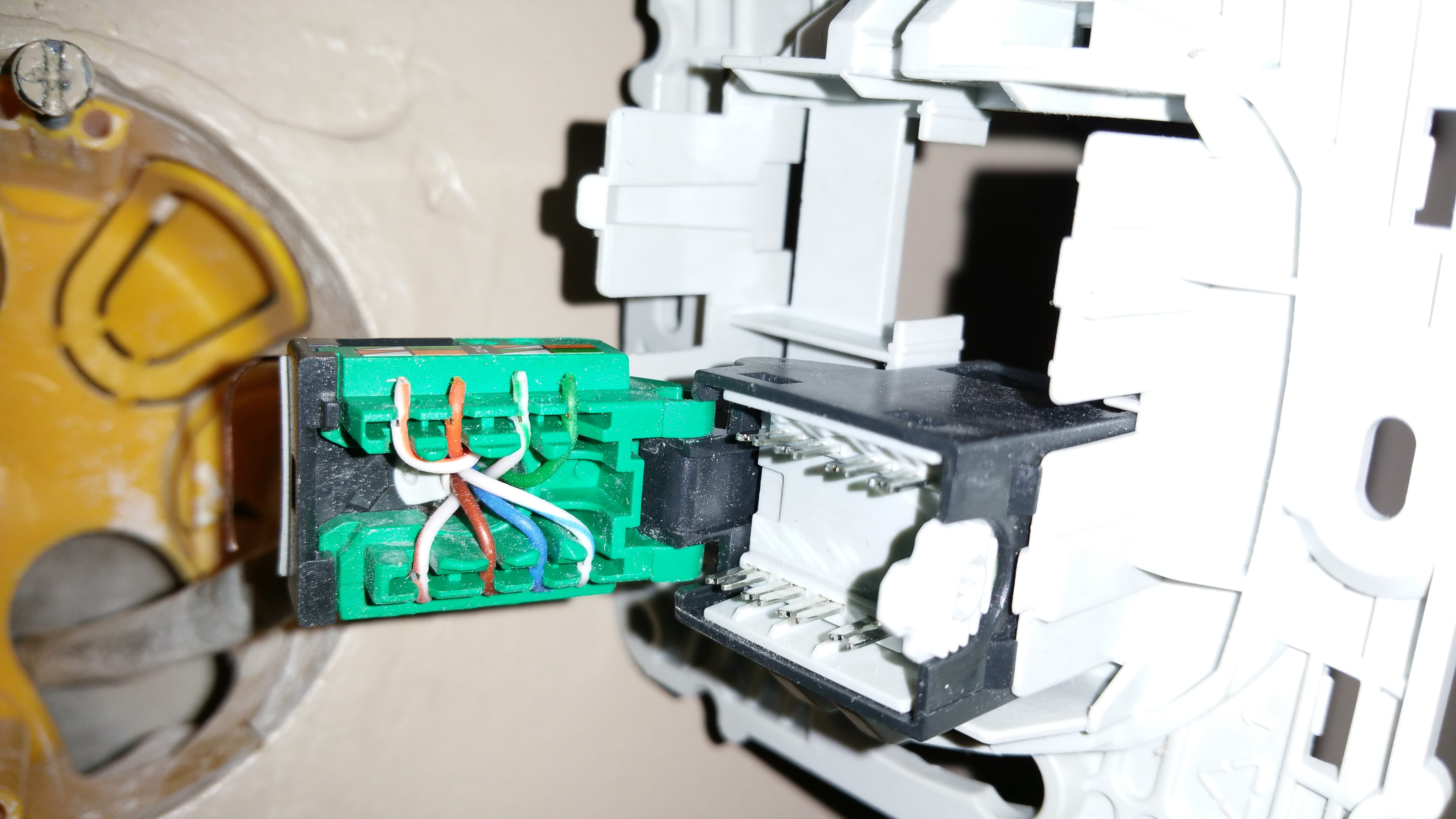
You should open both ends and check the connections, then show us photos of that.
Initially, I suspect a wiring issue.
What model of Bouygues box do you have and what speed is your PC connecting at?
And... there you go! -
@jee pee :
My box is connected to fiber.
The connection between the two is via an Ethernet cable type 5e if I remember correctly. On the box side, there is a male cable coming out of the wall, and on the bedroom side, there is a wall socket.
As for the subnet configuration, there shouldn't be any issues since when I connect the router directly to the box, there are no problems (I don't change the configuration of either the box or the router and I use the same port)
@brupala :
Model of bbox: F@st5330b
The speed:
- Configuration 1 "box => rj45 cable => router => rj45 cable => PC" :
https://www.speedtest.net/result/6066397720
- Configuration 2 "box => wall cable => socket => rj45 cable => PC" :
https://www.speedtest.net/result/6066406179
Aside from the slightly high ping in configuration 1, there is no notable difference
I haven't tried directly again, but from memory, it feels roughly the same as in configuration 2.
I will dismantle the socket and cable and post the photos.-
OK,
your links don't show anything for me...
but that's not a big deal, that's not what I was asking for, I wanted the speed of your local Windows network connection, the one that shows in your Ethernet connection 10/100 or 1000,
your router only does 10/100, but the box, I wanted to know.
Apparently, it's also 10/100...
-
-
Sorry, I misunderstood the question.
Windows tells me speed = 1Gbits/s
Photo of the wall socket:
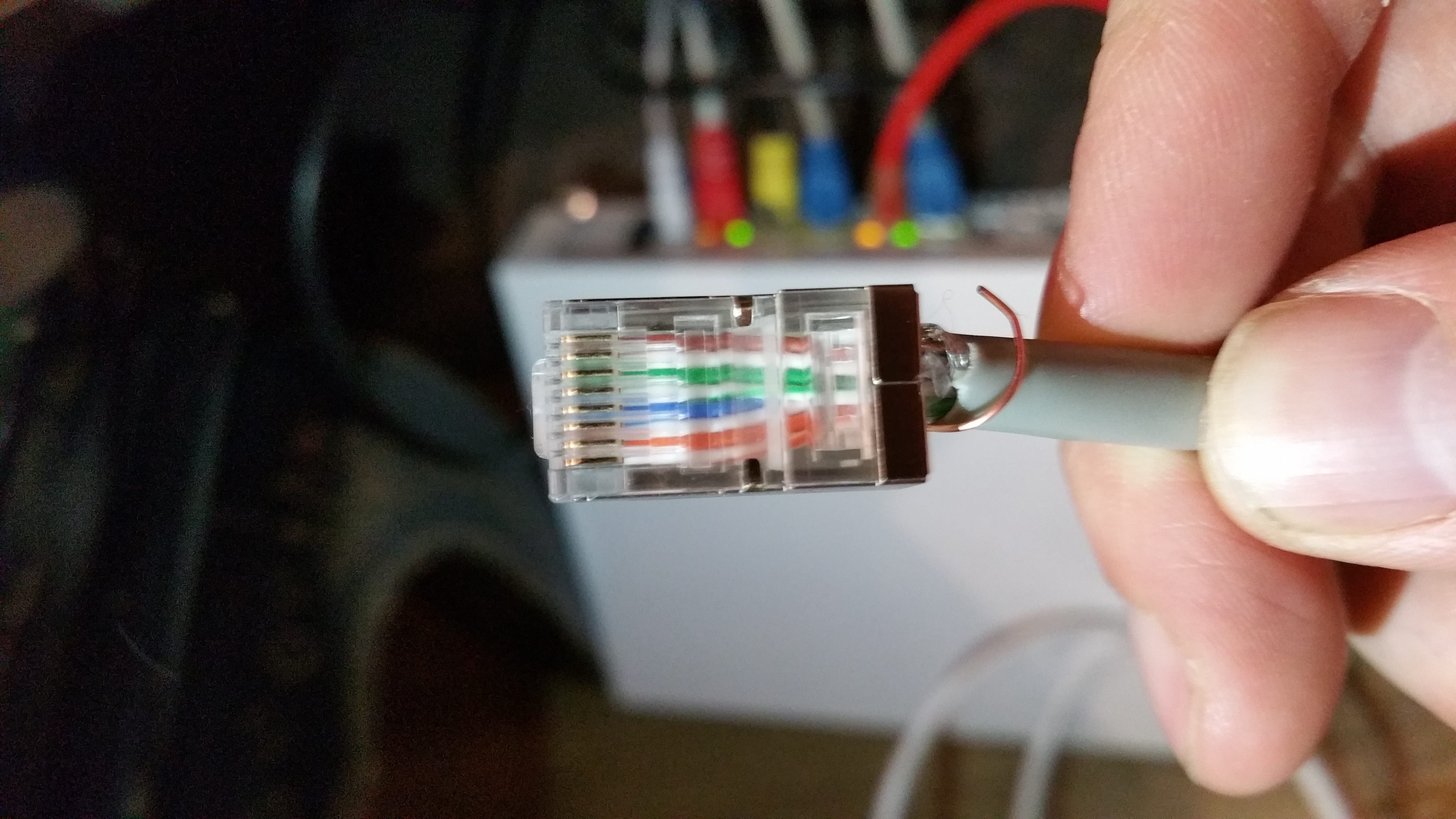
Photo of the cable side:
Let me know if they are clear enough.-
I'm going to let Brupala look into the physical connection.
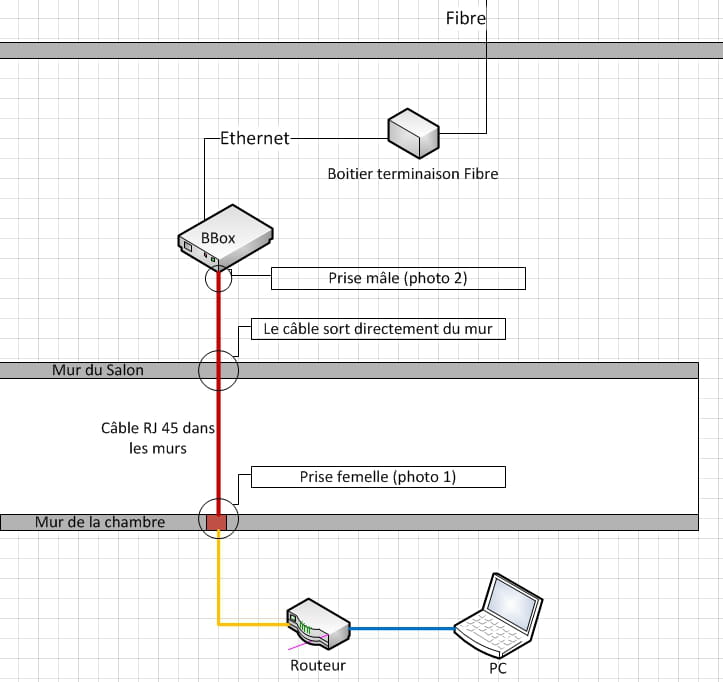
But you need to detail your setup. Because you have a female wall socket in the rooms and at the other end of the cable a male RJ45 plug? Where is this male plug located? In your central box? And is your box also in the central box?
The cable in the walls must be a single-strand cable; crimping a single-strand wire onto a male RJ45 plug is not common. -
Sure, beautiful photos.
The cable is indeed Cat5, no worries, it looks well wired, even quite well done, except that normally, you shouldn't have a male connector on a single-strand cable, you should have two female connectors at the end of this cable, as JP said.
On this male connector, in fact, we can only see the white of the accompanying colored wires, it’s possible that 2 white/color wires are reversed, we don’t know.
However,
you shouldn't have opened the CAD of the female connector, you'll need to redo the connection by cutting a few millimeters from each wire so that the insulation cut doesn’t fall at the same spot.
No pair-reversal detected, but we can't see everything regarding the positions and colors on the connector, I assume the ones at the bottom are correct :-)
What surprises me is that you say your PC indicates a gigabit connection, are you sure?
This box doesn’t have gigabit ports, right?
I haven't found the information yet.
-
-
Hello,
The male plug is next to the box (it's the fuzzy white spot at the back of the photo :-) ). I've made a little diagram:
Okay for the solid wires, but does it change anything other than being more fragile?
It's a shame about the plug... I'm not equipped yet to strip this kind of wire. Well, I can do it later; I have other rooms with the same plugs and the same problem to test.
For the Gigabit connection, I’m not sure how to check that on the bbox, is there a physical difference on the port? (to see the speed on Windows, I went into the connection properties)
For the male cable, I didn’t dare to unscrew it to check, but I can guess the right colors for the stripes.
I’ve picked up a crossover cable at the office; I’ll see if that changes anything.-
It's too bad about the socket... I'm not yet equipped to strip that kind of wire. Well, at worst, I'll do it later; I have other rooms with the same sockets and the same problem to test.
No,
you don't need to strip the wires; they are automatically stripped, as can be seen in your photo by the slots of the CAD (self-stripping contacts).
The problem is that once the CAD has acted, you shouldn't put the wire back in the same spot because it has worn a bit and its diameter has reduced, which may lead to a loss of contact; you need to start a little further away.
Otherwise, single-stranded wires aren't more fragile; on the contrary, but CAD systems are different for single-stranded and multi-stranded wires; it works, but it's not optimized.
Still, you should be able to check the pairing (inversion of two whites/x) on the male socket.
A 1000baseT port is identical to a 100baseT in terms of the socket.
The male socket should be discarded once disassembled (you cut it); you should replace it with a female socket for it to be done correctly.
Did you do this setup?
I searched a bit more for the model of your box; no one talks about it much, even at Sagem, no info, I found this, which seems to indicate gigabit ports, so better than your router.
Is it for the ac wifi, your router?
-
-
One observation, when enlarging the RJ45 male connector, I believe we have the following order of wires:
brown
white/brown
green
white/green
blue
white/blue
orange
white/orange
Whereas in all the wiring diagrams, in the center, we should have blue and white/blue in positions 4 and 5
a stranger is a friend we haven't met yet. -
@brupala: Thanks, that reassures me about the socket, I should manage. The router is good for Wi-Fi. As for the box, I’ll try to see if I can find more information on the box's interface.
@jeepee: Okay, I’ll check the colors tonight.
I didn’t do the installations. I'm not too surprised that they don't meet standards.
For the female socket, I was thinking of getting this:
https://www.amazon.fr/CSL-encastr%C3%A9-universelle-raccordement-horizontal/dp/B00YCCK61U/ref=sr_1_2/254-5695798-7990924?ie=UTF8&qid=1487604890&sr=8-2&keywords=prise+ethernet
But I don't think there are any CADs. So, do I need any tools (like crimping tools) or can I just do it in a rough manner?-
You don't need a double.
Indeed, it seems to be CAD but with a tool (Krone pliers).
For a tool-free installation, I recommend the Legrand cat6
price examples
-
-
Good news!
I connected a crossover cable between the wall socket and the router and it works!
I took the opportunity to test another socket (in another room) but this one doesn’t work. The symptoms are slightly different since the router is connected this time (WAN light is on) but it can’t obtain an IP from the box. I quickly looked at the wires on each end but didn’t find anything weird at first glance.
When I have the courage and time, I will do a neat wiring with female connectors on the box side.
In any case thank you very much for the help
I think I will manage by watching wiring tutorials for the future
PS: I checked for the speed; it’s indeed 100Mbps as indicated on the box.-
PS: I checked the speed and it is indeed 100Mbps indicated on the box
when you connect the router?
the crossover cable shouldn’t change anything at this level, I assume that the router and especially the box (if it is gigabit) are auto-mdix, all that should work on the edge, it can switch for a yes or for a no.
Rewire it neatly as soon as you can.
also,
not related to your problem, but if you have features that do not work behind your router, think about this:
https://forums.commentcamarche.net/forum/affich-37585052-routeur-en-point-d-acces
-