CANON MG3550 Printer
Solved
Jorge93
-
MPMP10 Posted messages 47609 Registration date Status Member Last intervention -
MPMP10 Posted messages 47609 Registration date Status Member Last intervention -
Hello,
Just wanted to know if the CANON MG3550 printer also scans or not? It doesn’t seem to have this function unfortunately... Thank you for your response and best regards.
Just wanted to know if the CANON MG3550 printer also scans or not? It doesn’t seem to have this function unfortunately... Thank you for your response and best regards.
2 answers
-
-
Thank you very much for your response, it's really nice because for a while now I’ve been stressing about this, lol. Well, I just need to buy another printer that scans this time. Best regards, Papounet17000, and have a good evening. Jorge93
- On the link above, we talk about digitizing, digitizing is really scanning, right?
" My Image Garden Software
A unique software for enjoying a complete PIXMA experience with solutions to organize and print your photos, digitize and access online services. Advanced features like face detection help you easily find the photos you want on your computer. "
https://www.canon.fr/printers/inkjet/pixma/pixma_mg3550/#specification
Unless I'm mistaken...
" Here’s how to scan from an HP printer or scanner to Devices and Printers with Windows 10 and 8. You will find more information about using the built-in print driver on our support site: http://support.hp.com/us-en/document/... For other videos, check out https://supportvideos.ext.hp.com/ or https://www.youtube.com/user/hpsupportfrancais More support options for your printer are available at https://support.hp.com/us-en?openCLC=true Procedure to scan to Devices and Printers: Turn on your printer or scanner. Place your document or photo against the glass of the scanner or in the automatic document feeder. Under Windows, search for and open Devices and Printers. Right-click on your printer and click Start Scan. Select the name of your printer or scanner, then click OK. Choose the scan source. Click Preview. Click Scan. Choose your import options, then click Import. This video was created by HP. "
https://www.youtube.com/watch?v=gouK9xDtXQ4
-
-
Good evening,
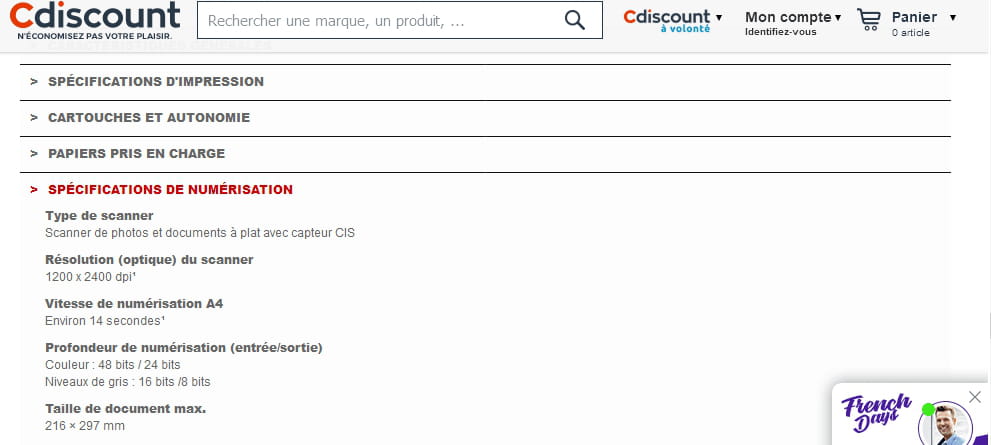
" Color inkjet printer - Functions: printer, copier, and scanner - WiFi - Mobile printing (Pixma Printing Solutions app) - Compatible with Google Cloud Print & Apple AirPrint "
https://www.fnac.com/Imprimante-Canon-Pixma-MG3550-Multifonctions-WiFi-Noire/a6360552/w-4
Source of the capture:
https://www.cdiscount.com/informatique/imprimantes-multifonction-fax/canon-pixma-mg3550-noire-imprimante/f-10711-8331b006aa.html#pres
--