Self-assigned IP address
Solved
flg91
Posted messages
336
Status
Member
-
oli -
oli -
Hello everyone,
I just bought an iMac and I'm trying to connect it to the Internet: it works with Wi-Fi, but I would prefer to connect it via Ethernet. So, I got a Powerline adapter to complete my setup: an SFR box connected to 2 TV decoders through other Powerline adapters, which work perfectly (even if they are not all from the same "box").
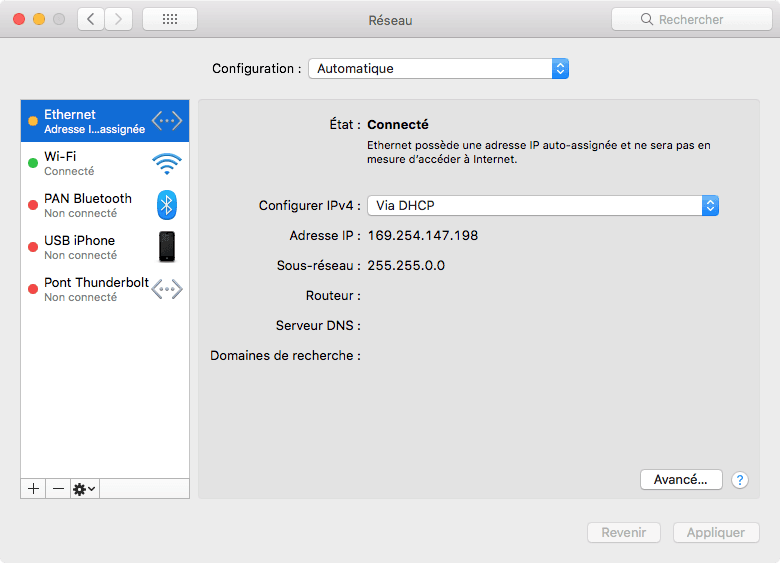
However, when I connect my Ethernet to my iMac, the following message appears: "Ethernet has an auto-assigned IP address and will not be able to access the Internet."
Does anyone have any idea how to solve the problem?
Thanks!
I just bought an iMac and I'm trying to connect it to the Internet: it works with Wi-Fi, but I would prefer to connect it via Ethernet. So, I got a Powerline adapter to complete my setup: an SFR box connected to 2 TV decoders through other Powerline adapters, which work perfectly (even if they are not all from the same "box").
However, when I connect my Ethernet to my iMac, the following message appears: "Ethernet has an auto-assigned IP address and will not be able to access the Internet."
Does anyone have any idea how to solve the problem?
Thanks!
4 answers
-
Hello,
If it is still not resolved:
- suggestion 1: then click on the "Renew DHCP Lease" button and see if that helps
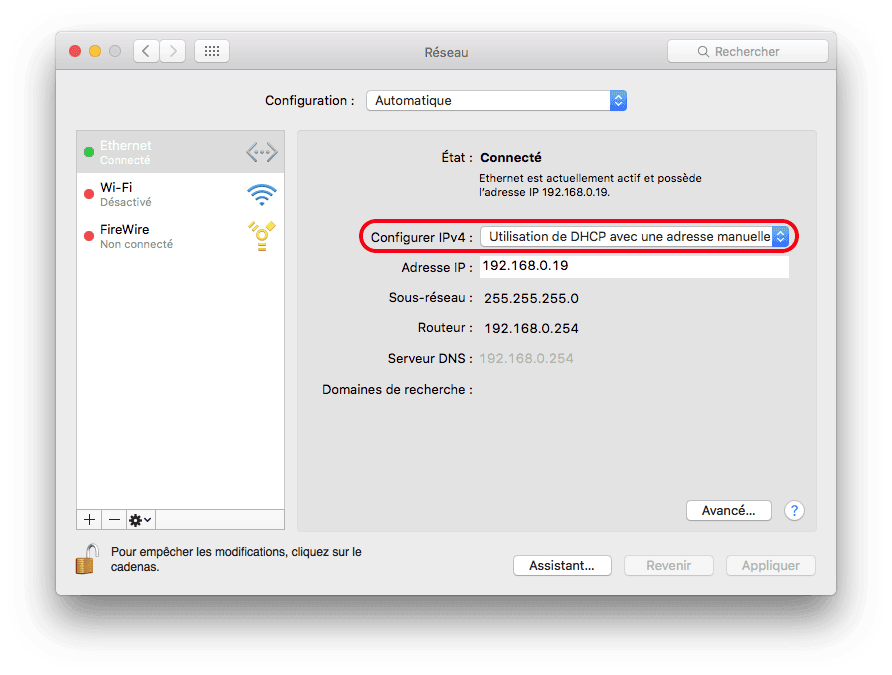
- suggestion 2: plug the Mac directly into the Ethernet port of the SFR box and check what IP address it gets by opening your network system preferences again. I would say it should be of the type 192.168.xxx.xxx. Note this address. Then configure your Mac to "Use DHCP with a manual address" and enter the IP address noted previously (in my example, it's 192.168.0.19):
As you are still directly connected to the SFR box via Ethernet, you should still be able to access the internet. Turn off the Mac, put it back in its original place, and connect it via Ethernet to the CPL unit. Turn it on and test the internet connection: does it work or is it still the same?
Ritchi