Startup virus?
Solved
Samy Rayan
Posted messages
388
Status
Member
-
Malekal_morte- Posted messages 178136 Registration date Status Moderator, Security Contributor Last intervention -
Malekal_morte- Posted messages 178136 Registration date Status Moderator, Security Contributor Last intervention -
Hi,
I’ve noticed for a while now that there are two processes starting up with my PC that I don’t recognize, but when I disable them, they automatically reactivate.
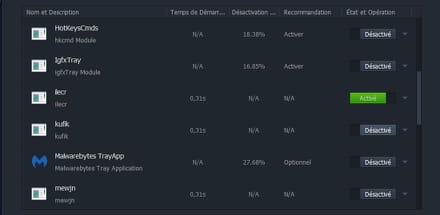
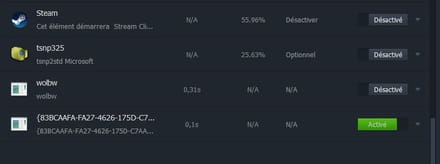
One of them is a registry key, and the other process changes; sometimes it’s “ilecr,” sometimes “kufik,” sometimes “dhtft,” “tukni,” “wolbwf”...
Is a scan of my PC necessary for someone to determine what these represent?
Thank you in advance.
I’ve noticed for a while now that there are two processes starting up with my PC that I don’t recognize, but when I disable them, they automatically reactivate.
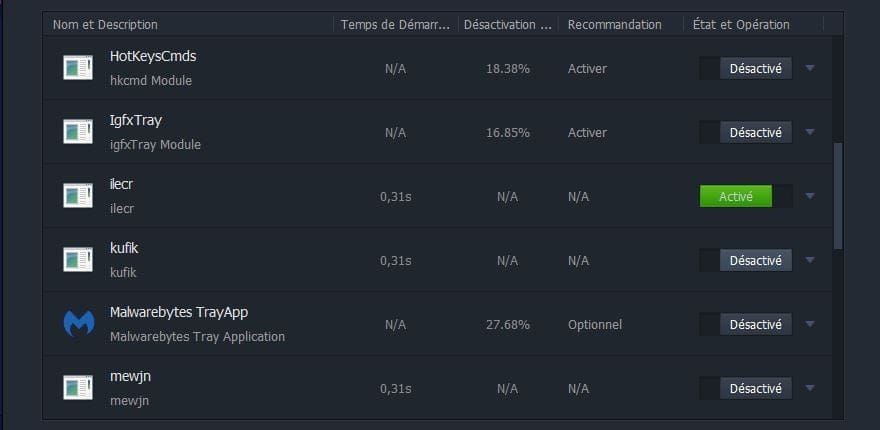
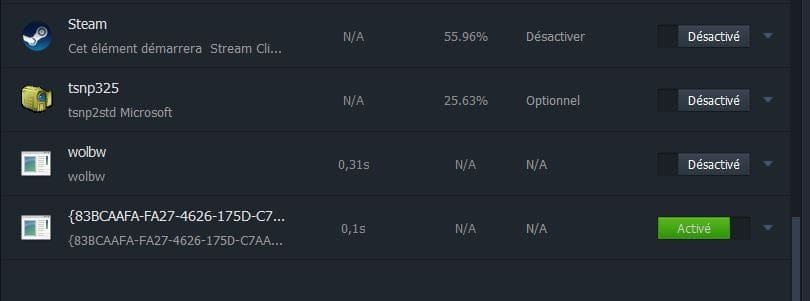
One of them is a registry key, and the other process changes; sometimes it’s “ilecr,” sometimes “kufik,” sometimes “dhtft,” “tukni,” “wolbwf”...
Is a scan of my PC necessary for someone to determine what these represent?
Thank you in advance.
6 answers
-
Hello,
yes malicious,
Follow the FRST tutorial. ( take the time to read carefully - everything is well explained ).
Download and run the FRST scan,
Wait for the scan to finish, a message will indicate that the analysis is complete.
Three FRST reports will be generated:- FRST.txt
- Shortcut.txt
- Additionnal.txt
Send these 3 reports to the site https://pjjoint.malekal.com/ to share them.
In return, provide the 3 pjjoint links that lead to the reports here in a new response so that we can review them.
-
Malekal_Morte - always there to help when we have a problem with viruses, I’ve known you for a very long time, thank you for the help :-)
Here are the 3 reports:
FRST: https://pjjoint.malekal.com/files.php?id=FRST_20180206_l5x12w9f5i15
ADDITION: https://pjjoint.malekal.com/files.php?id=20180206_i15z15c8b13c14
SHORTCUT: https://pjjoint.malekal.com/files.php?id=20180206_q7t14j10u9n10 -
You're welcome =)
You should uninstall IOBit programs, they're useless.
And also:
CCleaner
DriverMax
Java
PS: CCleaner is not really useful, even though it's recommended everywhere.
Disable CCleaner's monitoring, it's unnecessary, it starts up with Windows and slows it down with its constant cleaning, see: https://www.malekal.com/supprimer-ccleaner-demarrage-windows/
Here's the fix to perform with FRST. You can refer to this explanatory note with screenshots.
Restart FRST then press CTRL + Y on your keyboard.
The notepad will open, copy/paste this.
CreateRestorePoint:
CloseProcesses:
 2018-02-06 19:29 - 2018-02-06 22:28 - 000000000 ____D C:\ProgramData\{1281CA1B-9AC6-D71B-175D-C7AADB490C4A}
 2018-02-05 01:21 - 2018-02-05 21:23 - 000000020 _____ C:\Users\PICOS\Desktop\film a voir.txt
 2018-02-04 19:26 - 2018-02-05 21:34 - 000000076 _____ C:\Users\PICOS\Desktop\tokens bbl.txt
 2018-02-03 15:12 - 2018-02-03 15:12 - 000000000 ____D C:\ProgramData\SystemAcCrux
 2018-02-03 14:38 - 2018-02-03 14:38 - 000000221 _____ C:\Users\PICOS\Desktop\Upper.txt
 2018-02-02 21:54 - 2018-02-02 21:54 - 000000000 ____D C:\Users\PICOS\AppData\Roaming\aavwwvid
 2018-01-30 21:51 - 2018-02-06 13:20 - 000000000 ____D C:\ProgramData\{1FAC82CA-D217-DA36-175D-C7AADB490C4A}
2018-01-26 04:57 - 2018-01-26 04:57 - 001566502 ____N C:\Windows\Minidump\012618-19375-01.dmp
C:\Users\PICOS\AppData\Local\Google\Chrome\User Data\Profile 1\Extensions\chgpmaaockmdehmidghebcjafhihlgha
 HKU\S-1-5-21-1601674643-3913857965-3918657920-1000\...\Run: [{83BCAAFA-FA27-4626-175D-C7AADB490C4A}] => c:\programdata\{1fac82ca-d217-da36-175d-c7aadb490c4a}\b2135255.exe [267776 2018-02-06] ()
HKU\S-1-5-21-1601674643-3913857965-3918657920-1000\...\Run: [tuqni] => C:\Users\PICOS\AppData\Roaming\aavwwvid\vhwverva.ex
Task: {888FDD40-4443-457A-8B95-D306191A6BDD} - \GU5SkipUAC -> No file <==== ATTENTION
C:\Program Files\Skillbrains
C:\Users\PICOS\AppData\Roaming\aavwwvid
c:\programdata\{1fac82ca-d217-da36-175d-c7aadb490c4a}
Task: {8F3D89FF-B938-44DB-BFA3-4707B83562BD} - System32\Tasks\update-sys => C:\Program Files\Skillbrains\Updater\Updater.exe [2016-07-11] ()Hosts:
Task: {18225336-4BCE-408D-84FD-1F9D2FE65BA5} - System32\Tasks\update-S-1-5-21-1601674643-3913857965-3918657920-1000 => C:\Program Files\Skillbrains\Updater\Updater.exe [2016-07-11] ()
EmptyTemp:
RemoveProxy:
Reboot:
Save the content using the file menu and then save.
Close the notepad, return to FRST and click on the "Fix" button
A restart may be necessary and automatic.
A text file will appear, copy/paste the content here in a new message.
Restart the computer.
Finish with a cleanup using Malwarebytes - Malwarebytes Anti-Malware free version tutorial
--
Please press a key to continue the disinfection... -
Re,
Here is the FixLog file:
https://pjjoint.malekal.com/files.php?id=20180207_u15c6k7i14x5
Little problem, as soon as the restart is done, Advanced System Care detects 5 items to optimize, when I click on "optimize" it disables the stuff, but I just saw again in the list of startup programs, and there are still the two processes, the registry key and the other process "cepjw" :/
Could it be ASC that caused the relaunch of the two processes?
Moreover, 3 txt files on my desktop have been deleted :/ not knowing why you included them in the fixlist file, I would like to know the reason.-
The next step is Malwarebytes, what Advanced System Care says doesn't matter.
As mentioned before, IOBit programs are useless.
After MBAM, run a FRST scan again and provide the reports. -
Hey,
It's all good, MalwareBytes found some malware (I didn't expect that since I usually don't download software/files that I suspect are a source of malware) it also detected ASC files as PUPs but since I need them I kept them, but thanks anyway!
Regarding ASC, I need it because I have a very low-end setup so for me ASC helps to boost the PC's performance a bit,
Here are the 3 reports after the reboot:
FRST: https://pjjoint.malekal.com/files.php?id=FRST_20180207_c5d15n8k7f12
ADDITION: https://pjjoint.malekal.com/files.php?id=20180207_o5t8i9m12c11
SHORTCUT: https://pjjoint.malekal.com/files.php?id=20180207_e12e11t14w13s13- It messes things up at startup, so it's rather the opposite of the Boost effect .....
Make this correction and change your internet passwords just in case.
Here is the correction to be made with FRST. You can refer to this explanatory note with screenshots.
Restart FRST then on your keyboard press CTRL + Y.
The notepad will open, copy/paste this.
CreateRestorePoint:
CloseProcesses:
GroupPolicy: Restriction ? <==== ATTENTION
CHR HKLM\SOFTWARE\Policies\Google: Restriction <==== ATTENTION
Task: {18225336-4BCE-408D-84FD-1F9D2FE65BA5} - \update-S-1-5-21-1601674643-3913857965-3918657920-1000 -> No file <==== ATTENTION
Task: {8F3D89FF-B938-44DB-BFA3-4707B83562BD} - \update-sys -> No file <==== ATTENTION
Task: {AD59BF9C-5DC7-4351-9BD2-564252EF1F23} - System32\Tasks\DriverMax Notification => C:\Program Files\Innovative Solutions\DriverMax\drivermax.exe [2017-09-20] (Innovative Solutions)
Task: {B24B0DDA-D526-41BC-9F08-A23B8EA350D7} - System32\Tasks\Application Starter - 8882161c434ab0fd43dca37f474f4351 => C:\Program Files\Innovative Solutions\DriverMax\innostp.exe [2017-09-20] (Innovative Solutions)
Task: {BCA570B5-1648-4844-8854-F3AF7AD01CFE} - \{83BCAAFA-FA27-4626-175D-C7AADB490C4A} -> No file <==== ATTENTION
Task: {BD5157CA-F274-4A70-B91A-9EC676F95075} - \GlaryInitialize 5 -> No file <==== ATTENTION
EmptyTemp:
RemoveProxy:
Reboot:
Save the content from the file menu then save.
Close the notepad, go back to FRST and click on the "Fix" button.
A restart may be necessary and automatic.
A text file will appear, copy/paste the content here in a new message.
Restart the computer.
-
-
-
Nothing to add on the cleaning side.
--
Please press a key to continue the disinfection...