Sound issue on my computer

Solved
geldi64 Posted messages 21 Status Member -  
geldi64 Posted messages 21 Status Member -
Hello. I no longer have sound on my computer and the message says no audio output device is installed. I am using Windows 7 on a Compaq computer. I have tried a lot of things proposed on your site but with no results. I am not very tech-savvy, so if someone could give me a hand, that would be great. Thank you in advance for your replies.

10 answers

  1. glg29 Posted messages 29751 Registration date   Status Contributor Last intervention   4 582
     
    Good evening,
    Please avoid using capital letters when writing your question, as it means you are shouting and that's probably not the case (at least we hope so!), thank you.
    Can you provide us with the exact coordinates, references, etc. for the concerned Compaq?
    Windows 7 version 32 or 64 bits?
    Best regards.
    The one who does not bring pleasure upon arrival always brings pleasure upon departure!
    Breizh a tao.
    0
    1. geldi64 Posted messages 21 Status Member
       
      Hello. Sorry for the capital letters. Here are the specifications of my computer:
      Model: CQS221FR
      Processor: AMD Athlon (tm) iix2 215 PROCESSOR 2.70 GHz
      RAM: 4.00
      64 bits
      0
    2. astuces72 Posted messages 2146 Registration date   Status Member Last intervention   1 669
       
      Hi,

      are you sure about the model reference?
      it's not found on the internet!
      0
    3. geldi64 Posted messages 21 Status Member
       
      Hello. Sorry, small mistake: CQ5221FR COMPAQ PRESARIO
      0
      1. glg29 Posted messages 29751 Registration date   Status Contributor Last intervention   4 582 > geldi64 Posted messages 21 Status Member
         
        CQ5221F and not FR!
        Install this driver, sp44380.exe.
        Best regards.
        0
    4. geldi64 Posted messages 21 Status Member
       
      The reference is correct CQ5221FR. I installed the driver, but the problem persists.
      0
  2. glg29 Posted messages 29751 Registration date   Status Contributor Last intervention   4 582
     
    Hello geldi64,
    As mentioned by astuces72, whom I greet, here is the answer to the search on the manufacturer's website,


    A label should be stuck under the computer, the references are there.
    Best regards.

    --
    He who does not bring pleasure upon arrival always brings pleasure upon leaving!
    Breizh a tao.
    0
  3. kaneagle Posted messages 86284 Registration date   Status Moderator Last intervention   14 682
     
    Hello,

    If you can't find the model number:
    Download and install -->> AIDA64 extreme <<--

    For the report, look at the example in the tutorial.
    Post the report in your next message.

    --
    The human being is at its best when things are at their worst.
    0
    1. geldi64 Posted messages 21 Status Member
       
      Hello. Okay, I'll give it a try. Thank you.
      0
  4. gugu01 Posted messages 15669 Registration date   Status Contributor Last intervention   4 702
     
    Hello,

    Passing through ...his pc > https://support.hp.com/en-us/document/c01922063
    https://support.hp.com/en-us/drivers/selfservice/compaq-presario-cq5200-desktop-pc-series/3999467/model/4071908

    Correction of the person's message 6, the S becomes 5.

    ---------------

    Download and try to install this driver:
    http://whp-hou9.cold.extweb.hp.com/pub/softlib/software11/COL31165/pv-77270-1/sp44380.exe
    0
    1. geldi64 Posted messages 21 Status Member
       
      You're welcome!
      0
      1. glg29 Posted messages 29751 Registration date   Status Contributor Last intervention   4 582 > geldi64 Posted messages 21 Status Member
         
        Same driver as HERE which did not work!
        0
      2. gugu01 Posted messages 15669 Registration date   Status Contributor Last intervention   4 702 > glg29 Posted messages 29751 Registration date   Status Contributor Last intervention  
         
        Two minutes ago, I didn’t see your pilot given, I’m leaving you... lol
        0
      3. glg29 Posted messages 29751 Registration date   Status Contributor Last intervention   4 582 > gugu01 Posted messages 15669 Registration date   Status Contributor Last intervention  
         
        Hello gugu01,
        No worries, it's better to give it twice than not to give anything at all!
        If it had worked properly, that would have been even better!
        But well, you haven't lost everything either, you're the one who "digs up" the model!
        Have a good evening and see you later!
        0
  5. kaneagle Posted messages 86284 Registration date   Status Moderator Last intervention   14 682
     
    Try this one --> Realtek

    --
    Human beings are at their best when things are at their worst.
    0
    1. geldi64 Posted messages 21 Status Member
       
      ok I'm trying
      0
    2. geldi64 Posted messages 21 Status Member
       
      Always nothing. I'm despairing. Probably a silly question: could it be coming from the jack plug???
      At the top of the Compaq screen, there is this other reference CQ1859s.
      0
    3. geldi64 Posted messages 21 Status Member
       
      In the control panel, unable to open the Realtek audio manager.
      0
    4. glg29 Posted messages 29751 Registration date   Status Contributor Last intervention   4 582 > geldi64 Posted messages 21 Status Member
       
      Press Windows (keyboard flag) + R, type devmgmt.msc in the designated box, then OK.
      Expand the line (small triangle in front of) Sound, video and game controllers, what do you see displayed there?
      Is there any alert?
      0
    5. geldi64 Posted messages 21 Status Member
       
      No alert. Just the driver of my webcam that appears.
      0
  6. gugu01 Posted messages 15669 Registration date   Status Contributor Last intervention   4 702
     
    Let's try a hard reset to see if your card reappears.

    Unplug everything, especially the power supply.

    Hold down the power button for 1 minute.


    Open the PC
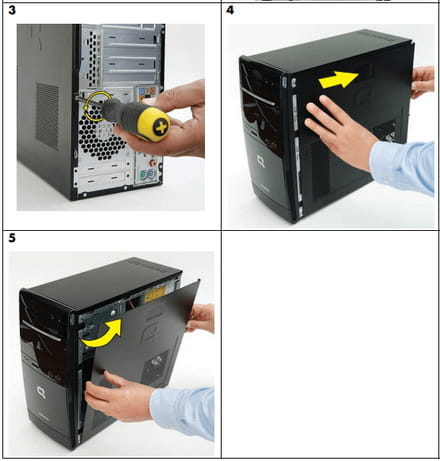
    (the side that disassembles is where there is a handle)

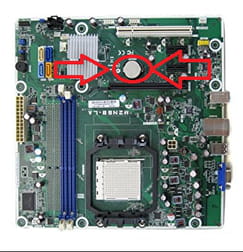
    Remove the BIOS battery
    (round flat battery)

    Hold down the power button for 1 minute.

    Then replace the battery.
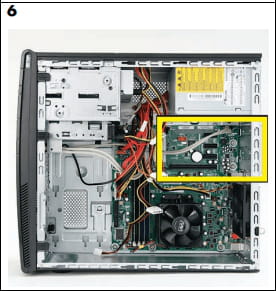


    Close the PC

    Plug back into the power supply

    Start
    (an unusual page may appear while it tests the hardware.
    Read the indicated commands and launch Windows normally or let it do its thing, it will start normally after a few seconds)

    Check if your sound card appears in your manager, if there is an alert, or if you have regained sound.
    0
    1. geldi64 Posted messages 21 Status Member
       
      OK, I'll give it a try. I'll keep you posted. Thanks again for your help.
      0
    2. geldi64 Posted messages 21 Status Member
       
      Hello. Action performed. No change.
      0
  7. kaneagle Posted messages 86284 Registration date   Status Moderator Last intervention   14 682
     
    If the problem is recent:
    Perform a system restore and choose a date prior to the problem.
    Check out this tutorial --> System Restore Windows 7

    --
    Human beings are at their best when things are at their worst.
    0
    1. geldi64 Posted messages 21 Status Member
       
      Okay, thank you, I'm trying.
      0
    2. geldi64 Posted messages 21 Status Member
       
      The restoration was completed successfully, but there is still no sound.
      0
  8. kaneagle Posted messages 86284 Registration date   Status Moderator Last intervention   14 682
     
    Proceed with an sfc.
    Go to Start
    All Programs
    Accessories
    Right-click on --> Command Prompt
    Choose --> run as administrator and confirm
    Type --> sfc /scannow and press enter.

    A system file check will take place.

    --
    The human being is at its best when things are at their worst.
    0
    1. geldi64 Posted messages 21 Status Member
       
      Hi. I did the operation. Nothing to report.
      0
  9. kaneagle Posted messages 86284 Registration date   Status Moderator Last intervention   14 682
     
    Make a Windows 7 repair without data loss.
    Check out this tutorial --> Repair Windows 7

    --
    Human beings are at their best when things are at their worst.
    0
    1. geldi64 Posted messages 21 Status Member
       
      Hello. It’s really nice of you to try to help me, but it’s getting too complicated for my little level!!! Plus, since the hard reset, my computer freezes when it's in sleep mode, and I have to unplug it to restart it, so I wouldn’t want to mess things up and break it for good. For now, I will manage without sound. One last question, maybe silly: if I plug a simple speaker into my computer, will I possibly get sound??
      Thank you for all your efforts.
      0
  10. kaneagle Posted messages 86284 Registration date   Status Moderator Last intervention   14 682
     
    The sound card does not appear in Audio, Video and Game Controllers.
    You need to check if the card is disabled in the BIOS.
    If enabled, it is probably a defective card.

    0
    1. geldi64 Posted messages 21 Status Member
       
      Pour accéder au BIOS, vous devez généralement appuyer sur la touche appropriée pendant le démarrage de votre ordinateur, avant que le système d'exploitation ne se charge. Dans votre cas, cela pourrait être l'une des touches mentionnées qui est souvent utilisée pour accéder au BIOS : - Cela pourrait être F10 pour "configuration", qui est souvent utilisé pour entrer dans le BIOS. Si cela ne fonctionne pas, je vous recommande de consulter le manuel de votre ordinateur ou de faire des recherches spécifiques au modèle de votre machine.
      0
    2. kaneagle Posted messages 86284 Registration date   Status Moderator Last intervention   14 682
       
      Try F10
      0
    3. geldi64 Posted messages 21 Status Member
       
      I went to F10. I found a built-in audio line with enabled, disabled, and automatic options. I tried all three, but there was no result. The sound card must be dead.
      0
    4. geldi64 Posted messages 21 Status Member
       
      Good evening. My problem was with the rear connection (where I plugged in my jack). Probably a small solder joint that came loose. Impossible to repair. So I bought a USB sound card that allows me to get sound from my computer, lower quality for sure, but it's sufficient for me.
      Thanks again for your efforts.
      0