Google Chrome - I'm logged out of sites after closing.
Solved
luluwebmaster
Posted messages
430
Status
Member
-
pistouri Posted messages 19010 Registration date Status Contributor Last intervention -
pistouri Posted messages 19010 Registration date Status Contributor Last intervention -
Hello,
I am encountering a rather annoying problem with Google Chrome lately:
As explained in the title, every time I completely close Google Chrome (end the process), and then reopen it, I have to log back into the sites I was connected to!
I have already tried many solutions, clearing the cache, changing settings for passwords, nothing works...
I must admit that I'm starting to feel overwhelmed :-/
Note: I am using version 64.0.3282.119 of Google Chrome.
Edit: To add to the topic, it's as if when I close Chrome, it doesn't save the cookies.
Edit²: After further testing, I also noticed that the cookies were saved when I modified them manually (via the Chrome console: https://i.luwe.fr/b3868679.png)
Thank you in advance for your help!
I am encountering a rather annoying problem with Google Chrome lately:
As explained in the title, every time I completely close Google Chrome (end the process), and then reopen it, I have to log back into the sites I was connected to!
I have already tried many solutions, clearing the cache, changing settings for passwords, nothing works...
I must admit that I'm starting to feel overwhelmed :-/
Note: I am using version 64.0.3282.119 of Google Chrome.
Edit: To add to the topic, it's as if when I close Chrome, it doesn't save the cookies.
Edit²: After further testing, I also noticed that the cookies were saved when I modified them manually (via the Chrome console: https://i.luwe.fr/b3868679.png)
Thank you in advance for your help!
5 answers
-
Go to Chrome settings (chrome://settings/) <--- (Copy-paste this in the search bar)
Then, click on "Advanced settings" and look for "System" and there will be a setting that says:
"Continue running background apps when Google Chrome is closed" and enable it...
Then, restart Chrome, log into an account, close Chrome, and reopen it and see if you are logged out or not...
-If you are logged out, sorry I don't know the solution.
-If you are still logged in, log in with your other account :)
Bye! -
pistouri Posted messages 19010 Registration date Status Contributor Last intervention Ambassador 8 732
Hello,
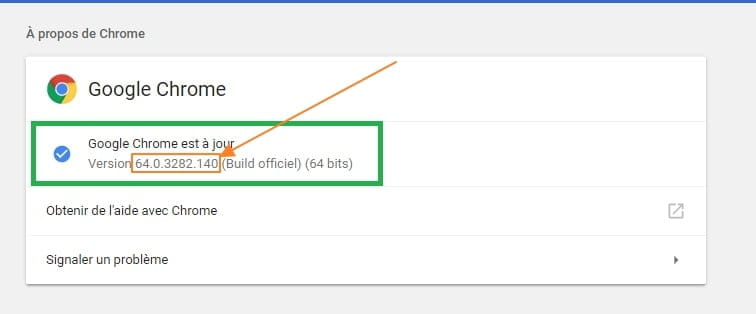
Check if you have the latest version of Google Chrome → Version 64.0.3282.140 (Official Build)
Between my message 4 (Version 64.0.3282.119) and this one, a new version has arrived
Yet I didn't do anything
I went to the three dots at the top right → Help → About Google Google
This is to verify if an update is available since nothing was proposed at the launch of Google Google... So I will try the manual method.
In this case, the download starts if an update is available, then restart the browser to install it
And well no!! .....I got a blank page
I closed and then relaunched Google Google
Surprise, there is indeed a new version

Version 64.0.3282.140 contains the fix for this issue and the fix works.
Maybe the end of this problem
To be verified.
Ps: I can't check it because I'm using a password manager
For some, this is resolved
Fixed thanks to the new update 64.0.3282.140 (Official Build) (64-bit)! Thank you!!!

64.0.3282.140 seems to have worked...
For those still having the problem, even with version 64.0.3282.140
- Reset Google Chrome, it's over here
or
- Uninstall the browser
- Restart the computer
Show hidden folders and files → see here
- Delete the following folders:
C:\Users\username\AppData\Local\Google
C:\Users\username\AppData\Roaming\Google
C:\Program Files (x86)\Google
Download and install the Google Chrome browser
Remember to back up your bookmarks before uninstalling
Looking forward to your feedback on this update....
A+
-
pistouri Posted messages 19010 Registration date Status Contributor Last intervention Ambassador 8 732
Hello,
it seems that this issue since the last update of Google Chrome concerns version 64
To check which version is installed
Clear everything in the address bar
Copy/paste
chrome://settings/help
Then press the Enter key
Note your version

The developers of Google Chrome are aware of this
Excerpt
Many users have this problem with version 64 of Google Chrome. I have personally reported this issue and I am waiting for feedback from Google.

For some users, this problem has fixed itself. Maybe you will be lucky enough to experience that?

This is currently under investigation by our team.

Thank you very much for bringing this to our attention, and we appreciate your patience.
The follow-up to this discussion continues on this page
A future update is expected to fix the problem, hoping for it to be resolved as soon as possible
See you later
--
pistouri -
pistouri Posted messages 19010 Registration date Status Contributor Last intervention Ambassador 8 732
Mac users are in the same situation:
Google Chrome does not autofill passwords. I recently bought a new iMac. The saved passwords from my devices appear in the saved passwords section. All settings such as sync, autofill, etc. are enabled.
Source here
A+
--
pistouri -
pistouri Posted messages 19010 Registration date Status Contributor Last intervention Ambassador 8 732
Latest info found
Bug name → Issue 795827
Everyone: A fix for this has been decided to be mastered by Friday. Once we ensure that the fix does not have any unforeseen negative interactions with other parts of Chrome, we will merge it with the appropriate release branches and you will receive an automatic update. If this bug is an absolute show-stopper for you, please consider using Canary for the time being - build 66.0.3334.0 includes the aforementioned fix.

The fix is relatively low-risk as it allows for a change in the code path for writing cookies in an older version we used for M64. Although we don't know exactly what triggers the failure mode (I haven't been able to reproduce it on Windows or Mac), the code path we are moving away from has a real problem and the fix targets this issue. So, the CL is low-risk and definitely fixes a bug. There is a strong likelihood that the fixed bug is this bug.

Restrict comments on this issue for now. As long as the fixes are not complete, it is unlikely that we will get useful information.
Hoping it's not mistaken for Friday
Source here
A+
--
pistouri-
Hello,
Thank you for your responses, I have indeed just received a reply from the official Google Chrome account on Twitter:
https://twitter.com/googlechrome/status/959074793298563072
I confirm that I have version 64 of Chrome ;)
Now we just have to wait for a patch ^^ -
-