Virus infections file .EXE at 0 bytes
Solved/Closed
levieux5
Posted messages
2
Status
Member
-
Malekal_morte- Posted messages 178136 Registration date Status Moderator, Security Contributor Last intervention -
Malekal_morte- Posted messages 178136 Registration date Status Moderator, Security Contributor Last intervention -
Hello,
I am experiencing the same problem as the previous user with all my executable files being 0 bytes, I have already received my links which are as follows (addition, FRST, shortcut)
https://pjjoint.malekal.com/files.php?id=20180128_g11i12y6g8t15
https://pjjoint.malekal.com/files.php?id=FRST_20180128_s10d13o9v13n12
https://pjjoint.malekal.com/files.php?id=20180128_f13q146j7h15
help please
Configuration: Windows / Chrome 63.0.3239.132
I am experiencing the same problem as the previous user with all my executable files being 0 bytes, I have already received my links which are as follows (addition, FRST, shortcut)
https://pjjoint.malekal.com/files.php?id=20180128_g11i12y6g8t15
https://pjjoint.malekal.com/files.php?id=FRST_20180128_s10d13o9v13n12
https://pjjoint.malekal.com/files.php?id=20180128_f13q146j7h15
help please
Configuration: Windows / Chrome 63.0.3239.132
19 answers
-
Hello,
Here is the correction to perform with FRST. You can refer to this explanatory note with screenshots.
Restart FRST and then press CTRL + Y on your keyboard.
The notepad will open, copy/paste this.
CreateRestorePoint:
CloseProcesses:
 HKU\S-1-5-21-957524350-1002898167-2383295667-1000\...\Run: [syswin] => C:\boots\syswin.exe [4730812 2017-12-30] ()
 C:\boots
Hosts:
EmptyTemp:
RemoveProxy:
Reboot:
Save the content from the file menu and then save.
Close the notepad, go back to FRST and click on the "Fix" button.
A restart may be necessary and automatic.
A text file will appear, copy/paste the content here in a new message.
Restart the computer.
-
Results of Farbar Recovery Scan Tool (x64) Version: 27.01.2018
Executed by THIERRY (29-01-2018 11:01:22) Run: 1
Executed from C:\Users\THIERRY\Desktop
Profiles loaded: THIERRY (Available profiles: THIERRY)
Boot mode: Normal
==============================================
fixlist content:
CreateRestorePoint:
CloseProcesses:
HKU\S-1-5-21-957524350-1002898167-2383295667-1000\...\Run: [syswin] => C:\boots\syswin.exe [4730812 2017-12-30] ()
C:\boots
Hosts:
EmptyTemp:
RemoveProxy:
Reboot:
The restore point was created successfully.
Processes closed successfully.
"HKU\S-1-5-21-957524350-1002898167-2383295667-1000\Software\Microsoft\Windows\CurrentVersion\Run\\syswin" => deleted successfully
C:\boots => moved successfully
C:\Windows\System32\Drivers\etc\hosts => moved successfully
Hosts restored successfully.
========= RemoveProxy: =========
"HKU\.DEFAULT\SOFTWARE\Microsoft\Windows\CurrentVersion\Internet Settings\Connections\\DefaultConnectionSettings" => deleted successfully
"HKU\.DEFAULT\SOFTWARE\Microsoft\Windows\CurrentVersion\Internet Settings\Connections\\SavedLegacySettings" => deleted successfully
"HKU\S-1-5-21-957524350-1002898167-2383295667-1000\SOFTWARE\Microsoft\Windows\CurrentVersion\Internet Settings\Connections\\DefaultConnectionSettings" => deleted successfully
"HKU\S-1-5-21-957524350-1002898167-2383295667-1000\SOFTWARE\Microsoft\Windows\CurrentVersion\Internet Settings\Connections\\SavedLegacySettings" => deleted successfully
========= End of RemoveProxy: =========
=========== EmptyTemp: ==========
BITS transfer queue => 8388608 B
DOMStore, IE Recovery, AppCache, Feeds Cache, Thumbcache, IconCache => 33362456 B
Java, Flash, Steam htmlcache => 1605 B
Windows/system/drivers => 270049653 B
Edge => 0 B
Chrome => 458145528 B
Firefox => 0 B
Opera => 0 B
Temp, IE cache, history, cookies, recent:
Users => 0 B
Default => 0 B
Public => 0 B
ProgramData => 0 B
systemprofile => 83598 B
systemprofile32 => 692 B
LocalService => 66708 B
NetworkService => 115708 B
akabwe => 271162 B
THIERRY => 4290242151 B
RecycleBin => 0 B
EmptyTemp: => 4.7 GB temporary data deleted.
================================
The system had to restart.End of Fixlog 11:06:33
-
-
Results of Farbar Recovery Scan Tool (x64) Version: 27.01.2018
Executed by THIERRY (29-01-2018 11:01:22) Run:1
Executed from C:\Users\THIERRY\Desktop
Loaded profiles: THIERRY (Available profiles: THIERRY)
Boot mode: Normal
==============================================
fixlist content:
CreateRestorePoint:
CloseProcesses:
HKU\S-1-5-21-957524350-1002898167-2383295667-1000\...\Run: [syswin] => C:\boots\syswin.exe [4730812 2017-12-30] ()
C:\boots
Hosts:
EmptyTemp:
RemoveProxy:
Reboot:
The restore point was created successfully.
Processes closed successfully.
"HKU\S-1-5-21-957524350-1002898167-2383295667-1000\Software\Microsoft\Windows\CurrentVersion\Run\\syswin" => deleted successfully
C:\boots => moved successfully
C:\Windows\System32\Drivers\etc\hosts => moved successfully
Hosts restored successfully.
========= RemoveProxy: =========
"HKU\.DEFAULT\SOFTWARE\Microsoft\Windows\CurrentVersion\Internet Settings\Connections\\DefaultConnectionSettings" => deleted successfully
"HKU\.DEFAULT\SOFTWARE\Microsoft\Windows\CurrentVersion\Internet Settings\Connections\\SavedLegacySettings" => deleted successfully
"HKU\S-1-5-21-957524350-1002898167-2383295667-1000\SOFTWARE\Microsoft\Windows\CurrentVersion\Internet Settings\Connections\\DefaultConnectionSettings" => deleted successfully
"HKU\S-1-5-21-957524350-1002898167-2383295667-1000\SOFTWARE\Microsoft\Windows\CurrentVersion\Internet Settings\Connections\\SavedLegacySettings" => deleted successfully
========= End of RemoveProxy: =========
=========== EmptyTemp: ==========
BITS transfer queue => 8388608 B
DOMStore, IE Recovery, AppCache, Feeds Cache, Thumbcache, IconCache => 33362456 B
Java, Flash, Steam htmlcache => 1605 B
Windows/system/drivers => 270049653 B
Edge => 0 B
Chrome => 458145528 B
Firefox => 0 B
Opera => 0 B
Temp, IE cache, history, cookies, recent:
Users => 0 B
Default => 0 B
Public => 0 B
ProgramData => 0 B
systemprofile => 83598 B
systemprofile32 => 692 B
LocalService => 66708 B
NetworkService => 115708 B
akabwe => 271162 B
THIERRY => 4290242151 B
RecycleBin => 0 B
EmptyTemp: => 4.7 GB temporary files deleted.
================================
The system had to be restarted.End of Fixlog 11:06:33
-
I'm encountering the same problem as the previous internet user with all my executable files at 0 bytes. I've already received my links, here they are (addition, FRST, shortcut)
https://pjjoint.malekal.com/files.php?id=FRST_20180508_y15n13j9v11p13
https://pjjoint.malekal.com/files.php?id=20180508_w9l11p7v5c7
https://pjjoint.malekal.com/files.php?id=20180508_e6e9x15w6x5
help please!!!
-
-
ok the malware has been removed
you need to reinstall the applications that were affected.
--
Please press any key to continue the disinfection...-
-
- You need to re-download them: How to download Microsoft Office.
-
-
-
Good evening, here, please I also had the same problem with my local disk D:
And I have already scanned with frst and here are the links.
https://pjjoint.malekal.com/files.php?id=20180222_s5y9s5w10f9
https://pjjoint.malekal.com/files.php?id=FRST_20180222_h5h5x13c12v12
https://pjjoint.malekal.com/files.php?id=20180222_l7y14h9e14v15
Thank you in advance. -
Hello,
Uninstall the IOBit programs, they are unnecessary.
You will need to reinstall your affected applications.
Here is the fix to perform with FRST. You can refer to this explanatory note with screenshots.
Restart FRST and then press CTRL + Y on your keyboard.
The notepad will open, copy/paste this.
CreateRestorePoint:
CloseProcesses:
HKU\S-1-5-21-2061001391-4137736777-2958416700-1001\...\Run: [BitTorrent] => C:\Users\LeW\AppData\Roaming\BitTorrent\BitTorrent.exe [2150088 2017-12-14] (BitTorrent Inc.)
HKU\S-1-5-21-2061001391-4137736777-2958416700-1001\...\Run: [syswin] => C:\boots\syswin.exe [4730812 2017-05-08] ()
2017-05-08 08:37 - 2017-05-08 08:37 - 00000000 ___HD C:\boots
 Hosts:
EmptyTemp:
RemoveProxy:
Reboot:
Save the content from the file menu then save.
Close the notepad, return to FRST and click on the "Fix" button.
A restart may be necessary and automatic.
A text file will appear, copy/paste the content here in a new message.
Restart the computer.
--
Please press any key to continue the disinfection...-
-
-
Hello,
I have a TOSHIBA laptop running Windows 64-bit and I recently bought a 1 TB external hard drive.
However, since I gave it to others to provide them with software, it has been infected by a virus that turned the .exe files into 0 KB.
Here are the links to the attachments of the FRST report:
https://pjjoint.malekal.com/files.php?id=20180220_y11p6d8y6j14
https://pjjoint.malekal.com/files.php?id=FRST_20180220_e6v1011c14d10
https://pjjoint.malekal.com/files.php?id=20180220_9f11z7w10l8
Could you please tell me how to recover my applications?
-
-
Hello everyone,
I have been experiencing the same virus problem on my machine for some time. It started with my HDD that I use to install applications on the PCs of my small LAN network. I ended up losing all my .EXE files (rendered to 0 KB) on my HDD. Now the virus has also spread to my laptop and I can no longer use it to install applications or insert a healthy USB stick. The virus systematically contaminates them. I am therefore considering completely reinstalling my laptop, but I would really like to know before doing so if I can clean and recover my .EXE files.
My laptop running WIN10 uses SOPHOS Pro AV which is up to date, but does not block this virus.
Here are the links to the attachments of the FRST report:
https://pjjoint.malekal.com/files.php?id=FRST_20180312_g8d14c13h10b5
https://pjjoint.malekal.com/files.php?id=20180312_g13t8b8i5f9
https://pjjoint.malekal.com/files.php?id=20180312_l711u6z6q12
Thank you very much for any assistance.-
Hello,
You need to restore the exe files, it's dead.
Here is the correction to be made with FRST. You can refer to this helpful note with screenshots.
Restart FRST and then press CTRL + Y on your keyboard.
The notepad will open, copy/paste this.
CreateRestorePoint:
CloseProcesses:
HKU\S-1-5-21-185866794-2674911608-285463921-92385\...\Run: [syswin] => C:\boots\syswin.exe [4730812 2018-02-14] ()
 2018-02-14 14:26 - 2018-02-14 14:26 - 000000000 ___HD C:\boots
Hosts:
EmptyTemp:
RemoveProxy:
Reboot:
Save the content from the file menu then save.
Close the notepad, go back to FRST and click on the "Fix" button
A restart may be necessary and automatic.
A text file will appear, copy/paste the content here in a new message.
Restart the computer.- A big thank you!! I was able to successfully download apps, everything is fine, they remain intact and functional. There are no more 0 kb files except for the old infected files that I will delete later.
Thank you so much for your quick response and the quality of the work.
But I was wondering, for my HDD now, should I format it or can I recover some video files, photos, and/or documents??
Thanks.
-
-
Good evening everyone.
I have the same problem with my setup.exe files which all have a size of 0 bytes.
I've been dealing with this problem for a week, I went to the site https://www.malekal.com/tutoriel-farbar-recovery-scan-tool-frst/#fix
I followed the instructions to the letter
here are the three links they sent me
the FRST link: https://pjjoint.malekal.com/files.php?id=FRST_20180323_y6p10f15y13e10
the shortcut link: https://pjjoint.malekal.com/files.php?id=20180323_x11m8t6s5v5
the addition link:https://pjjoint.malekal.com/files.php?id=20180323_p9c6y13p8t10
Thank you for your help.-
Hello,
Several malwares on this computer.
You have programs that were installed when you purchased the computer or installed later that are not necessarily useful.
They clutter Windows and can slow it down.
Therefore, you can uninstall them.
Go to the Control Panel
then Programs and Features.
Uninstall:
CCleaner
Spyware Terminator
P.S.: CCleaner is not really useful, even though it is widely recommended.
Disable the monitoring of CCleaner, unnecessary, it loads at Windows startup and slows it down with its constant cleaning, see: https://www.malekal.com/supprimer-ccleaner-demarrage-windows/
Here is the correction to perform with FRST. You can use this explanatory note with screenshots.
Restart FRST and then press CTRL + Y on your keyboard.
The notepad will open, copy/paste this.
CreateRestorePoint:
CloseProcesses:
 HKU\S-1-5-21-223142337-1604159864-1753999314-1001\...\Run: [{F1A39FA8-D87E-34F8-4E03-1836DB852D8A}] => c:\programdata\{6db3b798-f04e-a8e8-4e03-1836db852d8a}\c00c6707.exe
 HKU\S-1-5-21-223142337-1604159864-1753999314-1001\...\Run: [CCleaner Monitoring] => C:\Program Files\CCleaner\CCleaner.exe [12762872 2018-03-06] (Piriform Ltd)
HKU\S-1-5-21-223142337-1604159864-1753999314-1001\...\Run: [VEFLSQM] => wscript.exe //B //E:vbs C:\Users\MAMADO~1\AppData\Local\Temp\VEFLSQM <==== ATTENTION
 HKU\S-1-5-21-223142337-1604159864-1753999314-1001\...\Run: [syswin] => C:\boots\syswin.exe [4730812 2018-03-18] ()
 Startup: C:\Users\Mamadou Oury Barry\AppData\Roaming\Microsoft\Windows\Start Menu\Programs\Startup\NVIDIA Cryptex HD.vbs.lnk [2017-04-18]
 ShortcutTarget: NVIDIA Cryptex HD.vbs.lnk -> C:\Users\Mamadou Oury Barry\AppData\Roaming\AppData\NVIDIA Cryptex HD.vbs (File not found)
2018-03-21 18:14 - 2018-03-21 18:17 - 000000000 ____D C:\ProgramData\B0FFCDD9-5261-4e59-B29A-17A4FABDEBAB
2018-03-18 11:04 - 2018-03-18 11:04 - 000000000 ___HD C:\boots
c:\programdata\{6db3b798-f04e-a8e8-4e03-1836db852d8a}
Hosts:
EmptyTemp:
RemoveProxy:
Reboot:
Save the content from the file menu and then save.
Close Notepad, go back to FRST and click the "Fix" button.
A restart may be necessary and automatic.
A text file will appear, copy/paste the content here in a new message.
Restart the computer. -
fixlog
Results of the Farbar Recovery Scan Tool (x86) Version: 14.03.2018
Executed by Mamadou Oury Barry (26-03-2018 05:31:23) Run:1
Executed from C:\Users\Mamadou Oury Barry\Desktop
Profiles loaded: Mamadou Oury Barry (Available profiles: Mamadou Oury Barry)
Boot Mode: Normal
==============================================
fixlist content:
CreateRestorePoint:
CloseProcesses:
HKU\S-1-5-21-223142337-1604159864-1753999314-1001\...\Run: [{F1A39FA8-D87E-34F8-4E03-1836DB852D8A}] => c:\programdata\{6db3b798-f04e-a8e8-4e03-1836db852d8a}\c00c6707.exe
HKU\S-1-5-21-223142337-1604159864-1753999314-1001\...\Run: [CCleaner Monitoring] => C:\Program Files\CCleaner\CCleaner.exe [12762872 2018-03-06] (Piriform Ltd)
HKU\S-1-5-21-223142337-1604159864-1753999314-1001\...\Run: [VEFLSQM] => wscript.exe //B //E:vbs C:\Users\MAMADO~1\AppData\Local\Temp\VEFLSQM <==== ATTENTION
HKU\S-1-5-21-223142337-1604159864-1753999314-1001\...\Run: [syswin] => C:\boots\syswin.exe [4730812 2018-03-18] ()
Startup: C:\Users\Mamadou Oury Barry\AppData\Roaming\Microsoft\Windows\Start Menu\Programs\Startup\NVIDIA Cryptex HD.vbs.lnk [2017-04-18]
ShortcutTarget: NVIDIA Cryptex HD.vbs.lnk -> C:\Users\Mamadou Oury Barry\AppData\Roaming\AppData\NVIDIA Cryptex HD.vbs (File not found)
2018-03-21 18:14 - 2018-03-21 18:17 - 000000000 ____D C:\ProgramData\B0FFCDD9-5261-4e59-B29A-17A4FABDEBAB
2018-03-18 11:04 - 2018-03-18 11:04 - 000000000 ___HD C:\boots
c:\programdata\{6db3b798-f04e-a8e8-4e03-1836db852d8a}
Hosts:
EmptyTemp:
RemoveProxy:
Reboot:
Error: (0) Unable to create a restore point.
Process closed successfully.
"HKU\S-1-5-21-223142337-1604159864-1753999314-1001\Software\Microsoft\Windows\CurrentVersion\Run\\{F1A39FA8-D87E-34F8-4E03-1836DB852D8A}" => deleted successfully
"HKU\S-1-5-21-223142337-1604159864-1753999314-1001\Software\Microsoft\Windows\CurrentVersion\Run\\CCleaner Monitoring" => not found
"HKU\S-1-5-21-223142337-1604159864-1753999314-1001\Software\Microsoft\Windows\CurrentVersion\Run\\VEFLSQM" => deleted successfully
"HKU\S-1-5-21-223142337-1604159864-1753999314-1001\Software\Microsoft\Windows\CurrentVersion\Run\\syswin" => not found
C:\Users\Mamadou Oury Barry\AppData\Roaming\Microsoft\Windows\Start Menu\Programs\Startup\NVIDIA Cryptex HD.vbs.lnk => moved successfully
"C:\Users\Mamadou Oury Barry\AppData\Roaming\AppData\NVIDIA Cryptex HD.vbs" => not found
C:\ProgramData\B0FFCDD9-5261-4e59-B29A-17A4FABDEBAB => moved successfully
C:\boots => moved successfully
c:\programdata\{6db3b798-f04e-a8e8-4e03-1836db852d8a} => moved successfully
C:\Windows\System32\Drivers\etc\hosts => moved successfully
Hosts restored successfully.
========= RemoveProxy: =========
"HKU\.DEFAULT\SOFTWARE\Microsoft\Windows\CurrentVersion\Internet Settings\Connections\\DefaultConnectionSettings" => deleted successfully
"HKU\.DEFAULT\SOFTWARE\Microsoft\Windows\CurrentVersion\Internet Settings\Connections\\SavedLegacySettings" => deleted successfully
"HKU\S-1-5-21-223142337-1604159864-1753999314-1001\SOFTWARE\Microsoft\Windows\CurrentVersion\Internet Settings\Connections\\DefaultConnectionSettings" => deleted successfully
"HKU\S-1-5-21-223142337-1604159864-1753999314-1001\SOFTWARE\Microsoft\Windows\CurrentVersion\Internet Settings\Connections\\SavedLegacySettings" => deleted successfully
========= End of RemoveProxy: =========
=========== EmptyTemp: ==========
BITS transfer queue => 134966 B
DOMStore, IE Recovery, AppCache, Feeds Cache, Thumbcache, IconCache => 19718061 B
Java, Flash, Steam htmlcache => 524 B
Windows/system/drivers => 866713 B
Edge => 5542270 B
Chrome => 42731934 B
Firefox => 16291240 B
Opera => 150914 B
Temp, IE cache, history, cookies, recent:
Default => 0 B
Users => 0 B
ProgramData => 0 B
Public => 0 B
systemprofile => 0 B
LocalService => 4946 B
NetworkService => 0 B
Mamadou Oury Barry => 36297512 B
RecycleBin => 248176 B
EmptyTemp: => 116.3 MB temporary data deleted.
================================
The system had to restart.End of Fixlog 05:32:45
-
ok, that's fine.
You need to re-download the applications.
For your information, this infection spreads via USB flash drives.
Delete the folder C:\FRST
Finish with a cleanup using Malwarebytes - Malwarebytes Anti-Malware free version tutorial
Avoid regular scans and cleanups with ZHPCleaner, AdwCleaner, not useful.
Some advice:
To avoid getting caught again.
Read - Potentially Unwanted Programs (PUPs): Adware/PUPs folder: unwanted and parasite programs
(Especially enable LPI detections to detect unwanted and advertising programs)
To avoid viruses, you need to understand how hackers infect computers: How computer viruses are distributed
1) How to protect against malicious scripts on Windows
2) Windows Firewall: the right settings
3) ublock on your internet browser -
-
-
Hello! I think I have the same problem as before, so I need to do the scan and then can you help me please!!
-
-
Hello,
uninstall SMADAV
Here is the correction to be made with FRST. You can refer to this explanatory note with screenshots.
Restart FRST and then press CTRL + Y on your keyboard.
The notepad will open, copy/paste this.
CreateRestorePoint:
CloseProcesses:
 HKU\S-1-5-21-3249895717-3824381528-1712216078-1001\...\Run: [syswin] => C:\boots\syswin.exe [4730812 2018-03-12] ()
HKLM-x32\...\Run: [SMΔRT-Protection] => C:\Program Files (x86)\Smadav\SMΔRTP.exe [1736704 2017-01-14] (Smadsoft)
 2018-03-12 21:22 - 2018-03-12 21:22 - 000000000 ___HD C:\boots
2018-03-21 09:52 - 2018-03-21 09:52 - 000000000 ____D C:\ProgramData\Microsoft\Windows\Start Menu\Programs\SMADAV Antivirus
 2018-03-21 09:51 - 2017-01-20 15:23 - 001500777 _____ (Smadsoft ) C:\smadav2017 (1).exe
2018-03-23 17:15 - 2017-10-11 19:51 - 000000000 __SHD C:\[Smad-Cage]
 2018-03-21 10:17 - 2017-10-12 00:31 - 000000000 ____D C:\Program Files (x86)\SMADAV
 2018-03-21 09:52 - 2017-10-12 00:31 - 000003142 _____ C:\WINDOWS\System32\Tasks\smadav
 2018-03-21 09:52 - 2017-10-12 00:31 - 000000000 ____D C:\Users\RCV\AppData\Roaming\Smadav
Hosts:
EmptyTemp:
RemoveProxy:
Reboot:
Save the content using the file menu and then save.
Close the notepad, return to FRST and click on the "Fix" button
A restart may be necessary and automatic.
A text file will appear, copy/paste the content here in a new message.
Restart the computer.
Install an antivirus like Avast!
Scan your USB drives. -
-
-
-
-
Hello, please find my different links obtained. I need them to be interpreted in order to solve my problem.
Thank you in advance. -
-
-
-
Your Windows 7 is not up to date at all.
You will need to install Service Pack 1: https://www.malekal.com/telecharger-installer-service-pack-1-windows-7-kb976932/
and launch all updates.
Otherwise, for the malware, it is no longer active and for the files, it is too late.
You need to re-download them.
Uninstall Web Companion
Parasitic program, see: https://www.malekal.com/supprimer-adaware-web-companion/
Here is the correction to be made with FRST. You can refer to this explanatory note with screenshots.
Restart FRST, then on your keyboard press the CTRL + Y keys.
The notepad will open, copy/paste this.
CreateRestorePoint:
CloseProcesses:
2018-05-25 14:27 - 2018-02-08 14:07 - 000000000 ___HD C:\boots
EmptyTemp:
RemoveProxy:
Reboot:
Save the content via the file menu then save.
Close the notepad, return to FRST and click on the "Fix" button.
A restart may be necessary and automatic.
A text file will appear, copy/paste the content here in a new message.
Restart the computer.
-
-
Hello, here are the three report links:
https://pjjoint.malekal.com/files.php?id=FRST_20180530_e11n146o5j5
https://pjjoint.malekal.com/files.php?id=20180530_m14d9j13k5l6
https://pjjoint.malekal.com/files.php?id=20180530_c6r6n118h8-
Hello,
infected.
Here is the fix to perform with FRST. You can refer to this explanatory note with screenshots.
Restart FRST then on your keyboard press CTRL + Y.
The notepad will open, copy/paste this.
CreateRestorePoint:
CloseProcesses:
HKU\S-1-5-21-2059386177-1867506704-3217337387-1000\...\CurrentVersion\Windows: [Load] C:\ProgramData\msvrvcne.exe <==== WARNING
HKLM\...\Run: [flvga_tray] => C:\Windows\system32\flvga_tray.exe [398848 2015-12-07] ()
 2017-11-07 07:45 - 2016-11-09 17:55 - 093876224 ___SH () C:\ProgramData\msoojgb.exe
 2017-11-07 07:45 - 2016-11-09 17:55 - 102895616 ___SH () C:\ProgramData\msvrvcne.exe
EmptyTemp:
RemoveProxy:
Reboot:
Save the content from the file menu then save.
Close the notepad, return to FRST and click on the "Fix" button
A restart may be necessary and automatic.
A text file will appear, copy/paste the content here in a new message.
Restart the computer.
No antivirus installed, install Kaspersky Free: https://www.malekal.com/kaspersky-security-cloud-free/
Perform a full scan with it. -
-
-
-
Hello, after performing all the operations, I notice that the .exe applications on my external hard drive that were in place (connected) still remain at 0 bytes.
-
Hello, here are the links (FIRST-ADDITION-SHORTCUT) to my report:
https://pjjoint.malekal.com/files.php?id=FRST_20180615_f13w8z12c7c8
https://pjjoint.malekal.com/files.php?id=20180615_e15j12n10r14r10
https://pjjoint.malekal.com/files.php?id=20180615_e7h1111c11z12-
Hello,
Yep infected and Chrome also has a rogue extension.
You have programs that were installed when you bought the computer or installed later that are not necessarily useful.
They clutter Windows and can slow it down.
So you can uninstall them.
Go to the Control Panel
then programs and features.
Uninstall:
DriverPack Notifier
IObit Advanced SystemCare
McAfee Security Scan Plus
Yahoo! Toolbar
Here’s the correction to be made with FRST. You can help yourself with this explanatory note with screenshots.
Restart FRST and then press CTRL + Y on your keyboard.
The notepad will open, copy/paste this.
CreateRestorePoint:
CloseProcesses:
HKU\S-1-5-21-3221633186-1066557508-2796146323-1000\...\Run: [syswin] => C:\boots\syswin.exe [4730812 2018-06-07] ()
C:\Users\KONRAD Z\AppData\Local\Google\Chrome\User Data\Default\Extensions\pilplloabdedfmialnfchjomjmpjcoej
 2018-06-07 20:47 - 2018-06-07 20:47 - 000000000 ___HD C:\boots
Hosts:
EmptyTemp:
RemoveProxy:
Reboot:
Save the content from the file menu then save.
Close the notepad, go back to FRST and click the "Fix" button.
A reboot may be necessary and automatic.
A text file appears, copy/paste the content here in a new message.
Restart the computer.
2°)
Reset/Repair the web browsers affected by the issues:- Repair Google Chrome (only the first paragraph).
-
-
-
Hello,
The malware is not active on the computer.
You have programs that were installed at the time of purchase or installed later that are not necessarily useful.
They clutter Windows and can slow it down.
You can therefore uninstall them.
Go to the Control Panel
then Programs and Features.
Uninstall:
AVG Security Toolbar
DriverPack Notifier
-
-
Hello everyone, I had the same problem, I have a solution to offer you, but it's a bit long. I recovered all my EXE files thanks to an app RECUVA the problem is that it recovers them in another folder, you just need to rearrange them afterwards... I hope this helps you.
-
Hello, the same virus has reinfected me a week ago, please help.
Here is the FRST file: https://pjjoint.malekal.com/files.php?id=FRST_20180618_n13k13t9x13w5
The Shortcut file: https://pjjoint.malekal.com/files.php?id=20180618_n15v9d13c12v6
And the Addition file: https://pjjoint.malekal.com/files.php?id=20180618_l9r11t9c12x10
Thank you in advance.-
I have already replied on your topic: https://forums.commentcamarche.net/forum/affich-35424835-mais-setup-exe-on-une-taille-de-0-octet
-
-
Hello, please I have the same problem with my software
help me.
Here are the files
The FRST file: https://pjjoint.malekal.com/files.php?id=FRST_20180621_k6q14y5k11d10
the shortcut file: https://pjjoint.malekal.com/files.php?id=20180621_n7v12l5k9k5
the addition file: https://pjjoint.malekal.com/files.php?id=20180621_m7c10r12i7f10
Thank you -
Hello,
I'm encountering the same problem with all my executable files at 0 bytes, here are my links (addition, FRST, shortcut)
https://pjjoint.malekal.com/files.php?id=20180628_t13o14y11z13r5
https://pjjoint.malekal.com/files.php?id=FRST_20180628_b6h15p6i7s13
https://pjjoint.malekal.com/files.php?id=20180628_x15j12l14c11j12
Need help please. -
This topic has been closed due to an excessive number of disinfection requests.
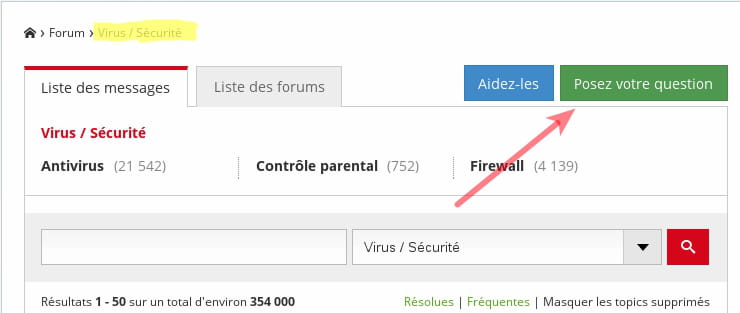
If you need assistance, please create your own topic by going to the Virus forum and clicking on the Ask a question button.
Fill in the fields and submit your request.