
4 TB hard drive recognized as a 2 TB disk
Solved
yakalelo57
Posted messages
103
Registration date
Status
Member
Last intervention
-
yakalelo57 Posted messages 103 Registration date Status Member Last intervention -
yakalelo57 Posted messages 103 Registration date Status Member Last intervention -
Hello,
I would like to ask the community for help with a SATA controller configuration issue, I believe (based on articles I have read on various forums before posting).
The problem: I am trying to boot from an external USB drive using an external enclosure (3.5" drive) with a SEAGATE IronWolf 4 TB hard drive. Through the disk management, I initialized it and noticed that Windows and its manager only see a drive of 1677.90 GB (basically like a 2 TB drive).
I haven't even mentioned partitioning GPT or MBR, as the total size of the drive is already incorrect in Windows.
I therefore attempted to work around the issue by inserting the drive internally, and after booting the machine, I noted that this time Windows recognized 3.63 TB of space. I then created a GPT partition of 3.63 TB and formatted it as NTFS. After that, I shut down the PC, took the drive out, and reinstalled it in my external USB enclosure.
Once the PC was powered on, everything seemed fine, I had my 3.63 TB partition, so I started copying files and to my surprise, after copying exactly 2 TB of data (with 1.63 TB remaining free), I received a copy error on my drive preventing any further data addition...
The error:

Does anyone know how to help me with this tricky situation?
Configuration: Windows / Chrome 63.0.3239.108
I would like to ask the community for help with a SATA controller configuration issue, I believe (based on articles I have read on various forums before posting).
The problem: I am trying to boot from an external USB drive using an external enclosure (3.5" drive) with a SEAGATE IronWolf 4 TB hard drive. Through the disk management, I initialized it and noticed that Windows and its manager only see a drive of 1677.90 GB (basically like a 2 TB drive).
I haven't even mentioned partitioning GPT or MBR, as the total size of the drive is already incorrect in Windows.
I therefore attempted to work around the issue by inserting the drive internally, and after booting the machine, I noted that this time Windows recognized 3.63 TB of space. I then created a GPT partition of 3.63 TB and formatted it as NTFS. After that, I shut down the PC, took the drive out, and reinstalled it in my external USB enclosure.
Once the PC was powered on, everything seemed fine, I had my 3.63 TB partition, so I started copying files and to my surprise, after copying exactly 2 TB of data (with 1.63 TB remaining free), I received a copy error on my drive preventing any further data addition...
The error:
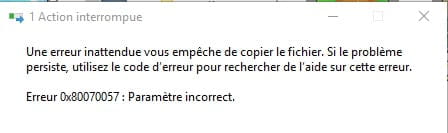
Does anyone know how to help me with this tricky situation?
Configuration: Windows / Chrome 63.0.3239.108
1 answer
-
Hi,
It’s possible that your enclosure doesn’t support hard drives larger than 2TB... the controller doesn’t follow.
What are the exact references of your enclosure? :-)
--
~ To listen is to possess, beyond oneself, the minds of others... said Leonardo da Vinci.
~ “The art of writing is above all to make oneself understood” — Eugène Delacroix
