Completely uninstall and reinstall Thunderbird
Solved
quidnovi5
Posted messages
1
Status
Member
-
jsidol -
jsidol -
Good evening,
I would like to uninstall and reinstall Thunderbird, which I have been using for years, but recently it has been showing some issues like losing passwords that I have to re-enter during certain restarts, or I have 5 addresses and my email displayed at each address but no longer in "Incoming Mail".
How can I backup the hundreds of messages that I have in archive?
How do I completely uninstall Thunderbird?
How do I properly reinstall it?
How do I install my archived emails?
Thank you and happy new year!
I would like to uninstall and reinstall Thunderbird, which I have been using for years, but recently it has been showing some issues like losing passwords that I have to re-enter during certain restarts, or I have 5 addresses and my email displayed at each address but no longer in "Incoming Mail".
How can I backup the hundreds of messages that I have in archive?
How do I completely uninstall Thunderbird?
How do I properly reinstall it?
How do I install my archived emails?
Thank you and happy new year!
5 answers
-
Hello everyone;
If you reinstall Thunderbird and then restore your old profile, you will encounter the same errors as before!
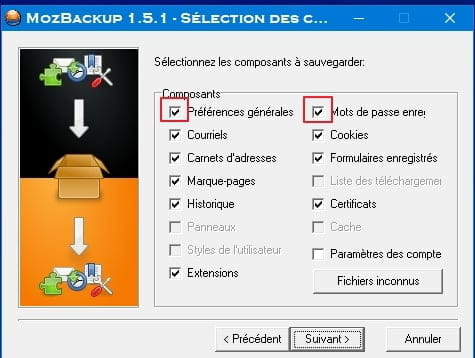
I suggest using Mozbackup (Tutorial) to back up your current profile by unchecking the 2 boxes highlighted in red to restore it without your passwords and general preferences that seemed to be causing problems.
Then I suggest making a clean and complete uninstallation of Thunderbird, including its hidden files such as the profile, and then reinstalling it via this link, and finally restoring the backup you made without the passwords that you will need to re-enter, and your general preferences, and in principle, you should have a clean email client with the history of your address book and emails...
See you soon
--
Best regardsAging well: It's preferring the time that remains to the time that passes
-
-
Hello,
Thank you for your help.
I recorded MozBackup by unchecking "Preferences" and "Passwords".
I also installed "Revo Uninstaller" but... I can't find the Thunderbird icon! Neither in Revo, nor in "Programs and Features", nor by browsing through "C:" for the installed programs!!!
Where is this software hidden, how can I find it, and how do I uninstall it? -
-
-
-