Unable to disable Secure Boot on an MSI Motherboard
ImParanoid
Posted messages
2
Status
Member
-
ImParanoid Posted messages 2 Status Member -
ImParanoid Posted messages 2 Status Member -
Hello,
I just upgraded to Windows 10 after completely restoring my computer, but when I try to install software, I get the message, "Your organization has used this setting to block this application."
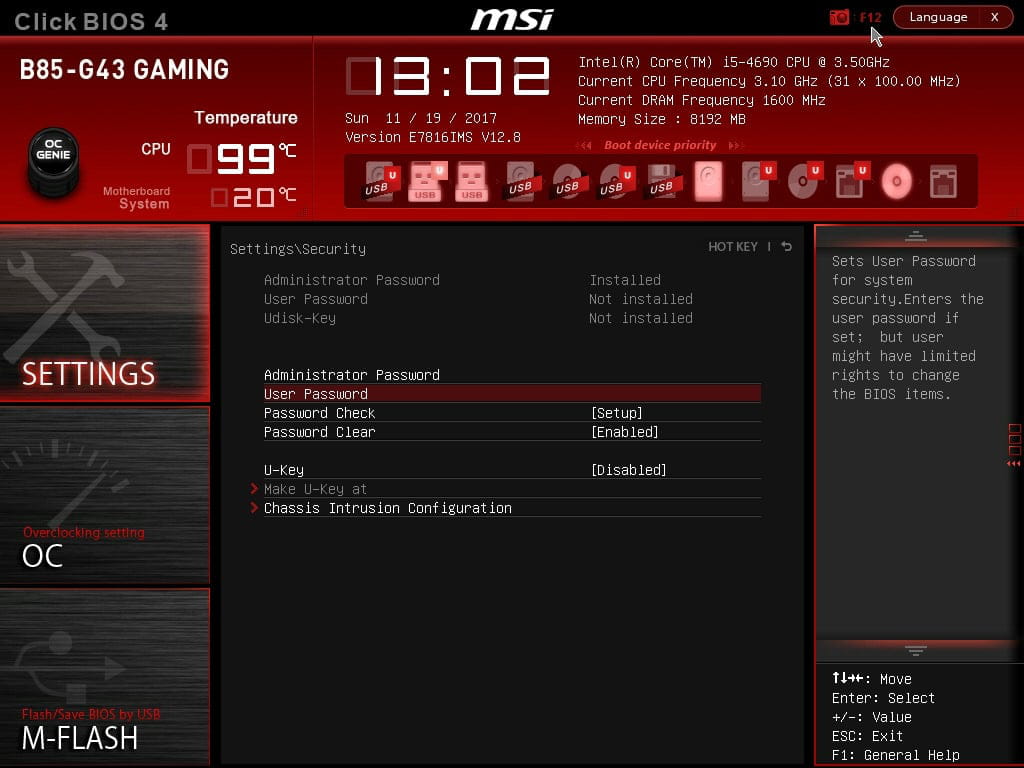
I searched online and the solution is to disable Secure Boot, but I can't find this option in the MSI UEFI, even after setting an administrator password for my UEFI. I also don’t have the "UEFI Firmware" option. As a result, my PC is still blocked.
Thank you in advance for your responses.
Configuration: Windows / Edge 16.16299
I just upgraded to Windows 10 after completely restoring my computer, but when I try to install software, I get the message, "Your organization has used this setting to block this application."
I searched online and the solution is to disable Secure Boot, but I can't find this option in the MSI UEFI, even after setting an administrator password for my UEFI. I also don’t have the "UEFI Firmware" option. As a result, my PC is still blocked.
Thank you in advance for your responses.
Configuration: Windows / Edge 16.16299