Thunderbird shared trash
fifidibosco
Posted messages
78
Status
Member
-
fifidibosco Posted messages 78 Status Member -
fifidibosco Posted messages 78 Status Member -
Hello everyone
I would like all the "trash" messages from all my accounts to be grouped in the same folder, "local folders/trash"
In "Account Settings/Copies and Folders" it is possible to choose folders for archives, sent messages, replies, drafts, templates, but not for the trash or sent messages, which are precisely the ones I'm interested in.
Is it possible to group all the "trashed" messages into the same folder??
Not to group all the trash with "unified folders," but for all the messages I put in the trash to go into the same folder "local folders/trash," regardless of the account they come from.
Thank you in advance
Fifi
I would like all the "trash" messages from all my accounts to be grouped in the same folder, "local folders/trash"
In "Account Settings/Copies and Folders" it is possible to choose folders for archives, sent messages, replies, drafts, templates, but not for the trash or sent messages, which are precisely the ones I'm interested in.
Is it possible to group all the "trashed" messages into the same folder??
Not to group all the trash with "unified folders," but for all the messages I put in the trash to go into the same folder "local folders/trash," regardless of the account they come from.
Thank you in advance
Fifi
7 answers
-
Hello,
According to https://support.mozilla.org/fr/questions/1024664, you just need to go to Tools menu > Account settings > Server settings. Then you have to change the local action (I imagine to delete) to move the email to the folder of your choice (let's say the shared trash).
According to https://support.mozilla.org/fr/questions/1117460, using a unified view allows you to have only one trash (but I imagine you also won't be able to distinguish the different inboxes on the interface other than by looking at the email header).
Good luck. -
Hello mamiemando
and thank you for the help.
I know these posts from the Thunderbird forum but I couldn't apply them because I don't have the option to change the local action in the server settings options.
Maybe because:
- the post is from 2014 and the server settings management has changed
or
- it's only possible for an IMAP account while I'm using POP
same for unified folders
fifi -
I reinstalled Icedove/Thunderbird to see, and... when it downloaded my 9000 emails, I understood why I switched to KMail :-D I thought my PC was going to take off ;-)
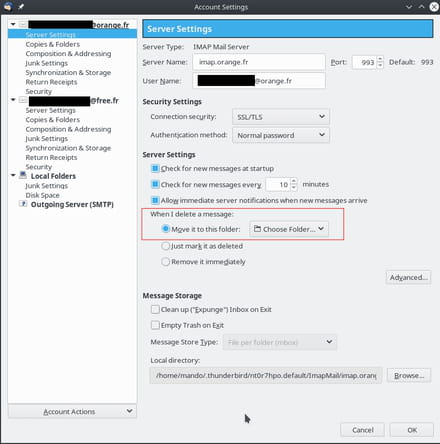
So from what I've seen, you can right-click on your email box, go to server settings, and then "when I delete a message, move it to this folder."
And I suppose you just need to choose the same folder for everyone...
Note that up until now, deleting a message means moving it from the inbox folder to the trash folder of your IMAP account. Here, it will delete the message and make a copy in the destination directory (potentially on your hard drive, depending on where your folder is set). I don't know if it will be possible to delete the trash folder from the IMAP server as well. There's a good chance that if you delete it, it will be recreated by the IMAP server at the next connection.
Good luck -
Hello mamiemando
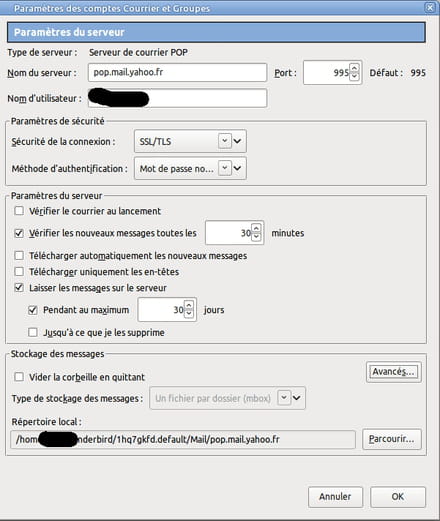
I probably don’t have that option in my server settings, as mentioned earlier, because I’m on POP and not IMAP
-
It's possible. At this stage, I have two solutions to propose to you:
- use the IMAP server of your email provider:
https://fr.aide.yahoo.com/kb/SLN4075.html
- change email client. For example, KMail has a consolidated trash. But KMail is only a reasonable choice if you are on KDE Plasma.
Good luck!-
Good evening mamiemando
I want to stick with POP and, as you said, Kmail wouldn't be a wise choice for me.
I was under KDE long enough that I abandoned it a few years ago when it started to "inflate".
Since this issue isn't crucial, I will keep searching and I'll come back to post the solution here if I find it.
Thanks again
fifi -
And for the IMAP track?
-
-
Well, I'm a bit out of ideas because it seems we don't have the same menus in Thunderbird.
Just to understand, which version of Thunderbird are you using? Have you tried updating? For my part, I had tested with version 1:52.4.0-1 in terms of Debian numbering.
And otherwise, even though I fully respect your choice, why do you want to stick with POP? Because I must admit I don't see the downsides of IMAP...
If you've tested with an earlier version, maybe an update would allow you to have the same menus?
Good luck! -
Hello mamiemando
I also have version 52.4.0. After researching with our neighbors across the Atlantic, it turns out that the configuration difference comes from the fact that I am using POP and you are using IMAP.
Apparently, to configure the trash as I want it, I will need to edit configuration files "manually".
I will come back here to post if I find something interesting.
Fifi