Toshiba, issue with certain keys
Solved
Lily243
-
vector2607 Posted messages 38 Registration date Status Member Last intervention -
vector2607 Posted messages 38 Registration date Status Member Last intervention -
Hello,
After a Windows 10 update on my Toshiba computer, some keys no longer work, such as the space key, the FN key, delete, and escape. I can no longer type or adjust the volume or brightness, exit full screen, etc. Does anyone have a solution?
After a Windows 10 update on my Toshiba computer, some keys no longer work, such as the space key, the FN key, delete, and escape. I can no longer type or adjust the volume or brightness, exit full screen, etc. Does anyone have a solution?
4 answers
-
Hello,
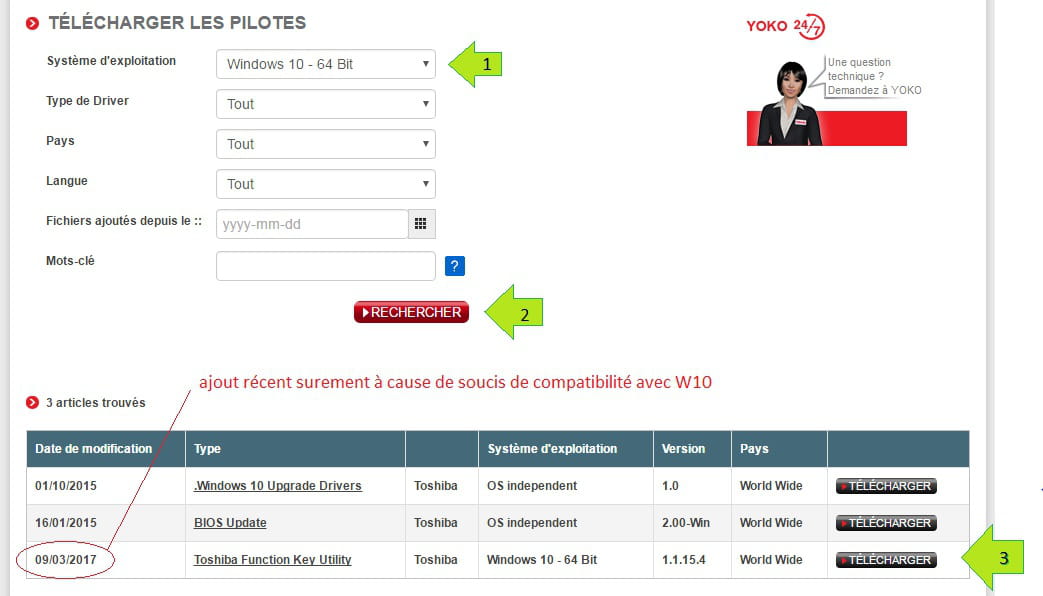
On Toshiba, the FN keys use a small software called "Function Key" or "Hotkey". I invite you to go to https://fr.dynabook.com/support/businesslaptops/, enter your PC's serial number, and go to the "Drivers" tab.
Select w10 in the "Operating System" field and click OK. Check if Toshiba has made a new version of "function key/hotkey" available to you.