Stop syncing

nlbmoi Posted messages 427 Registration date   Status Member Last intervention   -  
nlbmoi Posted messages 427 Registration date   Status Member Last intervention   -
Hello,

I would like to stop the synchronization of messages between Thunderbird and my email client: how do I proceed in Thunderbird?

Thank you in advance for your answers

Configuration: Windows / Firefox 51.0

3 answers

  1. barnabe0057 Posted messages 14329 Registration date   Status Contributor Last intervention   4 930
     
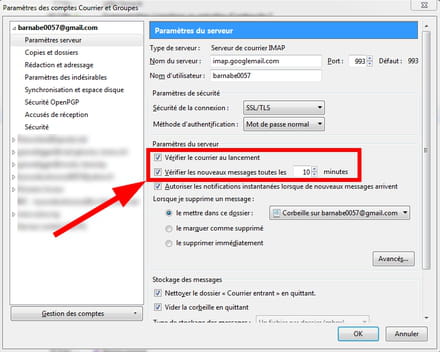
    You need to go to "tools", then to "account settings", and uncheck the two boxes as shown in the red box below:
    1
    1. nlbmoi Posted messages 427 Registration date   Status Member Last intervention   24
       
      I tested the proposed manipulation, but when I delete a message from my inbox and then start Thunderbird, it is also deleted in Thunderbird despite the unchecked boxes.
      0
      1. barnabe0057 Posted messages 14329 Registration date   Status Contributor Last intervention   4 930 > nlbmoi Posted messages 427 Registration date   Status Member Last intervention  
         
        I已经注意到这个功能有一个错误,但我以为只有我一个人受到了影响。
        0
  2. barnabe0057 Posted messages 14329 Registration date   Status Contributor Last intervention   4 930
     
    Good evening,

    Go to the control panel and uninstall Thunderbird.
    0
    1. nlbmoi Posted messages 427 Registration date   Status Member Last intervention   24
       
      Thank you, but I want to keep my emails in Thunderbird: my address will be deleted (since it is affiliated with an old account) and I wish to retain all my mails.
      1
  3. barnabe0057 Posted messages 14329 Registration date   Status Contributor Last intervention   4 930
     
    Otherwise, there is a radical method: you delete one of the access parameters to your account (server name, username, port, password).

    Or you can back up your profile and then delete your account.
    0
    1. nlbmoi Posted messages 427 Registration date   Status Member Last intervention   24
       
      If I understand correctly, the radical solution is: in Thunderbird's settings, I modify an account access element so that synchronization will no longer be possible?
      I used Mozbackup to backup my profile, but I'm thinking that if I use it again on Thunderbird, synchronization will resume immediately.
      0
      1. barnabe0057 Posted messages 14329 Registration date   Status Contributor Last intervention   4 930 > nlbmoi Posted messages 427 Registration date   Status Member Last intervention  
         
        I used Mozbackup to back up my profile, but I think that if I reuse it later on Thunderbird, the synchronization will resume immediately

        ==>> hence the point of my radical solution
        0
      2. nlbmoi Posted messages 427 Registration date   Status Member Last intervention   24 > barnabe0057 Posted messages 14329 Registration date   Status Contributor Last intervention  
         
        If I understand correctly the radical solution: in Thunderbird's settings, I modify an access element to my account so that synchronization will no longer be possible?
        0
      3. barnabe0057 Posted messages 14329 Registration date   Status Contributor Last intervention   4 930 > nlbmoi Posted messages 427 Registration date   Status Member Last intervention  
         
        Yes, that's right, I suggest you remove the username; it's the easiest parameter to find.

        The downside of this radical solution is that you may end up with an error message every time you open Thunderbird.
        0
    2. nlbmoi Posted messages 427 Registration date   Status Member Last intervention   24
       
      I tried to change the username, and there is indeed an error message: the problem is that the list of emails appears correctly, but when I try to open them, I have an issue where only the header displays: the content does not show up.
      0