
Unable to install NET Framework 4.6
Solved
Lt-E-Ripley
Posted messages
162
Status
Member
-
Malekal_morte- Posted messages 178136 Registration date Status Moderator, Security Contributor Last intervention -
Malekal_morte- Posted messages 178136 Registration date Status Moderator, Security Contributor Last intervention -
Hello,
I am unable to install .NET Framework 4.6. I searched on microsoft.com, and the version on my PC is 4.5. Why do I get the following message when I try to upgrade to 4.6:


I really need this version because HMA-Pro-VPN requires it, and without it, I cannot install it. Thank you for your help.
Configuration: Windows / Chrome 56.0.2924.87
I am unable to install .NET Framework 4.6. I searched on microsoft.com, and the version on my PC is 4.5. Why do I get the following message when I try to upgrade to 4.6:
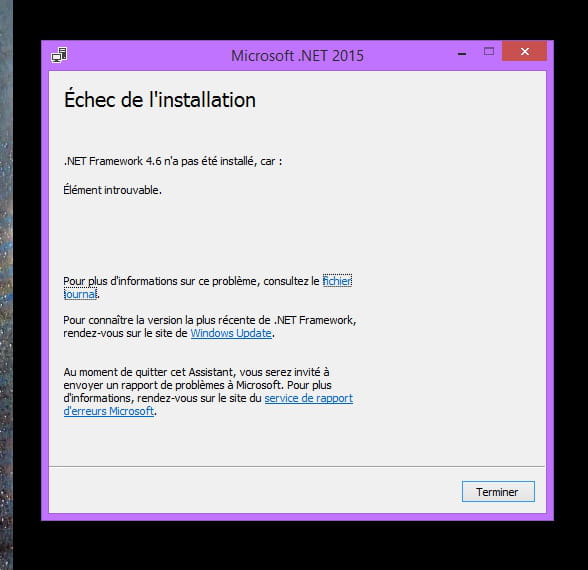

I really need this version because HMA-Pro-VPN requires it, and without it, I cannot install it. Thank you for your help.
Configuration: Windows / Chrome 56.0.2924.87
9 answers
-
In the journal, it is stated that the .NET Framework 4.6.2 is already installed.
Global Block Checks: Checking for global blockers
BlockIf: .NET Framework 4.6.2 or a later update is already installed on this computer.
BlockIf evaluated to false
BlockIf: The installer cannot run in compatibility mode.
Exists: evaluating
Exists evaluated to false
BlockIf evaluated to false
BlockIf: Cannot run the .NET Framework installer in safe mode. Restart your computer, allow your computer to start normally, and then rerun the installer.
Exists: evaluating
Exists evaluated to false
BlockIf evaluated to false
BlockIf: .NET Framework 4.6.2 cannot be uninstalled using this package. To uninstall .NET Framework 4.6.2 from your computer, go to Control Panel, choose Programs and Features, View installed updates, select Update for Microsoft Windows (KB3151804), and then choose Uninstall.
Have you checked in Control Panel
Programs and Features?
Check if KB3151804 is already installed.
If so, it means that .NET Framework 4.6.2 is already installed.
--
Please press a key to continue the disinfection...


