
Tencent impossible to remove
Solvedbazfile Posted messages 58492 Registration date Status Moderator Last intervention -
Hello,
On an old tower with Windows 7, I have some Chinese characters that start up when logging into the session, as well as on the home page of Internet Explorer (
Through the control panel, I can't uninstall the program because everything is written in Chinese.
Here are the 2 analysis reports:
https://pjjoint.malekal.com/files.php?id=20260610_q11x11f15k14y11
https://pjjoint.malekal.com/files.php?id=FRST_20260610_k13q15f7l11g10
Thank you very much.
4 answers
-
Hello.
I understand that uninstalling a program in Chinese can be problematic.
To uninstall the Chinese program called 电脑管家12.15, which means PCmanager 15.15, use this software, it will do the job and completely and automatically remove the Chinese program.
Once the software is uninstalled, if problems persist and only in that case let me know which ones and redo a FRST analysis.
bazfile
Moderator/Security Contributor.
A hello, a response, a thank you are always appreciated. -
Despite several attempts, Uninstalr detects the Chinese program but cannot uninstall it; Windows encounters an unexpected error and causes a planned/forced restart.
Software: Tencent High-Speed Download Engine Publisher: Tencent Version: 1.0.130.4 Installation directory: C:\Program files (x86)\Tencent\Qqpcmgr\ Main executable: C:\Program files (x86)\Common files\Tencent\Qqdownload\130\Tencentdl.exe Main shortcut: (none) Uninstaller: (none) Uninstaller registry key: (none) Found a total of 33 pieces of data relating to this software. 8 files or folders, and 25 registry keys or entries. Software's files and folders: C:\Program files (x86)\Common files\Tencent\Qqdownload\ C:\Program files (x86)\Common files\Tencent\Qqdownload\130\Tencentdl.exe C:\Program files (x86)\Tencent\Qqpcmgr\ C:\Users\Toto\Appdata\Roaming\Tencent\Deskgo\ C:\Users\Toto\Appdata\Roaming\Tencent\Qqdownload\ C:\Users\Toto\Appdata\Roaming\Tencent\Qqpcmgr\ C:\Users\Toto\Appdata\Roaming\Tencent\Tencentdl\ C:\Users\Toto\Appdata\Roaming\Tencent\Teniodl\ Software's registry data: HKEY_CLASSES_ROOT\Local settings\Software\Microsoft\Windows\Shell\Muicache\ : C:\Program files (x86)\Common files\Tencent\Qqdownload\130\Tencentdl.exe HKEY_CLASSES_ROOT\Local settings\Software\Microsoft\Windows\Shell\Muicache\ : C:\Program files (x86)\Tencent\Qqpcmgr\12.15.19676.234\Qqpcfileopen.exe HKEY_CLASSES_ROOT\Qmgcfiles\ HKEY_CLASSES_ROOT\Typelib\{da624f8f-98bf-4b03-ad11-a12d07119e81}\ HKEY_CLASSES_ROOT\Wow6432node\Clsid\{70de12ea-79f4-46bc-9812-86db50a2fd64}\ HKEY_CLASSES_ROOT\Wow6432node\Typelib\{da624f8f-98bf-4b03-ad11-a12d07119e81}\ HKEY_CURRENT_USER\Software\Microsoft\Windows Nt\Currentversion\Appcompatflags\Compatibility Assistant\Store\ : C:\Program files (x86)\Common files\Tencent\Qqdownload\130\Tencentdl.exe HKEY_LOCAL_MACHINE\Software\Wow6432node\Microsoft\Tracing\Tencentdl_rasapi32\ HKEY_LOCAL_MACHINE\Software\Wow6432node\Tencent\ HKEY_LOCAL_MACHINE\System\Controlset001\Services\Qqpcrtp\ HKEY_LOCAL_MACHINE\System\Controlset001\Services\Sharedaccess\Parameters\Firewallpolicy\Firewallrules\ : tcp query user{8714045f-4e39-4a44-8ca9-b216129eb0f4}c:\Program files (x86)\Common files\Tencent\Qqdownload\130\Tencentdl.exe HKEY_LOCAL_MACHINE\System\Controlset001\Services\Sharedaccess\Parameters\Firewallpolicy\Firewallrules\ : tcp query user{a2e7ab0f-c3be-4e9b-876b-d8e7973e660a}c:\Program files (x86)\Tencent\Qqpcmgr\12.15.19676.234\Qmdl.exe HKEY_LOCAL_MACHINE\System\Controlset001\Services\Sharedaccess\Parameters\Firewallpolicy\Firewallrules\ : udp query user{6b96fceb-85f3-4013-b094-e397d61a9399}c:\Program files (x86)\Tencent\Qqpcmgr\12.15.19676.234\Qmdl.exe HKEY_LOCAL_MACHINE\System\Controlset001\Services\Sharedaccess\Parameters\Firewallpolicy\Firewallrules\ : udp query user{e99ca12f-1b50-40e6-bb50-25fcd08033bf}c:\Program files (x86)\Common files\Tencent\Qqdownload\130\Tencentdl.exe HKEY_LOCAL_MACHINE\System\Controlset002\Services\Qqpcrtp\ HKEY_LOCAL_MACHINE\System\Controlset002\Services\Sharedaccess\Parameters\Firewallpolicy\Firewallrules\ : tcp query user{8714045f-4e39-4a44-8ca9-b216129eb0f4}c:\Program files (x86)\Common files\Tencent\Qqdownload\130\Tencentdl.exe HKEY_LOCAL_MACHINE\System\Controlset002\Services\Sharedaccess\Parameters\Firewallpolicy\Firewallrules\ : tcp query user{a2e7ab0f-c3be-4e9b-876b-d8e7973e660a}c:\Program files (x86)\Tencent\Qqpcmgr\12.15.19676.234\Qmdl.exe HKEY_LOCAL_MACHINE\System\Controlset002\Services\Sharedaccess\Parameters\Firewallpolicy\Firewallrules\ : udp query user{6b96fceb-85f3-4013-b094-e397d61a9399}c:\Program files (x86)\Tencent\Qqpcmgr\12.15.19676.234\Qmdl.exe HKEY_LOCAL_MACHINE\System\Controlset002\Services\Sharedaccess\Parameters\Firewallpolicy\Firewallrules\ : udp query user{e99ca12f-1b50-40e6-bb50-25fcd08033bf}c:\Program files (x86)\Common files\Tencent\Qqdownload\130\Tencentdl.exe HKEY_LOCAL_MACHINE\System\Currentcontrolset\Services\Qqpcrtp\ HKEY_LOCAL_MACHINE\System\Currentcontrolset\Services\Sharedaccess\Parameters\Firewallpolicy\Firewallrules\ : tcp query user{8714045f-4e39-4a44-8ca9-b216129eb0f4}c:\Program files (x86)\Common files\Tencent\Qqdownload\130\Tencentdl.exe HKEY_LOCAL_MACHINE\System\Currentcontrolset\Services\Sharedaccess\Parameters\Firewallpolicy\Firewallrules\ : tcp query user{a2e7ab0f-c3be-4e9b-876b-d8e7973e660a}c:\Program files (x86)\Tencent\Qqpcmgr\12.15.19676.234\Qmdl.exe HKEY_LOCAL_MACHINE\System\Currentcontrolset\Services\Sharedaccess\Parameters\Firewallpolicy\Firewallrules\ : udp query user{6b96fceb-85f3-4013-b094-e397d61a9399}c:\Program files (x86)\Tencent\Qqpcmgr\12.15.19676.234\Qmdl.exe HKEY_LOCAL_MACHINE\System\Currentcontrolset\Services\Sharedaccess\Parameters\Firewallpolicy\Firewallrules\ : udp query user{e99ca12f-1b50-40e6-bb50-25fcd08033bf}c:\Program files (x86)\Common files\Tencent\Qqdownload\130\Tencentdl.exe HKEY_USERS\s-1-5-21-1274802293-504822182-1890103616-1007_classes\Local settings\Software\Microsoft\Windows\Shell\Muicache\ : C:\Program files (x86)\Common files\Tencent\Qqdownload\130\Tencentdl.exe HKEY_USERS\s-1-5-21-1274802293-504822182-1890103616-1007_classes\Local settings\Software\Microsoft\Windows\Shell\Muicache\ : C:\Program files (x86)\Tencent\Qqpcmgr\12.15.19676.234\Qqpcfileopen.exe -
Here are the new reports:
https://pjjoint.malekal.com/files.php?id=FRST_20260611_o6x13n5c15m13
https://pjjoint.malekal.com/files.php?id=20260611_b6s15b14k5e8
-
It has been uninstalled and no longer appears in the installed programs; there are a few insignificant leftovers, to remove them follow these steps.
Procedure to follow in the indicated order:
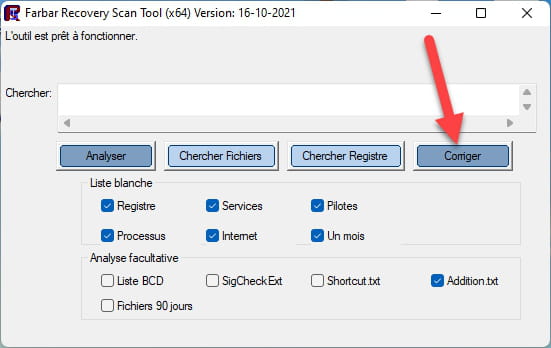
1- Open FRST as an administrator, for this right-click on FRST and choose run as administrator
2 - Copy the entire script that is in the box below:Start:: CreateRestorePoint: CloseProcesses: HKLM\SOFTWARE\Policies\Microsoft\Windows Defender: Restriction HKLM\SOFTWARE\Policies\Microsoft\Windows\WindowsUpdate: Restriction HKLM\SOFTWARE\Policies\Mozilla\Firefox: Restriction Task: {78B51306-F443-4C24-A771-A0454C44F846} - System32\Tasks\{15075B95-3555-4F53-BC10-B15B460107A7} => C:\Windows\System32\pcalua.exe [9728 2019-06-12] (Microsoft Windows -> Microsoft Corporation) -> -a C:\Users\Jean-Luc\AppData\Local\Temp\jre-8u111-windows-au.exe -d C:\Windows\SysWOW64 -c /installmethod=jau FAMILYUPGRADE=1 Task: {16D3F396-BF9E-40F1-BC0E-0B5AB4C0C50F} - System32\Tasks\{573E516F-57FD-4A33-872A-36FC774D6A3A} => C:\Windows\System32\pcalua.exe [9728 2019-06-12] (Microsoft Windows -> Microsoft Corporation) -> -a C:\Users\Jean-Luc\AppData\Local\Temp\jre-8u121-windows-au.exe -d C:\Windows\SysWOW64 -c /installmethod=jau FAMILYUPGRADE=1 HKLM\SOFTWARE\Policies\Microsoft\Internet Explorer: Restriction S3 TSSKX64Vir; C:\Windows\System32\drivers\tsskx64Vir.sys [67680 2017-07-24] (Tencent Technology(Shenzhen) Company Limited -> 电脑管家) S3 DrvAgent64; \??\C:\Windows\SysWOW64\Drivers\DrvAgent64.SYS (File not found) S3 QMUdisk; \??\C:\Program Files (x86)\Tencent\QQPCMgr\12.15.19676.234\QMUdisk64.sys (File not found) S3 softaal; \??\C:\Program Files (x86)\Tencent\QQPCMgr\12.15.19676.234\softaal64.sys (File not found) S3 TcHardWare; \??\C:\Program Files (x86)\Tencent\QQPCMgr\12.15.19676.234\QQPCHW-x64.sys (File not found) S1 TsDefenseBt; \??\C:\Program Files (x86)\Tencent\QQPCMgr\12.15.19676.234\TsDefenseBT64.sys (File not found) S2 tsnethlpx64; \??\C:\Program Files (x86)\Tencent\QQPCMgr\12.15.19676.234\TsNetHlpX64.sys (File not found) S2 QQPCRTP; "C:\Program Files (x86)\Tencent\QQPCMgr\12.15.19676.234\QQPCRtp.exe" -r (File not found) HKU\S-1-5-21-1274802293-504822182-1890103616-500\...\Run: [HydraVisionDesktopManager] => "C:\Program Files (x86)\ATI Technologies\HydraVision\HydraDM.exe" (File not found) HKU\S-1-5-21-1274802293-504822182-1890103616-500\...\Run: [HydraVisionMDEngine] => "C:\Program Files (x86)\ATI Technologies\HydraVision\HydraMD.exe" -AutoRun (File not found) HKU\S-1-5-21-1274802293-504822182-1890103616-500\...\Run: [EPLTarget\P0000000000000000] => C:\Windows\system32\spool\DRIVERS\x64\3\E_YATIMDE.EXE /EPT "EPLTarget\P0000000000000000" /M "WF-2630 Series" (File not found) HKLM\Software\Microsoft\Active Setup\Installed Components: [{30C521FB-255B-46C8-9F0D-EE5AE371C9AA}] -> "C:\Program Files (x86)\AVAST Software\Browser\Application\88.1.8016.150\Installer\chrmstp.exe" --configure-user-settings --verbose-logging --system-level (File not found) HKLM\Software\Wow6432Node\Microsoft\Active Setup\Installed Components: [{30C521FB-255B-46C8-9F0D-EE5AE371C9AA}] -> "C:\Program Files (x86)\AVAST Software\Browser\Application\86.1.6960.198\Installer\chrmstp.exe" --configure-user-settings --verbose-logging --system-level (File not found) HKLM\Software\Wow6432Node\Microsoft\Active Setup\Installed Components: [{981b174d-7733-4e7f-b89d-6545a7c21838}] -> C:\Program Files (x86)\Amazon\Amazon1ButtonApp\Amazon1ButtonTaskbarApp.exe /pin: (File not found) Task: {2F57269B-1E09-4E2D-AB1E-B0FDAC7D279C} - \Microsoft\Windows\WindowsBackup\ConfigNotification -> File not found Task: {AC4E5ACF-89F7-4220-BA21-81EE183975E2} - \Microsoft\Windows\Application Experience\AitAgent -> File not found Task: {CEE64558-E1A7-4D9D-80A7-2001912BE5B5} - \Microsoft\Windows\MemoryDiagnostic\CorruptionDetector -> File not found Task: {FA2BC0A6-8D4B-458A-85C8-2B8C72487513} - \Microsoft\Windows\MemoryDiagnostic\DecompressionFailureDetector -> File not found FF Plugin: @microsoft.com/GENUINE -> disabled [File not found] FF Plugin-x32: @microsoft.com/GENUINE -> disabled [File not found] S3 DrvAgent64; \??\C:\Windows\SysWOW64\Drivers\DrvAgent64.SYS (File not found) DcomLaunchx32: Power -> C:\Windows\SysWOW64\umpo.dll => File not found DcomLaunchx32: PlugPlay -> C:\Windows\SysWOW64\umpnpmgr.dll => File not found C:\Users\Toto\AppData\Roaming\Tencent C:\ProgramData\Tencent C:\Program Files (x86)\Tencent EmptyTemp End::3- Once the script is copied, click on Fix, FRST will automatically take the script that is in the clipboard.

Let the correction complete, once it is finished you will be asked to restart your PC, do it as soon as prompted, see below.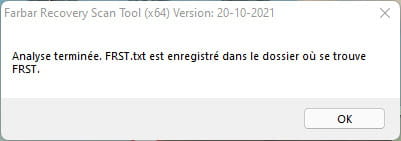
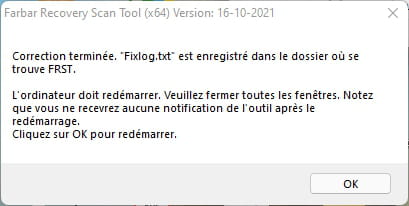

Then once your computer has restarted:
4- You will have a Fixlog file on your desktop, then send this fixlog report to https://pjjoint.malekal.com/ or https://www.catupload.com/.Then provide the link generated by https://pjjoint.malekal.com/ or https://www.catupload.com/ in your response.
5- CHECK AND TELL ME IF YOUR PROBLEM IS STILL PRESENT.
bazfile
Moderator/Security Contributor.
A hello, a response, a thank you is always appreciated.


