Freebox --> RJ45 socket --> computer
gereladame
Posted messages
6
Registration date
Status
Member
Last intervention
-
brupala Posted messages 111155 Registration date Status Member Last intervention -
brupala Posted messages 111155 Registration date Status Member Last intervention -
Hello everyone,
I hope you can guide me on a problem I'm facing.
I am a Free subscriber, I have the Freebox Revolution.
I installed this Freebox (server and TV) in the same room.
I would like to have internet in another room without using Wi-Fi.
The installation I'm going to describe was done by me, as I have just purchased the house and had to build the "internal" network.
So I connected an RJ45 cable from my Freebox to a wall RJ45 socket. From this wall socket, an RJ45 cable goes to another RJ45 socket. Finally, I connect a computer from the wall socket with a cable to the PC, but it doesn't work.
I also want to clarify that when I connect a PC via RJ45 to the server box, it works without any problem.
My first question is as follows (I'll try to be clear, sorry if the terms aren't accurate)
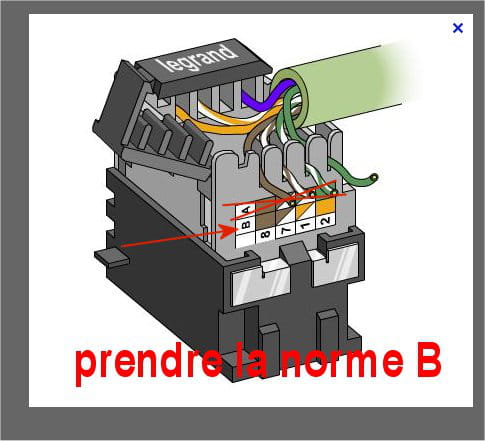
- When stripping an RJ45 cable, there are 4 twisted pairs: white/blue, white/green, white/orange, and white/brown. On the wall RJ45 sockets, we have the same color code, but the orange can be placed in 2 different locations. Does it have to be placed on the same side on both sockets?
- Furthermore, is the very fine wire important? Or can it be cut?
And finally, do you think the wiring I want to accomplish could be operational? The problem might actually come from that.
Thank you in advance for your answers.
I hope you can guide me on a problem I'm facing.
I am a Free subscriber, I have the Freebox Revolution.
I installed this Freebox (server and TV) in the same room.
I would like to have internet in another room without using Wi-Fi.
The installation I'm going to describe was done by me, as I have just purchased the house and had to build the "internal" network.
So I connected an RJ45 cable from my Freebox to a wall RJ45 socket. From this wall socket, an RJ45 cable goes to another RJ45 socket. Finally, I connect a computer from the wall socket with a cable to the PC, but it doesn't work.
I also want to clarify that when I connect a PC via RJ45 to the server box, it works without any problem.
My first question is as follows (I'll try to be clear, sorry if the terms aren't accurate)
- When stripping an RJ45 cable, there are 4 twisted pairs: white/blue, white/green, white/orange, and white/brown. On the wall RJ45 sockets, we have the same color code, but the orange can be placed in 2 different locations. Does it have to be placed on the same side on both sockets?
- Furthermore, is the very fine wire important? Or can it be cut?
And finally, do you think the wiring I want to accomplish could be operational? The problem might actually come from that.
Thank you in advance for your answers.
10 answers
-
Hi,
did you run a direct cable between your two sockets?
Yes, the orange pair should be in the same place at both ends; usually, we use wiring B, but it's not mandatory at all.
What’s important is that the twisted pairs are correctly respected and positioned at each end.
To check your wall socket wiring, I recommend investing in a small cable tester; it costs less than 10 euros on some websites, and it will save you time.
PS,
for the terms, a cable is not RJ45, it’s twisted pairs, RJ45 (8P8C) is the connector you put at the end.
Also,
it’s indeed solid core cable you have connected to your wall sockets, not stranded wires (which are flexible, for male connectors).
And ... Voilà Voilà Voilà!-
-
Hello,
sorry Brupala, if there are standards, they must be respected and in the case of our friend (or yours) if you have wall sockets, open them and you will see that you are wired to standard B)
For the cable, you need "category 6" like this one
https://www.conrad.fr/p/cable-reseau-uutp-8-x-0259-mm-cae-vg64sh-cat-6-bleu-atoll-marchandise-vendue-au-metre-094942 .
I do this job from time to time
Best regards
-