Allow a site blocked by Kaspersky Total Security
Solved
dela1956
Posted messages
676
Status
Member
-
jmarion3 Posted messages 49498 Registration date Status Contributor Last intervention -
jmarion3 Posted messages 49498 Registration date Status Contributor Last intervention -
Hello,
how to allow www.iheartradio.ca on my Kaspersky Total Security antivirus
thank you
how to allow www.iheartradio.ca on my Kaspersky Total Security antivirus
thank you
17 answers
-
Well, I found it (finally, I think!)
here:
--
The stone and the pebble fall at the same speed (an ancient Chinese proverb) -
Hi,
either disable it completely, or configure it in "exception" and enter the website address
--
The stone and the pebble flow at the same speed (an old Chinese proverb) -
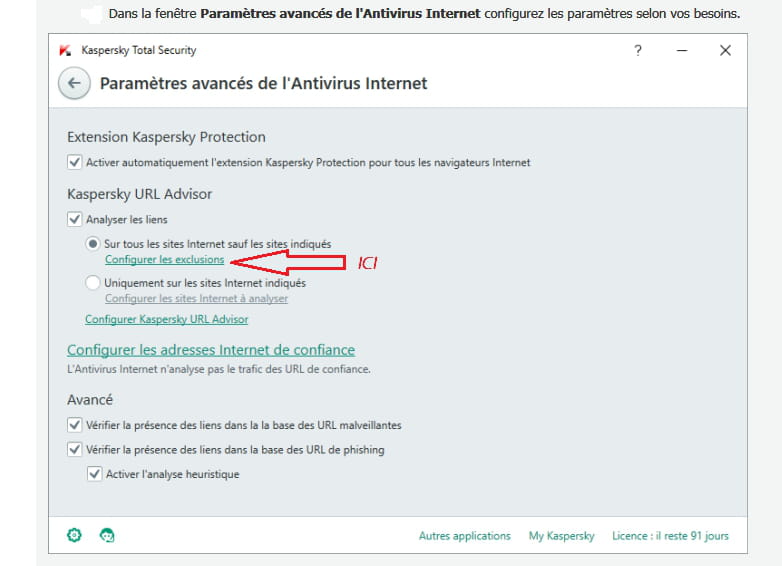
search for a tab "internet", then "exclusion", and enter the address: http://iheartradio.ca
The stone and the pebble flow at the same speed (an old Chinese proverb) -
Mark it as "trusted site"
--
The stone and the pebble fall at the same speed (an ancient Chinese proverb)-
- Follow the procedure on my page 8, click on "configure exclusions" and copy: https://www.iheartradio.ca/
-
-
A bit like >here< but here it's for parental control.
The process is normally the same.
--
The stone and the pebble flow at the same speed (an old Chinese proverb) -
Everything is explained on this page
--
The stone and the pebble fall at the same speed (an old Chinese proverb) -
Have you correctly entered this address? : http://iheartradio.ca
--
The stone and the pebble flow at the same speed (an old Chinese proverb) -
http://www.iheartradio.ca/home
--
The rock and the pebble fall at the same speed (an ancient Chinese proverb) -
Which browser do you use?
--
The stone and the pebble flow at the same speed (an old Chinese proverb)-
-
-
-
The complete address of Boom FM is https://www.iheartradio.ca/boom/boom-1041
-
-
-
I don't understand why he doesn't take it into account!!
All these antiviruses work on the same principle!!??
--
The stone and the pebble fall at the same speed (an old Chinese proverb)-
-
-
-
-
Can you take a screenshot of the "exclusion" option?
And post it >HERE<
-
-
Meh !!!???
"Active" should therefore let them pass, but that’s not the case!!
--
The stone and the pebble sink at the same speed (an ancient Chinese proverb) -
I modified your title to get more feedback
--
The stone and the pebble flow at the same speed (an ancient Chinese proverb) -
Hello everyone;
Personally, I have the Kaspersky Total Security version and I just clicked on the link https://www.iheartradio.ca/boom/boom-1041 provided and the listening works without any issues or modifications to Kaspersky
--
best regardsAging well: It's preferring the time that's left to the time that's passing
-
What message do you receive from Kaspersky when you want to visit the site?
If you could provide a screenshot again!!
--
The stone and the pebble flow at the same speed (an old Chinese proverb) -
Hi JB.
In my opinion, either Kaspersky is misconfigured or something else is wrong ?? Or the issue is elsewhere ??
Personally, and it doesn’t take much time, I would do a clean and complete uninstall of Kaspersky followed by its reinstallation, configuring the Kaspersky protections simply by checking Act.... and without doing anything else, like in the screenshots below, because if it works fine for me and without modifications .............
If our friend doesn't know how to properly uninstall Kaspersky, I suggest he comes back here

See you for upcoming comments?
SincerelyAging well: It's preferring the time that remains to the time that passes
-
I received a message from Kaspersky, I downloaded the new version of the antivirus, now everything works.
-
Hello;
Thank you for the response and especially happy for you
--
Best regardsAging well: It’s preferring the time that remains to the time that passes