Memory cannot be written...
Solved
WanDayo
Posted messages
22
Status
Member
-
-Shadow- Posted messages 2148 Registration date Status Member Last intervention -
-Shadow- Posted messages 2148 Registration date Status Member Last intervention -
Hello, first of all, I know this topic has already been discussed but mine is a bit different! In summary: I start my PC, Windows indicates that it's loading (normal), but after its loading, black screen! Then I find myself with a flickering black screen with my Windows theme (blue) and a message indicating that the memory cannot be written... For now, just like the other topic... For me, no solution... I restore Windows... Hooray! It works! It's evening and I'm going to bed so I turn off my PC. The next day, I restart it and bam! Same error, the memory cannot be written... (I'm losing it) I'm searching, searching, no solution so I reinstall Windows. It works! I restart AND THE SAME PROBLEM! DARN (not to be vulgar) so every time I restart, the same problem HELP! Thank you in advance...
15 answers
-
Hello
Curious. It's either a virus or a hardware problem.
Run a full antivirus scan, and if that doesn't change anything, contact me again through the forum, and we'll take a closer look at the issue.
Temporary solution in the meantime, if you want to shut down your PC every night: Put it in hibernation. :)
--
~ The sockets of the archduke are drying ~ -
Thank you for your response, but I cannot access Windows unless I reinstall it... :/
-
Hi,
oh, have you already formatted? Restoring Windows rather means repairing or doing a system restore. In this case, the problem is more serious. It must be a hardware issue, or a very nasty rootkit. Some viruses can avoid formatting by embedding themselves in the hard drive firmware!!! You reinstall Windows, and upon restart, the rootkit reappears as if nothing happened.
1. You should perform a health check with CrystalDisk Info. And then reinstall Windows...
2. If it indicates a problem, you need to change the hard drive.
3. Otherwise, if it’s neither the hard drive nor a rootkit, it’s the RAM, and in that case, the RAM sticks need to be changed.
4. If it still doesn’t work, it’s the motherboard that is failing, and then it’s a hassle to fix that problem. :(
See you!
-
-
How to format Windows? (I pressed F11 at startup to repair it, Troubleshoot, Reset this PC, remove everything... I also tried System Restore...)
-
You need an installation disc. But beware of data loss, so you need to back up your files first.
--
~ The sockets of the archduke are drying ~ -
Hello,
To see:
Follow the FRST tutorial. ( take the time to read carefully - everything is well explained ).
Download and run the FRST scan, 3 FRST reports will be generated:- FRST.txt
- Shortcut.txt
- Additionnal.txt
Send these 3 reports to the site http://pjjoint.malekal.com/ and in return provide the 3 pjjoint links leading to the reports here in a new response so that we can review them.
--
Please press any key to continue the disinfection... -
-
I reinstalled Windows and ran FRST, here's the report:
FRST: https://pjjoint.malekal.com/files.php?id=FRST_20170123_r9u11c5s13n8
Addition: https://pjjoint.malekal.com/files.php?id=20170123_n13v10b14c7p8
Shortcut: https://pjjoint.malekal.com/files.php?id=20170123_y15r7x9u13l5
Thank you for your replies! ;) -
mouaip possible disk problem :
Error: (01/23/2017 08:31:33 PM) (Source: NTFS) (EventID: 137) (User: )
Description: The default transaction resource manager on volume C: encountered a non-recoverable error and could not start. The data contains the error code.
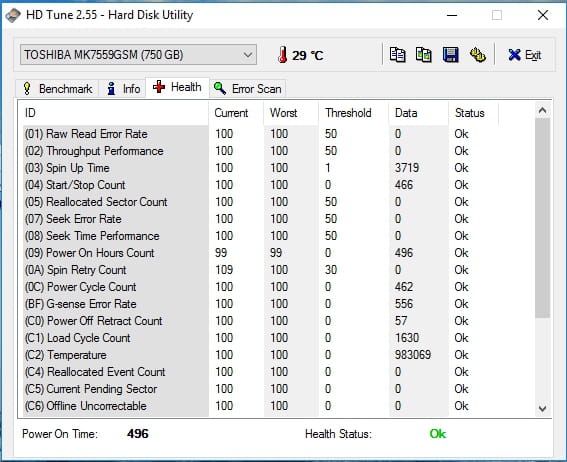
Start by checking the health status of the disks, in particular, it would be good to provide a screenshot of the Health tab from HD Tune.
--
Please press any key to continue the disinfection... -
Thank you, I installed HD Tune and saw that everything was okay... This morning my PC restarted normally but it turned off last night! I don't know if FRST was able to fix it, but if that's the case, I think it's great! :)
(I have to send it in two parts and I separated the end of the first image with dashes... You'll see when you open the screenshot.)

-
By the way, would it be a good idea to downgrade to Windows 7?
-
Personally, I would run a memtest.
For Windows 7, it's up to you.
--
Please press a key to continue the cleanup... -
For Windows 7, I will see later...
I installed Memtest, but I don't know if I need to send you a folder for example? Or something else... -
Okay, I think my problem is resolved since my PC starts
normally and memtest shows 0 errors... -
I think the formatting has realigned the hard drive heads, they shift more and more with use.
From time to time, it doesn't hurt to format everything.
You can mark it as resolved if you're not experiencing any issues anymore.
See you later
PS: I recommend you downgrade to Windows 7 because Windows 10 isn't very trustworthy regarding personal data... xD
~ The arcidu's sochettes dry ~ -
I want to thank you, the bug has come back but by reverting to Windows 7 everything works! Thank you!
-
Good =)
I invite you to create a system image now that you have a stable Windows.
=> How to create a Windows system image
This system image can be restored at any time, including Windows, updates, and installed programs.
Very handy for easily restoring Windows when everything crashes.
In your case, this will avoid all those tedious updates, software removals, and application reinstallations.
-