Frozen screen with colored lines or small squares
Solved
Arthur1411
-
Profile blocked -
Profile blocked -
Hello, I have a Dell computer (from 2009) that boots under Windows 7 (Pro). After a few minutes, and each time after opening a window, the screen freezes and colored lines appear. At first, it happens in the open window, for example, the web browsing window or a program window. If I enlarge the window, it freezes immediately; otherwise, without enlarging it, I can surf for a few minutes and it freezes after about 5 or 6 minutes. Sometimes instead of colored lines, there are small black and white squares, and each time it freezes. When the problem occurs, I can only turn off the computer and restart it, but it comes back almost immediately after booting. I have run several antivirus and malware scans: Avira antivirus, MalwareBytes, Junkware Removal Tool, Roguekiller Pro, ZHP Cleaner, and Asquared. I also tested with a Linux system on a USB stick (so without booting into Windows), and the problem also appears on Linux.
The problem is still unresolved at this time. I don't know what to do anymore, and I'm afraid it might be an issue with the video card. If anyone has an idea or advice, please propose it here.
System: Dell laptop - Windows 7 Pro - Pentium T4300 (2.10 GHz) 64 Bits - RAM 3 GB - graphics card ATI Mobility Radeon HD 4500
The problem is still unresolved at this time. I don't know what to do anymore, and I'm afraid it might be an issue with the video card. If anyone has an idea or advice, please propose it here.
System: Dell laptop - Windows 7 Pro - Pentium T4300 (2.10 GHz) 64 Bits - RAM 3 GB - graphics card ATI Mobility Radeon HD 4500
8 answers
-
I am pleased to announce that the problem is solved. After searching through other topics on the forum, I ended up trying to update the display drivers. This did not work. So, I searched the web and found the ATI website, which offered a program to upgrade the drivers. And bingo, it worked! Everything is running smoothly now. The display has regained its fluidity and, above all, it's no longer bugging at all. Phew, my mother is super happy. She just saved the price of a new computer.
Thank you @Papounet17000 and @jeannets
Merry Christmas to both of you :-)-
OK, good for you...
But the stripes in the BIOS weren't a Windows driver issue... Because the BIOS operates independently and its display functions are elementary.
Shall we consider the issue resolved??- Indeed, it seems strange regarding the stripes at the BIOS level.
But currently the computer is working without any problems and after multiple openings-closing-resizing of windows in all directions as well as restarts. My mother was able to update her emails and her personal settings (which she hadn't been able to do for a month and a half).
For me, the issue is resolved.
Thanks again.
-
-
Hi,
The graphics card is dying.
Monitor your temperatures with [downloadtelecharger-34066754-speccy Speccy].
I think we should remove all the dust that has accumulated over the years inside the laptop. -
jeannets Posted messages 28462 Registration date Status Contributor Last intervention Ambassador 6 618
Hello,
I think that Windows 7 is a bit too much for a PC like that... especially since you're loading it with graphics
You can read this https://forums.commentcamarche.net/forum/affich-19936547-telecharge-mobility-radeon-hd-4500-series even though it's not the same PC, they discuss the same graphic chip..
This PC was at its maximum with Vista... I think you're overloading it with Win 7 Pro -
jeannets Posted messages 28462 Registration date Status Contributor Last intervention Ambassador 6 618
I wonder what can fill up a disk with 550 GB... everything mixed together, Windows, email program, photos, movies... watch out for the day of the crash...
Anyway..! If the screen also shows scratches in the BIOS, it’s not a problem related to Windows... there are things to check with the screen...
And if we connect an external screen... what does that say...?
One common screen problem is a failing inverter... or the CCFL tubes flickering (like fluorescent tubes) which gives exactly the same impression as a screen that turns off for a moment... a broken wire in the hinge could also be an issue.-
By the way, speaking of crashes, use CrystalDiskInfo to check the health status of your hard drive.
Once it's on the desktop, you need to unzip the file into a folder.
Once done, click on the DiskInfo64 file to launch it.
You're not immune to an issue like this, and since apparently all your life is on this hard drive, it would be a shame if it were to fail and you hadn't made a backup.
-
-
jeannets Posted messages 28462 Registration date Status Contributor Last intervention Ambassador 6 618
3 GB should be enough, but it's the processor and the other components of the motherboard that aren't keeping up...
Basically... Win 7 takes up 30 or 40 GB on the hard drive
and Windows XP is 10 times less. Its lightness allows an old PC to function... but as soon as you hook a semi-trailer behind it, it can no longer climb the hills... -
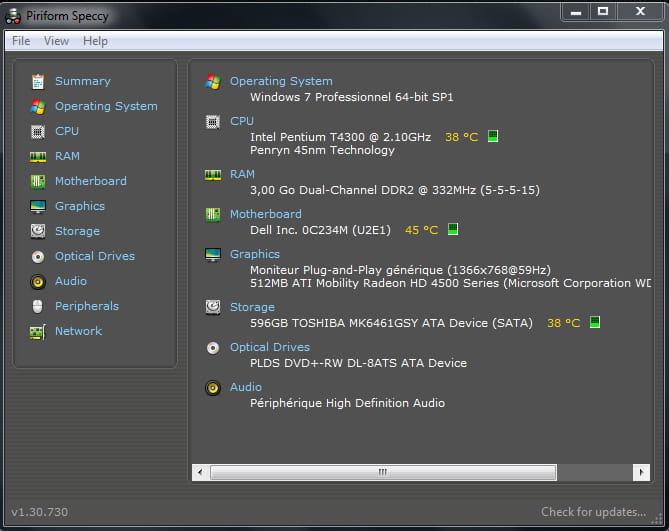
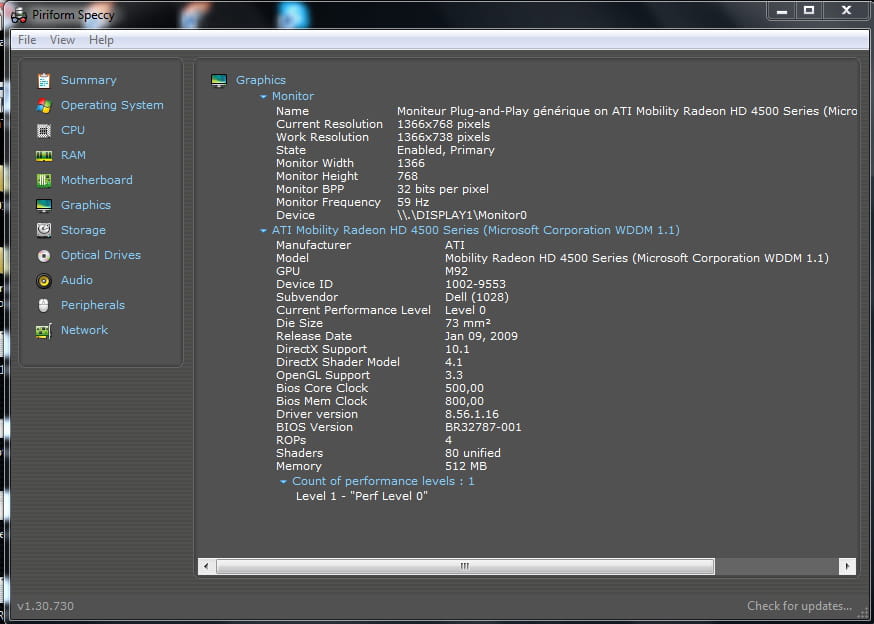
the results of the test conducted by Speccy:
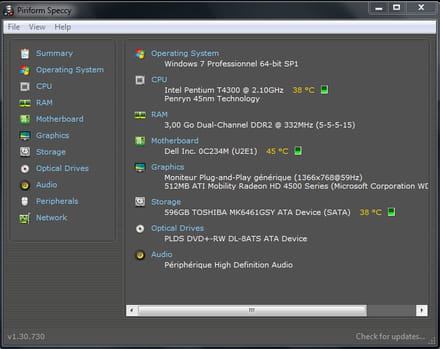
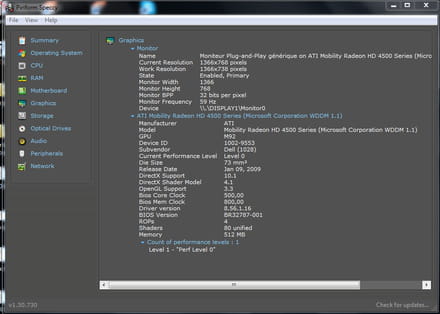
I am in doubt because it seems there is no overheating problem. -
@Papounet17000: Oops! I made a mistake. Actually, it's 550 GB free out of 596. Yet I haven't been drinking tonight. Well, just a little aperitif. Lol.
@jeannets: Indeed, the fact that it crashed at the BIOS level also pointed me towards the screen (or maybe the video card). I've heard that's the most common failure in an old laptop.
I also looked into other topics and tapped on the screen as some suggested, but nothing's happening.
I'm wondering if I shouldn't place an order for a new PC with Santa Claus. -
jeannets Posted messages 28462 Registration date Status Contributor Last intervention Ambassador 6 618
Yes, your order idea is also a solution; it would cover all the others. We need to discuss it with management...!
As @papounet said from the beginning, your graphics card shouldn't follow, it is dying... and it's only going to get worse and worse.. and vice versa.-
It's true that we wish our computers would last a lifetime, lol. I feel like this one has reached the end of its life. But what's annoying is that this is the second laptop my mom has burned out in the span of eight months (old second-hand laptops). The first one doesn't start at all; I tried using a bootable USB with Linux, but nothing works. On the other hand, what's frustrating is that this one starts up, but of course, it's impossible to navigate properly due to this display issue. I'm increasingly convinced that @Papounet17000 is right, that the graphics card is on its last legs.
However, I'm waiting until next week to see if I need to buy another one. I'm going to explore as many options as possible beforehand.
-