Samsung UE50HU6900 Front Color Issue
Solved
brikolo09
Posted messages
2
Registration date
Status
Member
Last intervention
-
Benben -
Benben -
Hello everyone,
I'm reaching out for your help to try to solve my problem and as they say, "I'm in a fix..."
I had the unfortunate initiative to take a look in the Samsung Hidden Menu of my UHD series 6 UE50HU6900 TV
I had an issue with a freezing image and rebooting of the TV while watching a movie via USB (a relatively recent problem)
So while searching the web, I tried to turn the watchdog OFF, then accidentally I moved the TYPE option (I didn't know what it was).
I attempted a Factory reset, but after that the TV image looks really weird with an unusual color tone, then I made multiple attempts adjusting the TYPE and FRONT COLOR
So I'm looking for the correct combination of TYPE and FRONT COLOR for my model.
I removed the back panel for the labels to have as many elements as possible to try to resolve my issue.
Between the model names 6900, 6900S, etc... and the types...
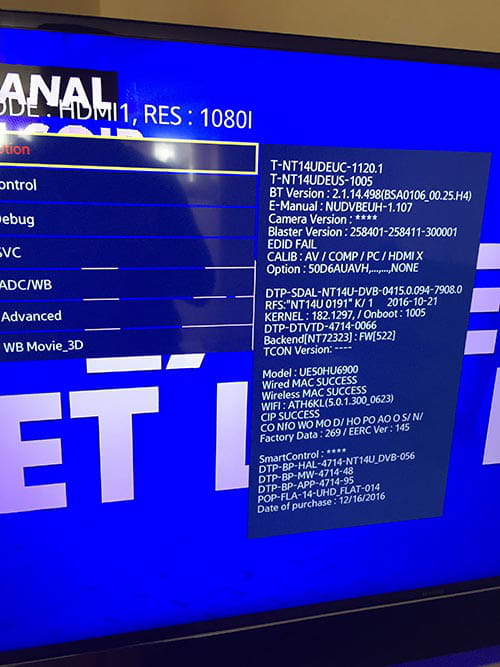
My current settings in options (which are not correct):
Type: 50D6AUAVH / / Front Color: U-UHD-H9K
Strange date of purchase, is this due to the Factory reset?

Behind the TV
Inside, once the back panel is removed
On a ribbon just in case
I hope this helps
Thanks in advance
I'm reaching out for your help to try to solve my problem and as they say, "I'm in a fix..."
I had the unfortunate initiative to take a look in the Samsung Hidden Menu of my UHD series 6 UE50HU6900 TV
I had an issue with a freezing image and rebooting of the TV while watching a movie via USB (a relatively recent problem)
So while searching the web, I tried to turn the watchdog OFF, then accidentally I moved the TYPE option (I didn't know what it was).
I attempted a Factory reset, but after that the TV image looks really weird with an unusual color tone, then I made multiple attempts adjusting the TYPE and FRONT COLOR
So I'm looking for the correct combination of TYPE and FRONT COLOR for my model.
I removed the back panel for the labels to have as many elements as possible to try to resolve my issue.
Between the model names 6900, 6900S, etc... and the types...
My current settings in options (which are not correct):
Type: 50D6AUAVH / / Front Color: U-UHD-H9K
Strange date of purchase, is this due to the Factory reset?
Behind the TV
Inside, once the back panel is removed
On a ribbon just in case
I hope this helps
Thanks in advance
1 answer
-
I solved my problem
I think the right combination is:
Type:50D6AU7VH / Front Color:U-WM-HU7K
After that, I did a HDMI Calibration with this procedure here [url]http://wiki.samygo.tv/index.php?title=Main_Page
I connected my Box to the HDMI of my TV and then displayed the SamyGo image from a USB stick.
HDMI Calibration: Success
I did an Options/Factory Reset
I turned the TV back on and the image has become correct now.