
Network card issue
Solved
Rajinsk
Posted messages
10
Status
Member
-
billmaxime Posted messages 50526 Registration date Status Contributor Last intervention -
billmaxime Posted messages 50526 Registration date Status Contributor Last intervention -
Hello everyone,
First of all, I apologize for posting a topic that seems to have already been addressed on this forum. However, while trying to follow the multiple solutions that have been proposed, I ended up either confused or in a worse situation than before (this aspect seems to be fixed for now... I hope).
As for my issue, I have no idea how it appeared: I updated some drivers using the Driver Booster software and did some cleaning with the Advanced System Care 10 software.
During these operations, there were no difficulties, and the computer ran perfectly well.
I then stepped away for an afternoon, shutting down the computer, and when I returned, I found that I could no longer connect to the internet, even though the box is working perfectly, I am directly connected to it, and the little light on the PC connection is blinking properly.
So I tried to update the drivers, but they are already up to date. Yet, when diagnosing the problem, it seems that it stems from the drivers, so I don't understand.
I've done countless manipulations that nearly caused my PC to not start anymore, but nothing has worked.
Regarding the configuration, I am running Windows 7 x64, and my network card seems to be the Intel(R) 82579V Gigabit Network Connection.
I am also attaching a screenshot that I hope will be useful to you.

I'm sorry again for the repost and for this rather long message, but I admit I'm a bit desperate at the moment.
Thank you in advance for your help.
PS: I also specify that my motherboard is an Asus P8Z68-V PRO/GEN3.
First of all, I apologize for posting a topic that seems to have already been addressed on this forum. However, while trying to follow the multiple solutions that have been proposed, I ended up either confused or in a worse situation than before (this aspect seems to be fixed for now... I hope).
As for my issue, I have no idea how it appeared: I updated some drivers using the Driver Booster software and did some cleaning with the Advanced System Care 10 software.
During these operations, there were no difficulties, and the computer ran perfectly well.
I then stepped away for an afternoon, shutting down the computer, and when I returned, I found that I could no longer connect to the internet, even though the box is working perfectly, I am directly connected to it, and the little light on the PC connection is blinking properly.
So I tried to update the drivers, but they are already up to date. Yet, when diagnosing the problem, it seems that it stems from the drivers, so I don't understand.
I've done countless manipulations that nearly caused my PC to not start anymore, but nothing has worked.
Regarding the configuration, I am running Windows 7 x64, and my network card seems to be the Intel(R) 82579V Gigabit Network Connection.
I am also attaching a screenshot that I hope will be useful to you.
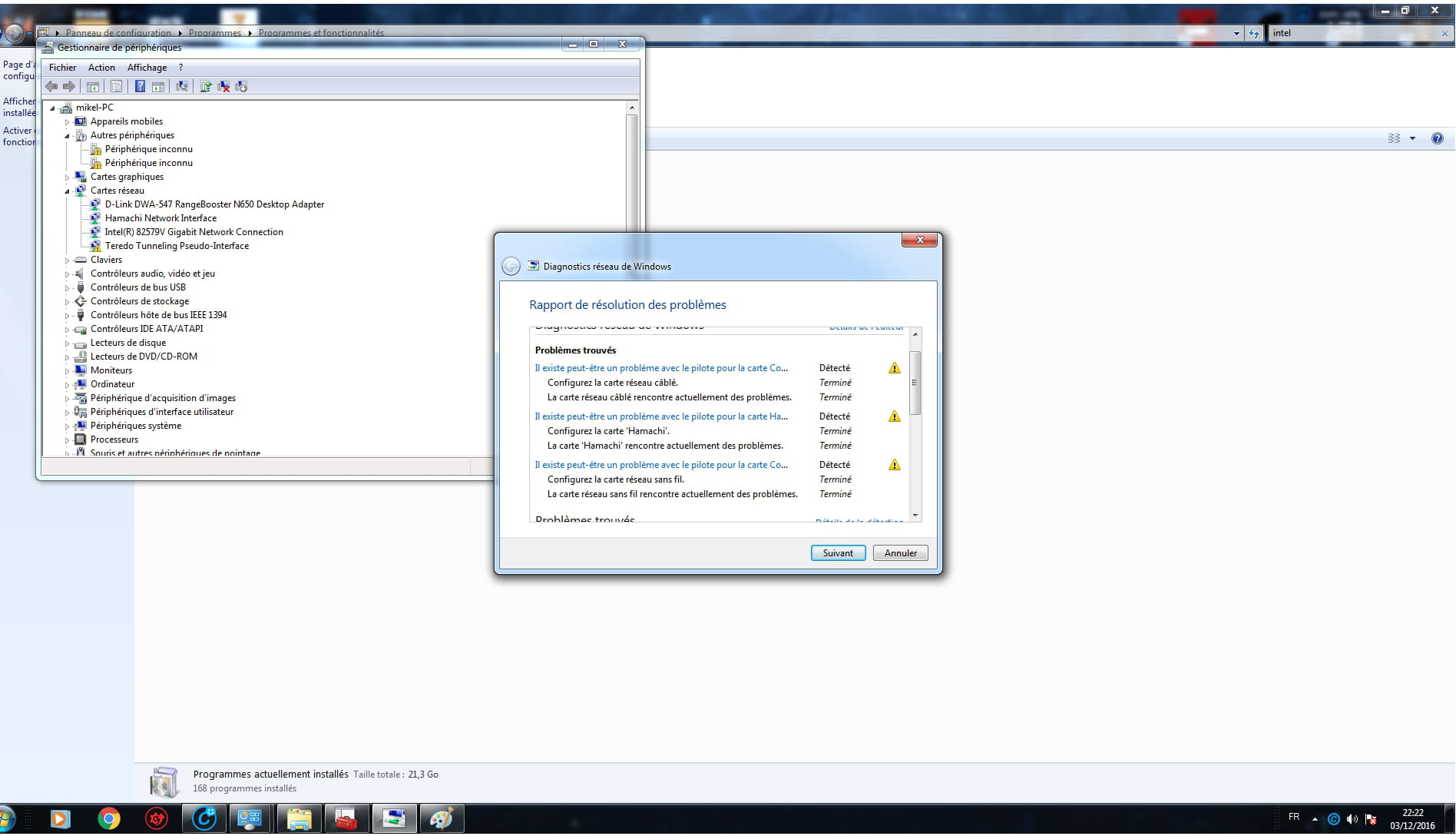
I'm sorry again for the repost and for this rather long message, but I admit I'm a bit desperate at the moment.
Thank you in advance for your help.
PS: I also specify that my motherboard is an Asus P8Z68-V PRO/GEN3.
8 answers
-
I raised the topic a bit.
I also tried to see if it works in safe mode but still nothing.
Additionally, I get the impression that the wireless network card has the same problem, so I hope it's not a hardware issue... but I'm doubting it more and more. -
Even with a zoom on your screenshot, it's still not very clear. However, we notice that you have many driver issues (yellow exclamation points). You should try reinstalling the drivers for your motherboard. If you don't have the driver CD, try downloading them on another PC and saving them on a USB stick.
--
To misname things is to add to the misery of the world (Albert Camus)-
First of all, thank you very much for your response. I was starting to lose hope.
As for the image on my screen, it appears large enough so I didn't pay attention.
Overall, it says:
There may be a problem with the wired network driver -> Detected
Configure the wired network card -> Finished
The wired network card is currently encountering problems -> Finished
And the same thing for the wireless network card and the Hamachi card (I thought I had removed it but it's quite persistent)
I have already reinstalled the LAN drivers for my motherboard with no results. I will try to do the same with the other drivers hoping not to break anything, but I won't be able to do it until quite late or at worst tomorrow evening.
Otherwise, I think I will try to perform a system restore from an October backup, but that one is on an external hard drive and I can't activate it for now.
But I will wait until I have tried everything in any case.
In any case, thank you again and I will keep you updated.- "I have already reinstalled the LAN drivers for my motherboard without results. I will try to do the same with the other drivers hoping not to break anything, but I won’t be able to do it until quite late or at worst tomorrow evening."
Does this mean that you have a support with the motherboard drivers? Otherwise, given that you can't go online, you cannot download the motherboard drivers on this PC. What are the make and model of your PC?
-
-
-
-
-
Well, I'm posting one last time.
I'm still surprised not to have received a single response. But maybe there's nothing to do except change the card, although I would have liked to know if that was really the case. -
Hello
The drivers for your motherboard are on this page:
https://www.asus.com/support/Download/1/39/6/11/KDh9nqBoiqs2jqua/30/
WARNING: for the Intel(R) 82579V Gigabit Network adapter, you must first install this:
Note: Install the NVM Update Utility for Intel 82579V Gigabit Ethernet PHY Network Connection before updating this driver.
The URL for the utility: https://downloadcenter.intel.com/download/22026
the link to the page:
https://downloadcenter.intel.com/download/22026
See you
--
the radiation level is higher at Pôle Emploi than at Chernobyl. -
re
How long ago did your problem start?
@+
--
The radiation level is higher at the unemployment office than at Chernobyl. -
re
This dates back to this weekend
check if you have a restore point from before your manipulations with Driver Booster and Advanced System Care 10
if so, choose and execute the system restore
https://www.commentcamarche.net/informatique/windows/147-restaurer-windows-avec-les-points-de-restauration/
let me know how it goes
@+
--
the radiation level is higher at the employment agency than in Chernobyl -
re
ok, waiting for your response
@+
--
the radiation level is higher at the job center than at Chernobyl-
News update:
I found the CD and did a complete installation of the motherboard drivers, result -> Nothing ... still no connection for both wired and wireless network
HOWEVER, I installed a driver for a DLINK wireless card that I had installed on the computer but never really used, and I don't know why, but everything is working again for wired (I verified by unplugging the Ethernet cable and I lost connection, so I conclude that I am indeed on Ethernet)
Unfortunately, I am completely unable to understand why this had an influence.
On the other hand, I noticed that the light on my Ethernet cable was flashing orange (apparently it's a speed issue from what I understood), but there is also a solid dark orange ... I may have looked poorly, and it has always been orange and not green.
In any case, I hope that this will hold.
Thank you very much for your help and your time.
Best wishes.
-
-
re
thank you for the feedback^^
I hope everything is working for you
@+
--
the radiation level is higher at the unemployment office than in Chernobyl
