
—
Solved
Turpinou
Posted messages
442
Status
Member
-
Hello -
Hello -
Hello, good evening
I would like to know how to access the em dash, generally used for dialogues, with a shortcut, without a numeric keypad (since it turns out my computer doesn't have one), on Word software.
I know there's a shortcut: by using the hyphen key twice (-) you should get the em dash, but instead, I'm getting a big square dot... However, the "hyphen with en dash" option in Word's display settings is checked.
Thank you for your responses, which I hope will be as quick as possible!
--
If there's no solution, it's because there is no problem.
I would like to know how to access the em dash, generally used for dialogues, with a shortcut, without a numeric keypad (since it turns out my computer doesn't have one), on Word software.
I know there's a shortcut: by using the hyphen key twice (-) you should get the em dash, but instead, I'm getting a big square dot... However, the "hyphen with en dash" option in Word's display settings is checked.
Thank you for your responses, which I hope will be as quick as possible!
--
If there's no solution, it's because there is no problem.
1 answer
-
Hello Turpinou,
in the Insert tab, Symbols group, click on Symbol and
choose "More Symbols..." => "Special Characters" window;
then select the 2nd tab (with the same name); at the very beginning
of the list, you will find: "Em Dash" and also "En Dash".
If your problem is resolved, please go to the top of the page
to click on "Mark as resolved".
Best regards. 😊
-
-
-
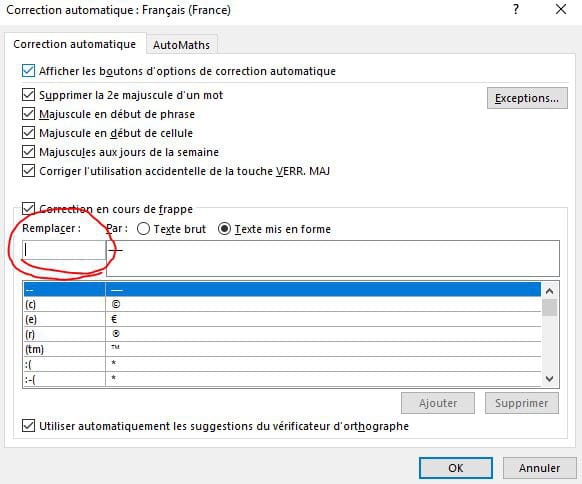
Hello! To go even further and use the - key (key 6) twice to draw your em dash instead of searching for it in the symbols, just go to (in Word) the Insert section, then Symbols, select the em dash, and then click the button at the bottom left (AutoCorrect). Finally, in the dialog box that appears, in the "Replace" section (highlighted in red in the screenshot below), type two hyphens (--) and click OK to close the dialog box. Thus, when you type -- twice in your text, the software will automatically convert this "sign" into an em dash (formatted text). Good luck!
-
