[Linux Fedora] No boot option in BIOS
Lamyo80
Posted messages
14
Registration date
Status
Member
Last intervention
-
Lamyo80 Posted messages 14 Registration date Status Member Last intervention -
Lamyo80 Posted messages 14 Registration date Status Member Last intervention -
Hello,
I messed up a bit while trying to install Unix-Fedora on my laptop (Asus) in dual-boot with Windows 8. The installation went well but when the PC restarted to complete the installation, the BIOS opened directly. In the boot options, there are no boot options left such as Windows boot manager, USB, etc., and the option to add boots is also missing.
Thank you in advance for your help and I hope for quick responses as I need my PC to be operational for my classes.
PS: It is impossible to launch Fedora live from a USB stick, although that's what I had done before proceeding with the installation.
I messed up a bit while trying to install Unix-Fedora on my laptop (Asus) in dual-boot with Windows 8. The installation went well but when the PC restarted to complete the installation, the BIOS opened directly. In the boot options, there are no boot options left such as Windows boot manager, USB, etc., and the option to add boots is also missing.
Thank you in advance for your help and I hope for quick responses as I need my PC to be operational for my classes.
PS: It is impossible to launch Fedora live from a USB stick, although that's what I had done before proceeding with the installation.
13 answers
-
Hello,
1) Is what you call the BIOS actually grub?
2) What is displayed on the screen at that moment (if necessary, take a photo and attach it to your next message using the 5th button located above the box where you type your message)?
3) By any chance did you just overwrite your Windows by installing Fedora over it instead of doing a dual boot?
4) Does Fedora start correctly?
Good luck.-
Hello, thank you for your response :)
So,
1) Yes, it's indeed the BIOS I'm talking about
2) I took a picture but I can't integrate it into the message, so here's what appears in the BOOT tab of the BIOS:
Boot Configuration (black writing)
Launch CSM [Enabled]
Launch PXE OpROM policy [DISABLED]
Boot option Priorities (black writing)
Boot option #1 [P2: HL-DT-ST DVDRAM GUAON] (this boot option just appeared while it wasn't there yesterday)
CD/DVD ROM DRIVE BBS Priorities
--> Delete Boot Option
3 & 4) I don't know if my Windows has been overwritten or not because I can't even access Fedora (so it's not working). As soon as I turn on my computer, it boots into the BIOS by itself. -
To integrate the photo into the message, do not write a comment, but click on the "reply to the topic" button. It's the button you're always supposed to use, as comments are more for providing clarification to a message.
As for your problem: I think you didn’t install your Fedora correctly. If the installation is not EFI compatible, there’s a good chance that not only did you overwrite your Windows, but also that your Fedora is not bootable.
What I suggest is to reinstall your Linux starting with a recent Ubuntu version that will be UEFI compatible and for which you will find many detailed installation tutorials.
https://ubuntu.com/
When partitioning, do a manual partitioning to see which partitions are still present and if there’s anything to recover...
https://openclassrooms.com/fr/courses/43538-reprenez-le-controle-a-laide-de-linux/36939-tester-et-installer-ubuntu
Good luck! -
-
-
Hello,
thank you very much for your help!!
I was able to access my PC with a live version of Ubuntu, Windows and Fedora are respectively on their partitions, so I don't understand why the boot options are not in the BIOS...
Do you have any idea? The problem is still the same... -
-
Hello,
The first problem appears right from the first lines:=> Grub2 (v2.00) is installed in the MBR of /dev/sda and looks at sector
However, your PC is set up to run in UEFI.
sda1:
 Boot sector type: Windows 8/2012: FAT32
 Boot sector info: No errors found in the Boot Parameter Block.
 Operating System:
 Boot files: /EFI/Boot/bootx64.efi /EFI/Microsoft/Boot/bootmgfw.efi
 /EFI/Microsoft/Boot/bootmgr.efi
So, your Linux is incorrectly installed. It is installed in Legacy mode, as evidenced by the creation of a bios-boot partition:sda6:
File system: BIOS Boot partition
I even think you tried to install a 32-bit version.sda1 : nogrub, no-docgrub, no-update-grub, 32.... /mnt/boot-sav/sda1.
No Grub.
Let’s add a few fun jokes:
Fedora (the 64-bit one) is installed in LVM version (virtual disks):9 964GB 979GB 15.2GB lvm,
So, managing partitions isn't straightforward. And to top it all off:=================== efibootmgr -v
BootCurrent: 0001
BootOrder: 0001
Boot0001* UEFI: USB DISK Pro PMAP PciRoot(0x0)/Pci(0x14,0x0)/USB(2,0)/HD(1,MBR,0x4294967222,0x1f80,0xe6c080)..BO
You’ve messed up the Windows boot. Well, I must say “great performance.” This is one of the worst situations I’ve encountered (I’ll keep a copy of the boot-info as a souvenir). I’m curious to see how the experts on ccm will handle this.
The only positive thing here is:
BIOS is EFI-compatible, and is setup in EFI-mode for this live-session.
You were able to boot Ubuntu 64 bits in UEFI. So you should be able to do the same with a Windows tool. Because you can’t escape it to fix all this.
-
-
Hello,
Thank you for taking the time to write such a response.
Specifically, if we forget about Fedora, what is the solution? Reinstall Windows in UEFI? If the installation works, will the "Windows Boot Manager" reappear in the BIOS? I should just need to remove Fedora from the partition where I installed it, right?
Thank you again for the trouble you are going through to help me.-
There is no reason to reinstall. Your Windows is still there and it takes up 103 Gb. That's quite a bit of "recovery copy" to make, anyway.
There are several options. The "simplest".
1. Recover the content of sda2, notably the file winre.wiim.
2. Format partitions sda1 and sda2 to recreate them correctly.
3. Delete all Linux partitions because they are poorly installed.
4. Repair the Windows boot.
5. Repair the advanced Windows boot.
6. Reinstall a Linux correctly in uefi.
Otherwise,
We can try point 4 directly if the Windows console identifies the efi partition as the system partition. Point 3 can come afterwards. The first thing to do is to create a Windows installation or repair USB in fat32 and ensure to boot from it in uefi.
-
-
I confirm what Ankara says, follow a tutorial to repair a Windows 8 or 10 installed in UEFI in order to be able to boot on it.
https://blog.d0zingcat.xyz/2015/09/28/Windows/How%20to%20repair%20the%20EFI%20Bootloader%20in%20Windows%2010/
Once that is done, reinstall Linux by ensuring you take a recent version (for example the latest Ubuntu) while paying attention to:
1) not to delete/format your Windows partitions
2) not to delete/format your EFI partition
https://ubuntu.com/
The safest way is to do a manual partitioning during the installation to ensure avoiding points (1) and (2). Do not use LVM if it is on the same hard drive as Windows, just create "well-sized" partitions from the beginning (for example 4GB of swap, 20GB for / in ext4, the rest in ext4 for /home).
https://openclassrooms.com/fr/courses/43538-reprenez-le-controle-a-laide-de-linux/37192-partitionner-son-disque
Good luck -
-
Hello, thank you for your valuable help, but I have some bad news: I followed all your advice and yet, the boot options did not reappear. In the Windows console, at the end of the repair, the console told me that everything had worked well, as indicated in mamiemando's tutorial.
I correctly formatted sda1 and sda2, but what do you mean exactly by "properly recreate"? -
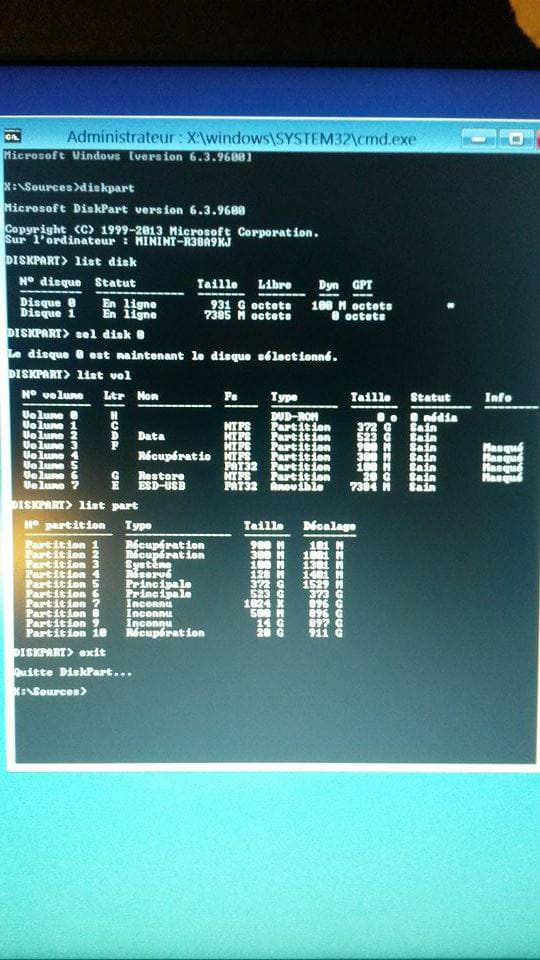
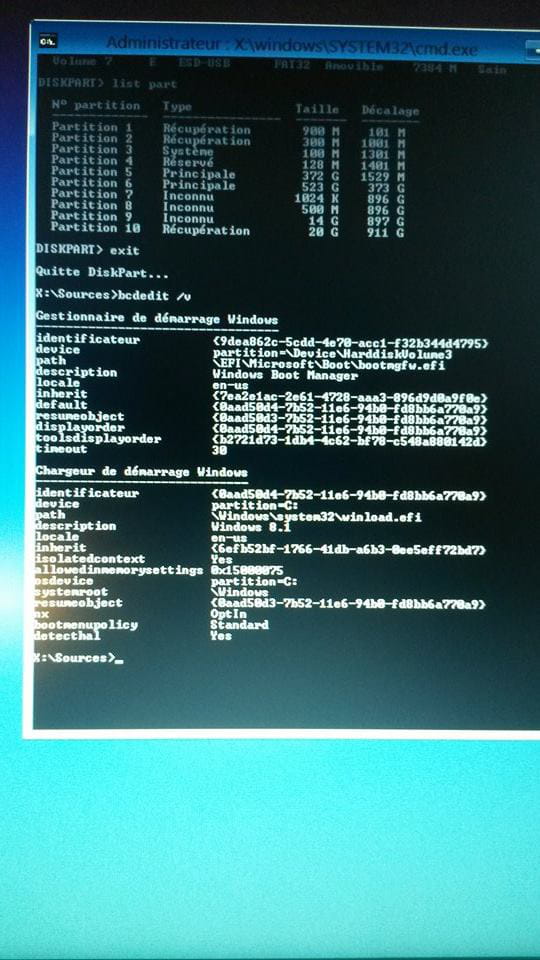
Here are the photos, I hope they'll help you see things more clearly:


-
I was harsh with the tutorial... it seems to have done things by the book. However, we'll redo the manipulation, if only to set the startup to French (and the hidden attribute on volume 5 might explain the situation)
diskpart
sel disk 0
sel part 3
delete partition override
create partition efi offset=1
format fs=fat32 quick
exit
Then, the minimalist command (with a lowercase L, not a 1):bcdboot c:\windows /l fr-FR
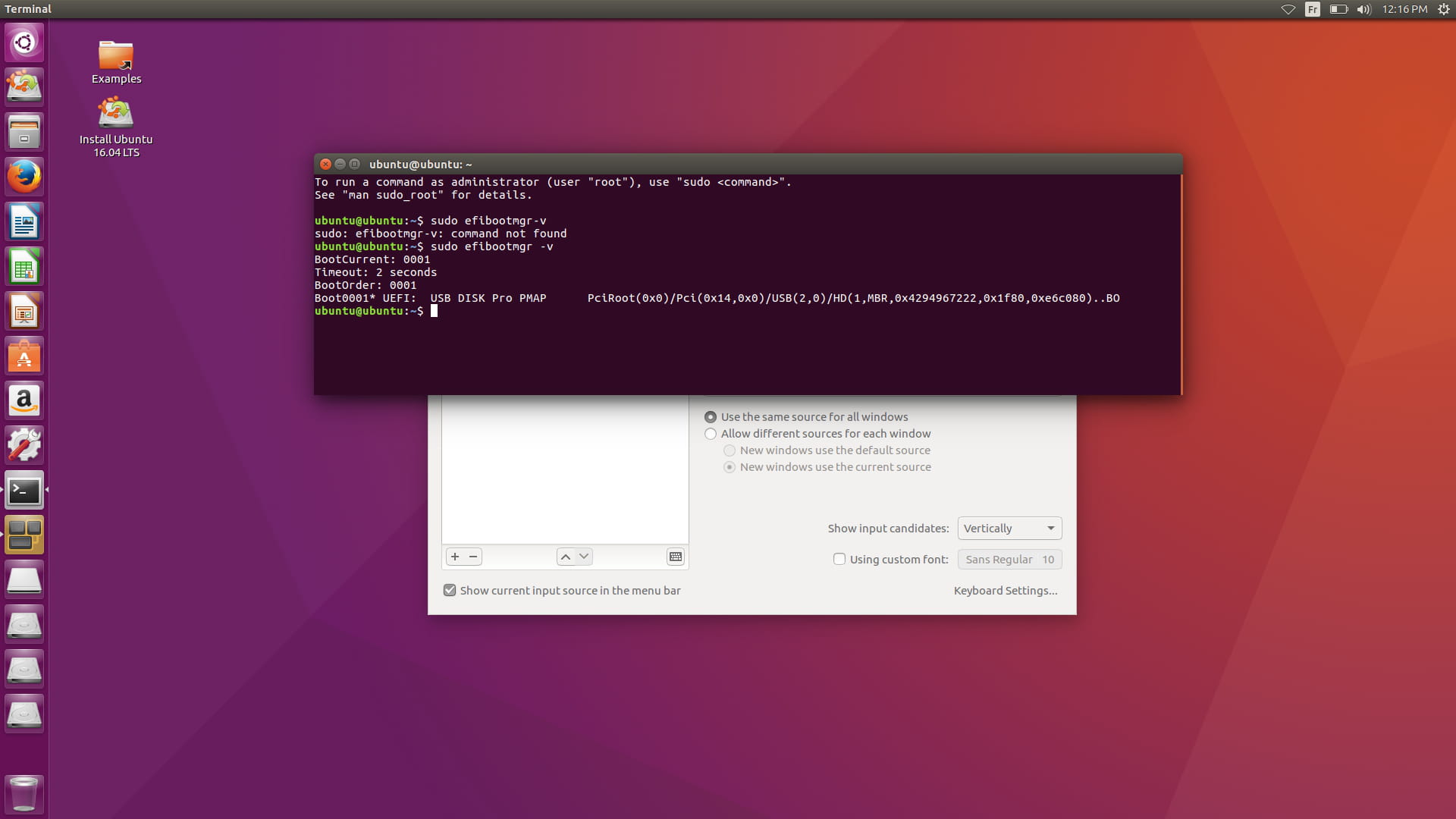
If everything goes smoothly, try a reboot. If it’s still the same, boot into the live USB Ubuntu and capture the result of:sudo efibootmgr -v
Also take a picture of the "boot" tab in your bios/uefi.
Edit. Be careful, I modified it to delete and recreate partition 3.
-
-
He is unable to create the partition, he says: "Virtual disk service error: Not enough usable space for this operation."
-
Unfortunately, it didn't work.
Here is the photo of the command you told me to run in the Ubuntu terminal:

However, I don't have the photo of the BIOS, but it's still the same as before.-
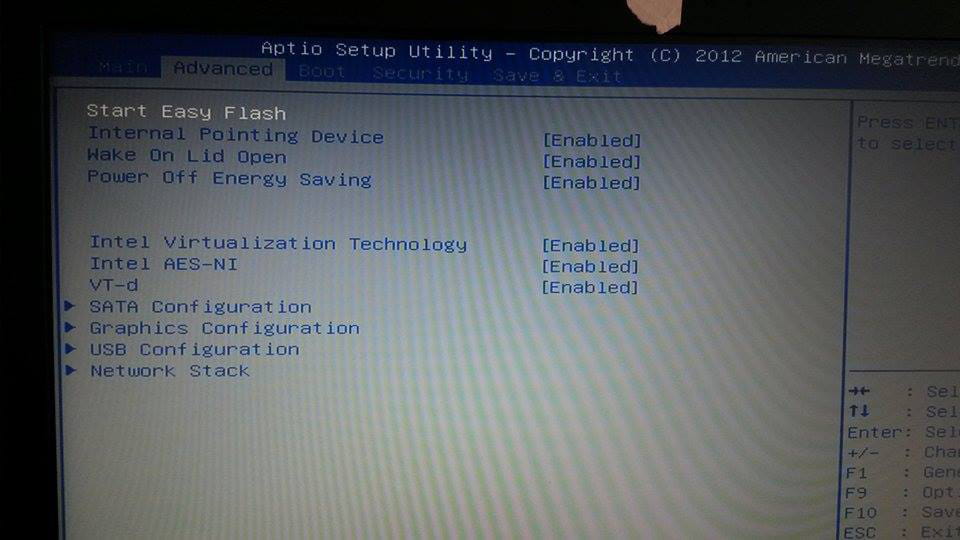
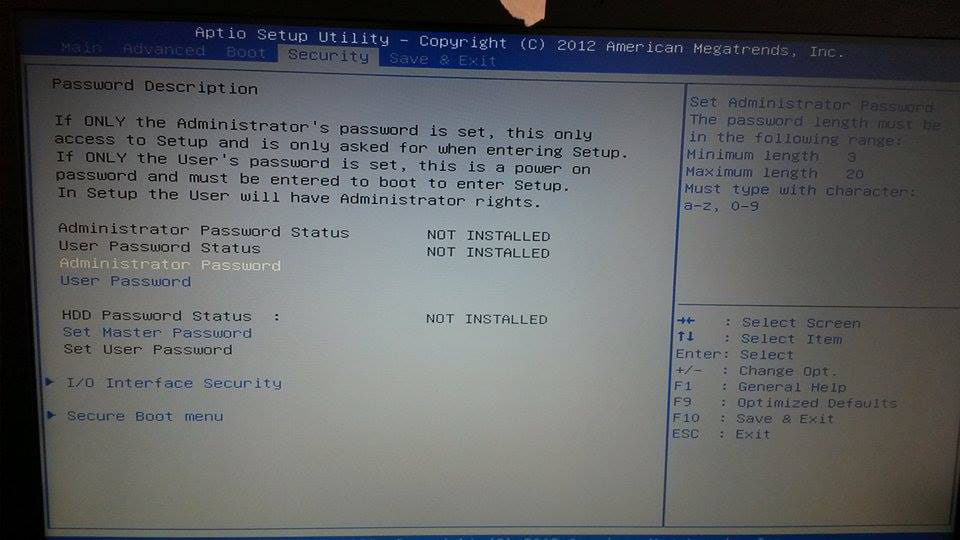
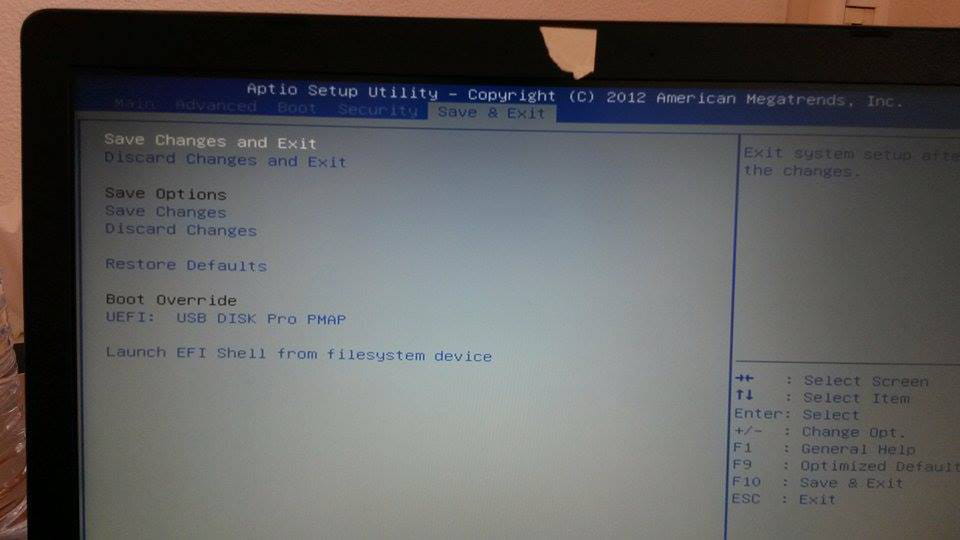
I would like to see the options provided by this BIOS, particularly the possibility of a line allowing booting from an EFI file. And you need to have disabled this option:
Launch CSM [Enabled]
It needs to be set to disabled... Did you do that?
Please redo a boot-info report, just to see if I missed something.
Otherwise, I have no solution. Your case is unusual.
-
-
https://paste2.org/ptNVnbaV
Here is the boot-info report, followed by the BIOS photos (yes, I set it to disabled)


-
-
In absolute terms, we have all the elements for it to start. A few points remain uncertain, notably:
/dev/sda2: unknown GPT attributes
8000000000000001
/dev/sda3: unknown GPT attributes
8000000000000000
Unknown BootLoader on sda6
The attributes are deemed unknown. However, they correspond to what M$ recommends.RAID detected. You may want to retry after installing the [mdadm] packages
Boot-info detects RAID... Is that the case?=================== df -Th:
Filesystem Type Size Used Avail Use% Mounted on
/dev/sda4 fuseblk 373G 8.2G 365G 3% /mnt/boot-sav/sda4
I find that 8.2 GB is really little for an installed Windows./dev/sda3 2664448 3131391 466944 228M EFI System
/dev/sda4 3131392 783718399 780587008 372.2G Microsoft basic data
The msr partition has been overwritten by your first repair.
But all this does not explain why the BIOS does not detect the EFI files on the hard drive when they are there, and that the boot is good. Try the two BIOS options I mentioned in the previous message. See if they lead anywhere: if we can manually launch the file /efi/Microsoft/boot/bootmgfw.efi, we might be able to figure it out.
We can also try resetting the BIOS to default (being sure to disable fast boot before saving). I admit that your problem is starting to become puzzling.
We could also try deleting all the Linux partitions and reattempt the bcdboot command, but I don't think it will change anything.
Edit. I’m done writing on this damn site that tells me this (what a joke when you read the jargon of some):
Please write correctly (no SMS, spelling, grammar)
If you want to continue, we will continue on the cnet forum.
-
-
The two options didn't yield any conclusive results, and we can't choose a custom path to add a boot option.
I've already reset the BIOS to default, nothing changed either.
I will see someone knowledgeable in this field on Monday, I hope he can help me...
If my problem is resolved, I will explain what the expert did for those who - unfortunately - might be in the same situation, but I can't promise anything.
Thank you all for your help! A thousand thanks even. Take care! -
What do you mean by complete formatting?