
Microsoft Word: Issue with a table split across two pages
ozls
Posted messages
1
Status
Membre
-
C-Claire Posted messages 4562 Registration date Status Membre Last intervention -
C-Claire Posted messages 4562 Registration date Status Membre Last intervention -
Hello everyone,
I have a problem that I can’t solve on my own using Microsoft Word. I have a table that is split across two pages; that doesn’t bother me, it’s even normal. What I’m annoyed about, however, is that one line appears at the end of the first part of the table and at the beginning of the second part of the table. Since a picture is sometimes worth a thousand words, here’s a screenshot of what I’m getting:

And another screenshot (modified with Paint) of what I would like to achieve:

Do you have any ideas on how to proceed? This is to make a presentation that is very important to me look more aesthetic, so I’m open to all solutions, even very complicated ones :-)
Thank you in advance, and see you soon!
I have a problem that I can’t solve on my own using Microsoft Word. I have a table that is split across two pages; that doesn’t bother me, it’s even normal. What I’m annoyed about, however, is that one line appears at the end of the first part of the table and at the beginning of the second part of the table. Since a picture is sometimes worth a thousand words, here’s a screenshot of what I’m getting:
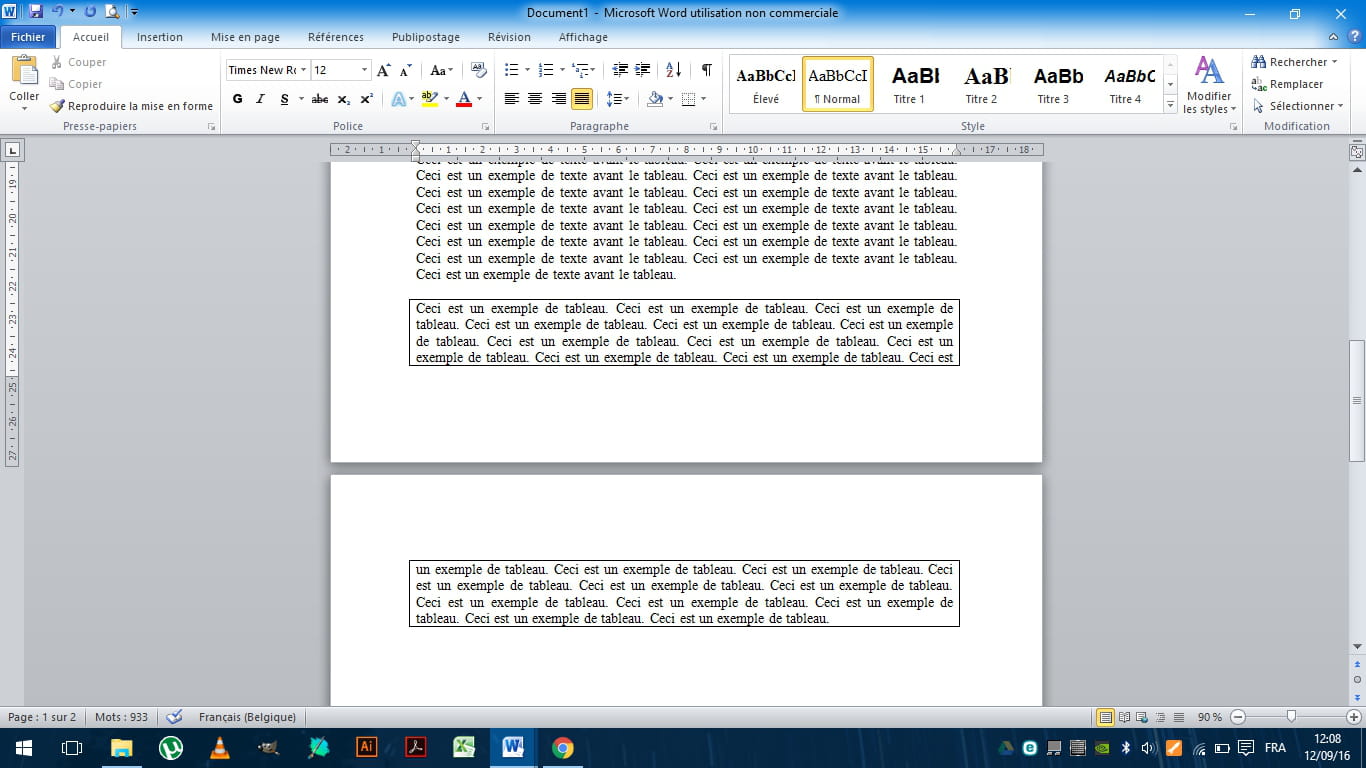
And another screenshot (modified with Paint) of what I would like to achieve:
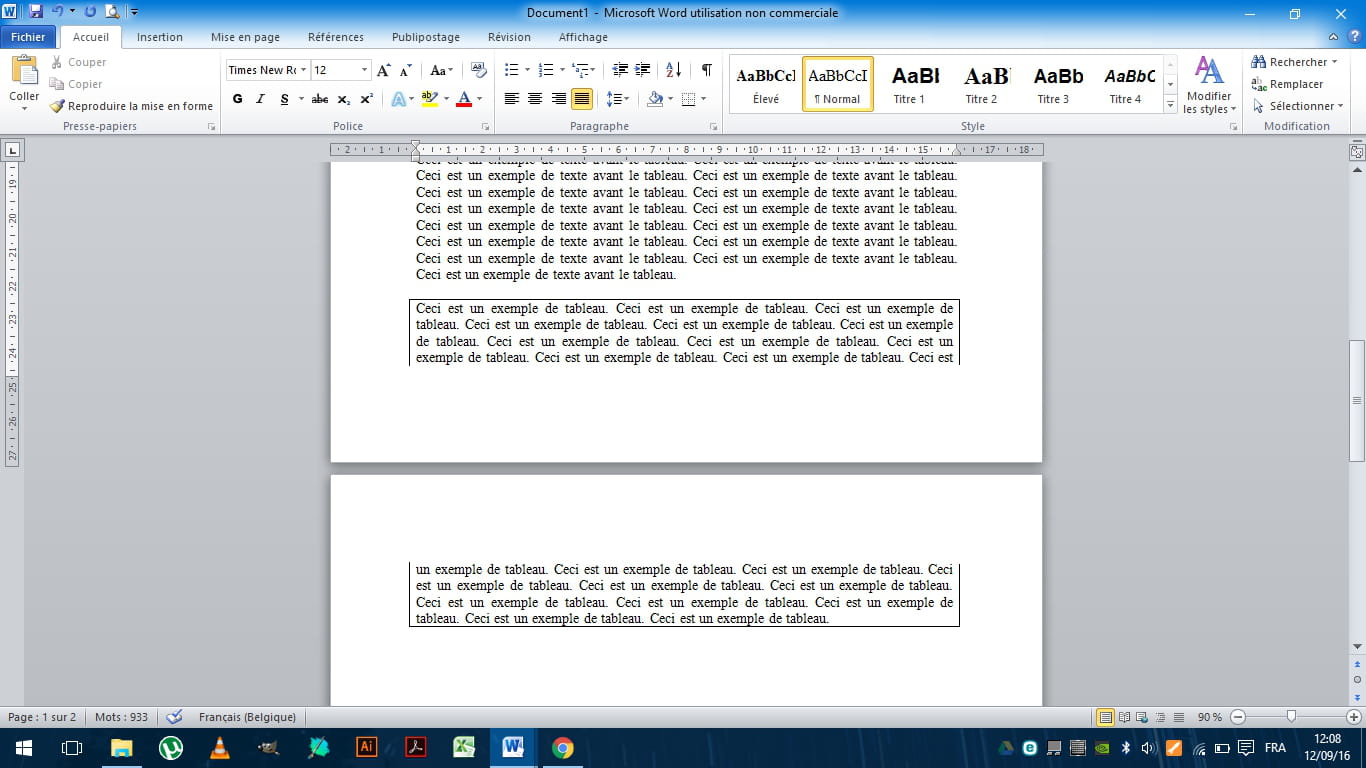
Do you have any ideas on how to proceed? This is to make a presentation that is very important to me look more aesthetic, so I’m open to all solutions, even very complicated ones :-)
Thank you in advance, and see you soon!
2 réponses

Hello.
The solution is very simple: create 2 separate tables, then use an eraser to remove the bottom row of the first one and the top row of the second one.

Another solution is not to frame this table,
and for example to limit yourself to a left border:
It's great, retirement!
Especially in the Caribbean... :-)
Raymond (INSA, AFPA, CF/R)
The solution is very simple: create 2 separate tables, then use an eraser to remove the bottom row of the first one and the top row of the second one.

Another solution is not to frame this table,
and for example to limit yourself to a left border:
It's great, retirement!
Especially in the Caribbean... :-)
Raymond (INSA, AFPA, CF/R)
Hello ozls,
For aesthetics, it would be better not to cut the box ;-)
That's why the programmers of Word found it more useful to impose a border at the bottom of the page and at the top of the next page.
Instead of a table cell, you can use the paragraph border:
- you frame your block of text with a paragraph border
- at the bottom of the page, you will have the same issue as with the table. You insert a manual page break ([Ctrl] [Enter]) at the beginning of the paragraph that needs to move to the next page
- you remove the lower border from the bottom of the page and the upper border from the top of the next page
- you can then delete the page break.
The border that divides your block of text will be removed and especially, if your box needs to move higher or lower because you add or remove text on the preceding pages, you won't have to worry about it anymore. If it reaches the bottom of the page again, it will be divided as you wish, without an intervening border.
--
C-Claire
For aesthetics, it would be better not to cut the box ;-)
That's why the programmers of Word found it more useful to impose a border at the bottom of the page and at the top of the next page.
Instead of a table cell, you can use the paragraph border:
- you frame your block of text with a paragraph border
- at the bottom of the page, you will have the same issue as with the table. You insert a manual page break ([Ctrl] [Enter]) at the beginning of the paragraph that needs to move to the next page
- you remove the lower border from the bottom of the page and the upper border from the top of the next page
- you can then delete the page break.
The border that divides your block of text will be removed and especially, if your box needs to move higher or lower because you add or remove text on the preceding pages, you won't have to worry about it anymore. If it reaches the bottom of the page again, it will be divided as you wish, without an intervening border.
--
C-Claire