Virtual memory
Sametegal
Posted messages
13
Registration date
Status
Member
Last intervention
-
phil2k Posted messages 10841 Registration date Status Contributor Last intervention -
phil2k Posted messages 10841 Registration date Status Contributor Last intervention -
Hello,
I would like to know if it is possible to allocate memory on the D: drive and if it is advisable or risky. I want to increase my PC's memory, and I have an optimized C: SSD of 119GB thanks to this tip: https://www.commentcamarche.net/informatique/windows/299-gerer-la-memoire-virtuelle-de-windows-10/
My D: drive is 931GB.
Thank you for your future responses.
I would like to know if it is possible to allocate memory on the D: drive and if it is advisable or risky. I want to increase my PC's memory, and I have an optimized C: SSD of 119GB thanks to this tip: https://www.commentcamarche.net/informatique/windows/299-gerer-la-memoire-virtuelle-de-windows-10/
My D: drive is 931GB.
Thank you for your future responses.
3 answers
-
Hello
It is advised, with an SSD, to move the swap file of the virtual memory to a second drive.
But this does not actually increase the RAM of the PC.
Could you please specify what exactly you want to do?
--
There are 3 types of people: those who can count and those who can't. -
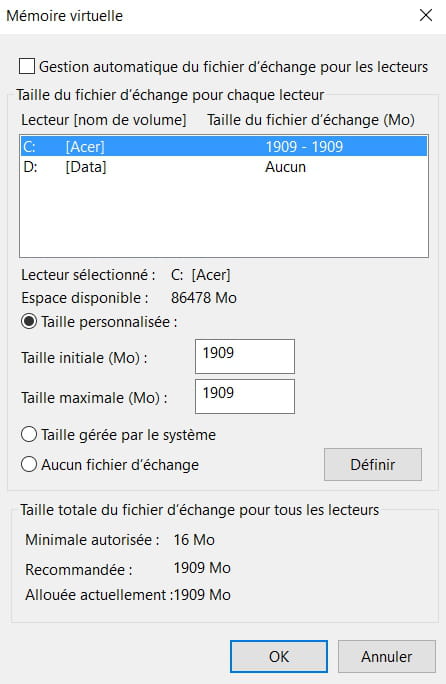
mo[image:http://static.ccm2.net/www.commentcamarche.net/pictures/KnwyoL5GPBRXjTOaXG7f9Bpio2lWTmJb9Q5FFIX9aKoFYXEEmxFaY7Kju4sbAEF6-008-s-.png|354px||center
Here is an image I found to illustrate my question. For my part, my C: drive is an SSD and is optimized with the recommended settings. The D: drive has no swap file. Sorry if my question is silly, but I don't know much about the subject.]-
-
There is indeed a swap file on D:.
Its size is managed by the system.
You can, if you want, give it a fixed size to save time on size modifications by the system.
For example, you can set it to 12000 MB as both the initial and maximum size.
If it gets tight, you can increase it.
@amazingrece:
The fact that it is an SSD or an HDD has nothing to do with swap (virtual memory).
It is a disk space that Windows and some programs need.
In some cases, it can be completely dispensed with, but not always...
-
-
Sorry, I picked the wrong image xD. Thanks anyway for your responses. :)


The available space on my D: drive is larger, so I was thinking maybe I should use it even though it's not an SSD. However, I don't know if I should set virtual memory for both or just one. What would you do in my place?
There you go.